고객 서비스

판매자들은 가입하면 더 많은 혜택을 누릴 수 있습니다.

모든 주문 무료 배송.

입력 장치

ELECOM HUGE Trackball, 2.4GHz Wireless USB, Index Finger Control, Customizable 8-Button, Large Soft Palm Rest, 52mm Ball, Windows PC Mac (M-HT1DRBK)

4.20

지난 32시간 동안 판매됨 42

$ 54.99
$ 57.00
-3.66%

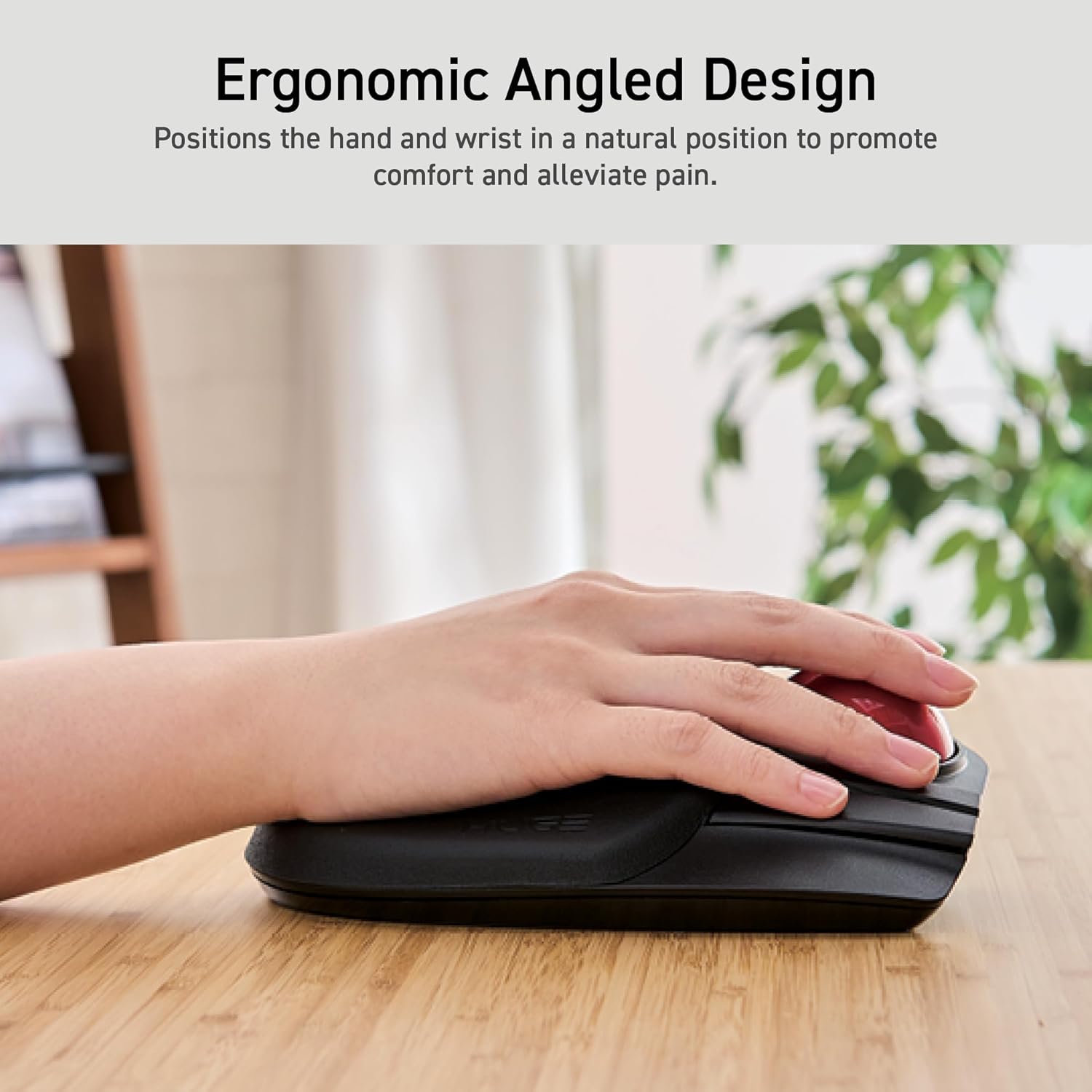
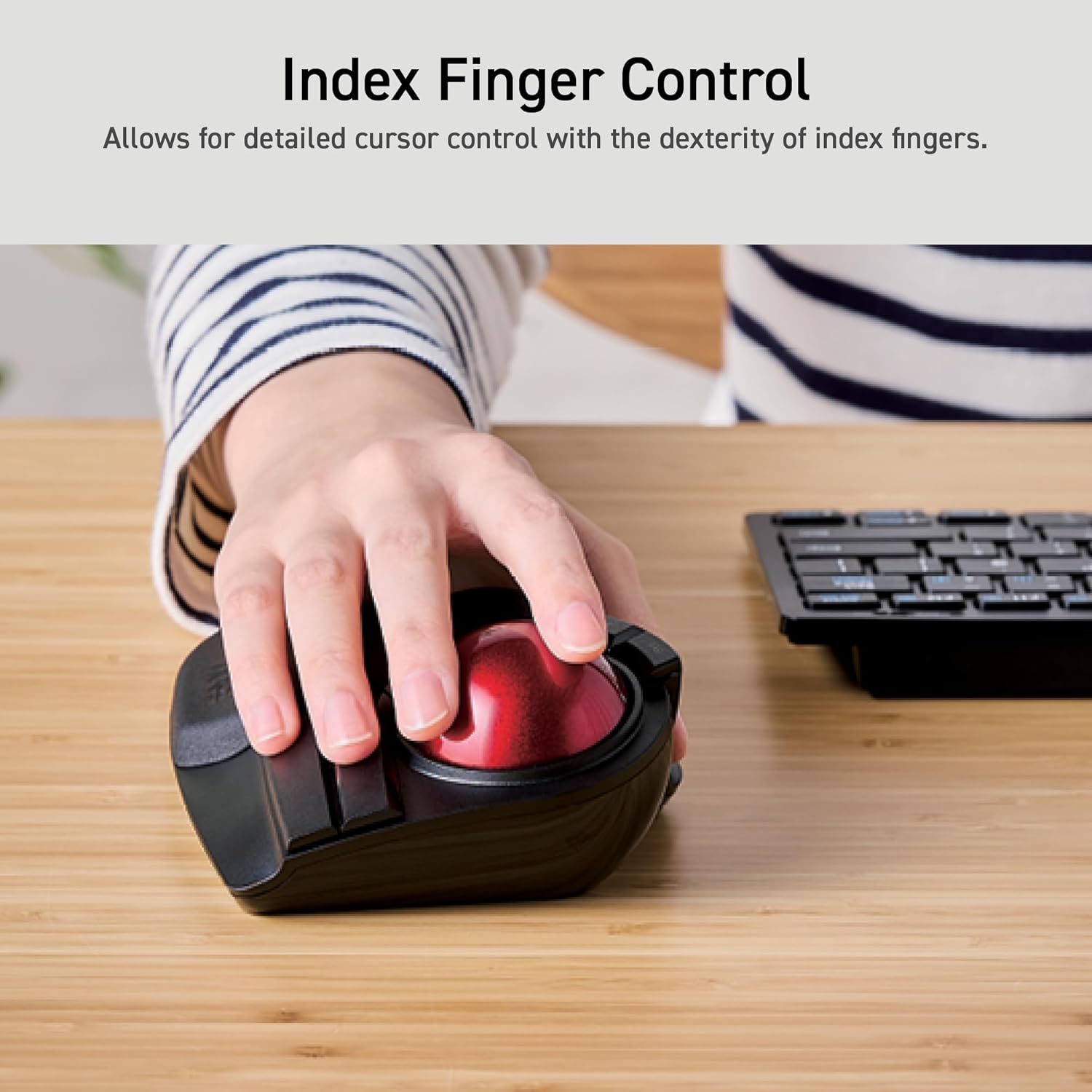
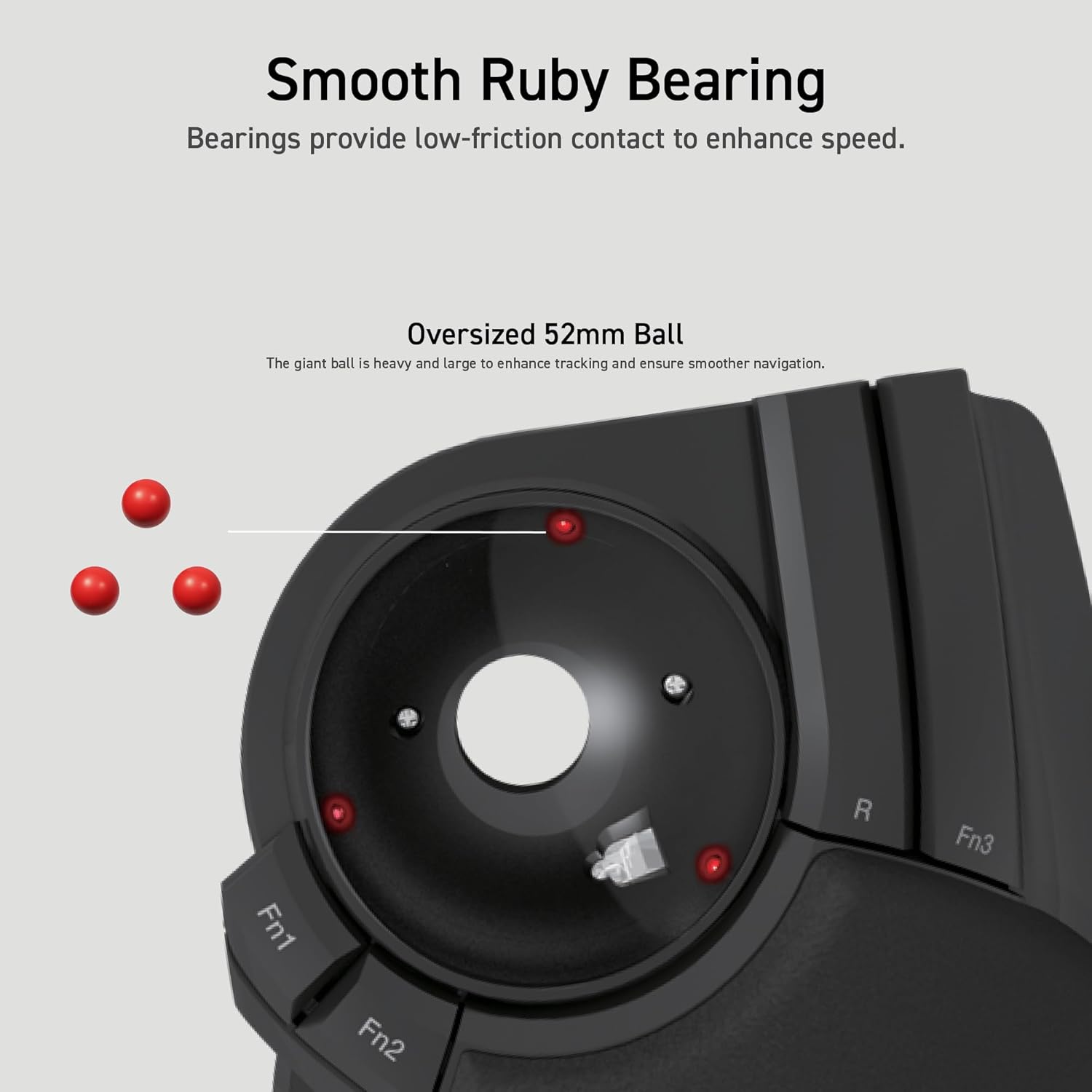
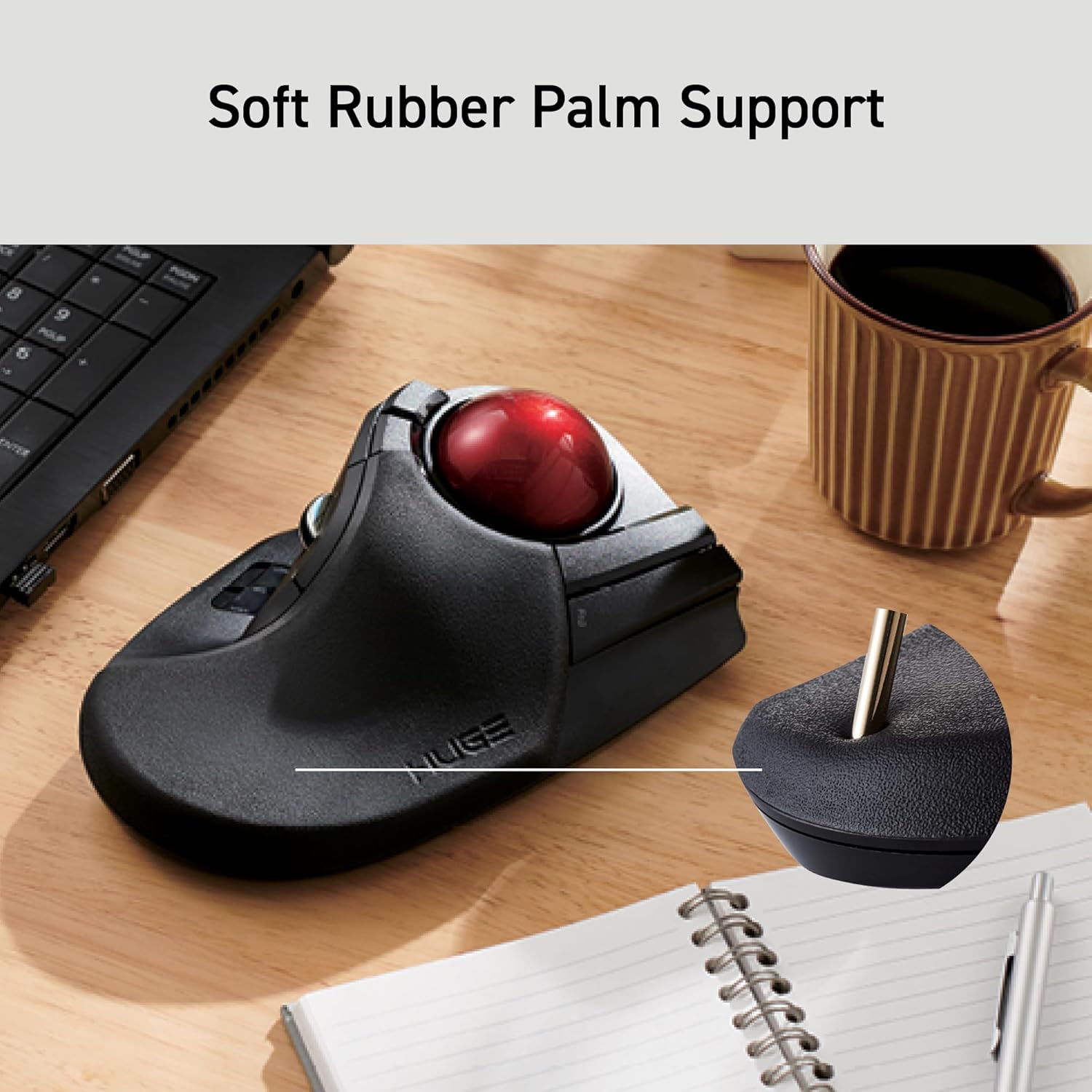
Quick Summary: MSTE users who don't have an MSTE - get this mouse as it's the closest "replacement" to date. Obviously, if one wants a mouse like the MSTE, then get an MSTE. But even a used MSTE costs a bit and you have to be careful of the cord. If one wants something Less Expensive that closely resembles the MSTE and is also cordless, then this is the best mouse on the scene since the MSTE itself.Update2: Trying to add some slightly better pictures and others that show the MS Trackball Explorer, Logitech Cordless Optical Trackmall, and the smaller Elecom "DEFT" trackball mouse. But some pictures are not loading to the site. Sorry. :(Update1: IMPORTANT NOTE: Waaay down in the comments (the oldest one at the "bottom" should be a link to the Elecom software download page and the English PDF manual. As this mouse is "very new" you *DO* need a more recent Elecom proprietary software to recognize this mouse if you wish to use it's three proprietary function buttons (F1-F3).Long Winded Review===============This new Elecom Fingerball wireless mouse - the M-HT1DRBK - appears to have been released is June 2017 and has been available on Amazon since July 2017. In August I was about to order a second of the smaller Elecom M-DT2DRBKs when I stumbled over this new **larger** "HUGE" mouse and figured it was worth a try. The M-HT1DRBK just arrived and after giving it a ten minute test spin I just ordered two more. No clue if it will take "1-2 months" for the next batch to arrive, or if the price will drop from $85.99, but would say it is certainly worth the investment. FYI: It actually does say "HUGE" on the mouse itself. :)Comparisons to the MSTE (MS Trackball Explorer)======================================1) It has a nice large "red ball" like a certain MSTE we all know and love. In fact, the Elecom ball is slightly BIGGER than the MS one. There were many reviews about the smaller Elecom mouse's "grey ball" having issues, and several people purchased a "blue" M570 ball to swap with the "grey" one. From my quick tryout of this new mouse with it's "red ball", would say that the quality looks to be significantly better than that of the smaller mouse's "grey" one. An excellent improvement.2) This mouse is *MUCH LARGER* than the smaller "grey ball" M-DT2DRBK. Excellent for people with "larger" (aka normal sized) hands.3) It is a bit wider than the MSTE, and Elecom moved one of the three proprietary "Function Buttons" to the right side of the ball. If you use their proprietary software, this would give you "two buttons to the right of the ball" just like the MSTE.4) MOST IMPORTANT OF ALL. This mouse has a PALM REST. As this seems to be an alien concept to most mouse manufacturers I will state it again - this mouse actually has a place for the palm of one's hand to "rest" while using the mouse, so for the first time since the MSTE, there is actually a trackball that not only fit's one's hand, it is actually COMFORTABLE. Plus it doesn't have teeny tiny thumb-killing buttons like a certain L*git*ch Trackman. Wish I could show a decent side-view of the palm rest, but this can also be seen with via the pics on Elecom's web site.5) ??? I would assume that being a wireless device, there may be an occasional "lag" in response times, but cannot say for certain. However there does appear to be a wired version of this mouse as well. It's part number (August 2017) is M-HT1URBK.Usage=====Bulk of this review was written after only ten minutes of mouse use, so haven't had the time to give it an extended run, but observations so far are positive. "Weeks later" - Still great. Haven't tried the Elecom software yet myself (not using the F1-F3 buttons).- Seems to respond MUCH better than the smaller Elecom version (blue or grey ball).- Range seems to be about the same as the smaller one. About nine feet out it gets tricky and Line of Sight is critical.- The "left" button isn't as "tall" as the MSTE's, so my clumsy thumb is hitting the wheel, but this should be a minor issue.- ??? I read elsewhere that the "left" and "right" mouse buttons are "better quality" than the other buttons, that one should be able to tell the difference, that they should have made *all" the buttons "better quality", etc. Haven't noticed any difference between buttons yet. Too busy enjoying having a wireless mouse that actually fits the shape of my hand for a change.Customization - aka The Buttons========================So far as remapping buttons, "drivers", and support for various operating systems... Would assume this mouse works as a basic mouse in anything from XP up to Win10. You've got your Left, Right, Forward, Back and Wheel Buttons, plus the three Extra Proprietary Function Buttons F1-F3. Remapping the eight buttons and basic customization is where it gets interesting. Would assume one needs at least version 5.1.0 of Elecom's proprietary software to use/control all eight buttons. For now I am sticking with X-Mouse Button Control which allows configuration of everything except the three extra Function Buttons. Both programs allow for the use of multiple profiles for easy customization across different applications. Elecom's software (and English PDF manual) is available from their website. I will try adding possible links as a "comment" later as this review is too long as it is.Odd Future Issue (?)================Since the palm-rest is made of a "soft" material vs plastic, I wonder how it might hold up over time. Will it wear out? Time will tell.

11 현재 누군가가 웹사이트를 탐색 중입니다.

수량:
- +

예상 배송 시간: 12~26일(국제), 3~6일(미국)

구매일로부터 45일 이내에 반품이 가능합니다. 관세 및 세금은 환불되지 않습니다.

  • ASIN:

    B0735584RM

  • BATTERIES:

    1 AAA batteries required. (included)

  • BEST_SELLERS_RANK:

    #10 in Computer Trackballs

  • BRAND:

    ELECOM

  • COLOR:

    Black

  • COMPUTER_MEMORY_TYPE:

    VRAM

  • CUSTOMER_REVIEWS:

    4.2 4.2 out of 5 stars (3,193) 4.2 out of 5 stars

  • DATE_FIRST_AVAILABLE:

    July 16, 2017

  • HARDWARE_PLATFORM:

    Laptop, PC

  • IS_DISCONTINUED_BY_MANUFACTURER:

    No

  • ITEM_DIMENSIONS_LXWXH:

    2.25 x 4.52 x 7.16 inches

  • ITEM_MODEL_NUMBER:

    M-HT1DRBK

  • ITEM_WEIGHT:

    9.1 ounces

  • MANUFACTURER:

    ELECOM

  • OPERATING_SYSTEM:

    Windows 10, Windows 7, Windows RT8.1, Windows XP, macOS 10.12 Sierra

  • POWER_SOURCE:

    Battery Powered

  • PRODUCT_DIMENSIONS:

    2.25 x 4.52 x 7.16 inches

  • SERIES:

    M-HT1DRBK

  • VOLTAGE:

    1.5 Volts

안전한 결제를 보장하세요
제품 상세 정보
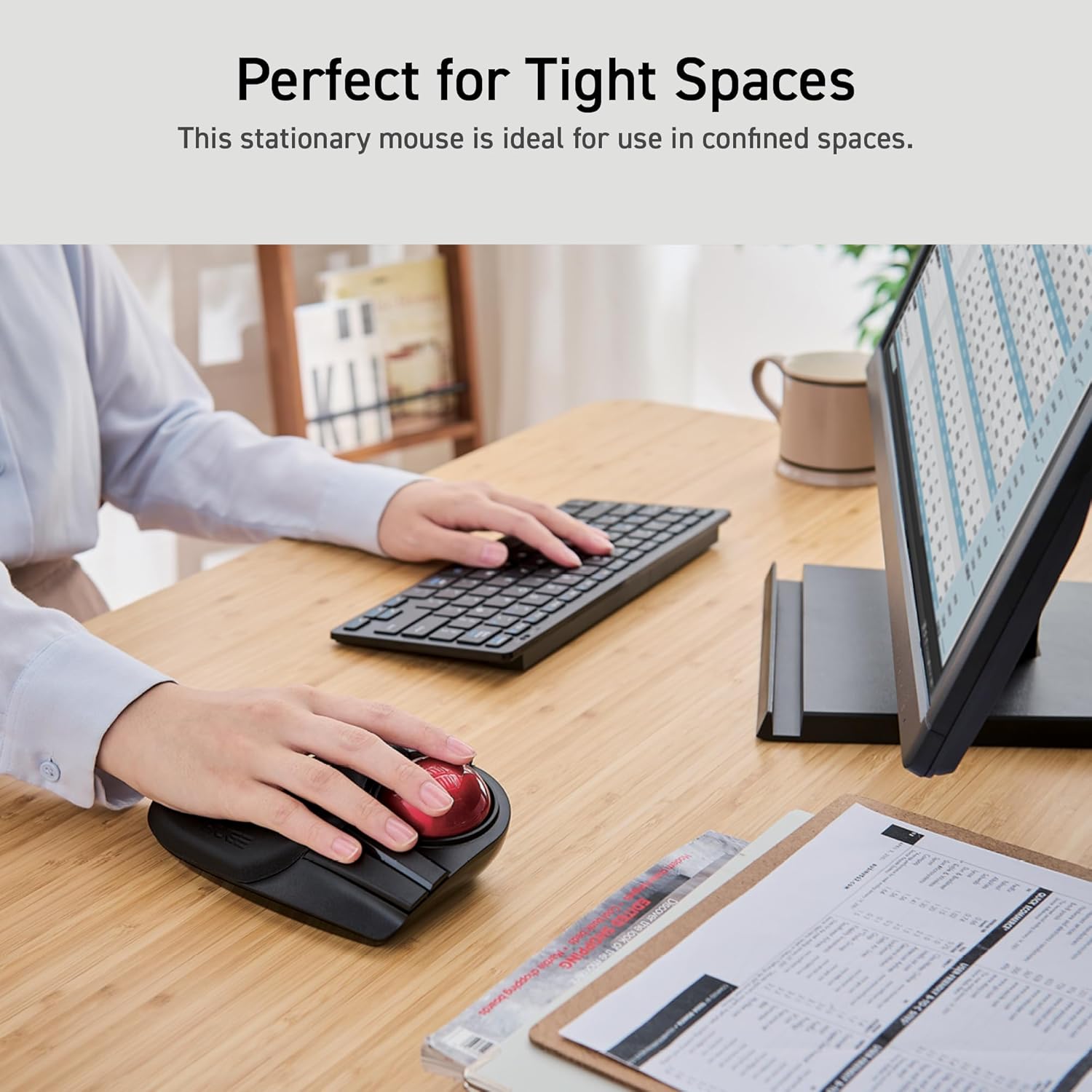
The shape and the placement of each button are similar to those of a mouse, making it easy for people who have used a mouse before to get used to the shape. To equip with a larger ball than the thumb type. This has the advantage of making it easier to control the fine movements of the cursor. The feel of the operation is unique and requires some getting used to. High design quality has been recognized by numerous design awards, including the Good Design Award, as well as by many users. is a Japanese consumer goods company with a simple mission: create quality products that deliver the most comfort and convenience for its customers. With a track record boasting some of the most innovative yet accessible products ever created, ELECOM has consistently raised the standards of excellence for technology products while taking care of its customers and employees. EX-G PRO IST RollMaster Bearing HUGE DEFT PRO EX-G Relacon Q: How can I install Mouse Assistant software? A: Head to the ELECOM USA site to download the software. Q: How can I get the English Product Manual? A: The PDF manual is can be found attached to this product listing page or on the ELECOM USA site. Q: How do I clean a trackball mouse? A: Turn off your computer and disconnect your mouse. Remove the ball using the ball removal hole in the back of the mouse. Use a soft, lint-free cloth and rubbing alcohol to clean the ball housing. Q: What are the benefits of using a trackball mouse? A: The main benefits decreased wrist and arm movement, which can reduce strain and the risk of repetitive stress injuries, and the ability to use the mouse in narrow spaces because it doesn't need to be physically moved around.
고객 리뷰
4.20

(100 점수)

5
7
4
5
3
10
2
16
1
62
댓글 취소
댓글을 남겨주세요

16 논평

PERFECT TRACKBALL !!
2026-01-17    -Magnus Brockman

I have used many track balls and this is definitely my favourite- I have bought 2 spare as back ups for the future. Bundled software does not work on Macintosh but Cursor Sense works perfectly as a driver.Very comfortable for someone with big hands and much more ergonomic that a traditional mouse - very good for audio / video production professionals.Very good build quality and mapping the many buttons optimises workflow a lot.I highly recommend this mouse.Beware it is HUGE so if you have smaller hands it may not be for you.5 stars !

I love this, I have both wired and wireless versions, the former being used with my desktop computer and the latter my laptop. This has the feel of my old Microsoft TrackMan, and works very well. I'm a gamer and for me it's much easier to use than a mouse (and doesn't aggravate my carpal tunnel as much). It's simple to connect using the provided dongle that plugs into a standard USB port, and the dongle stores tightly in the bottom of the unit, so minimal chance of it coming loose and getting lost. It's plug and play, so for basic use you can use the Windows (I haven't tested it on a Mac) default mouse driver to adjust button assignments, but the manufacturer has it's own software that gives you far greater flexibility.If you have either version of this unit (wireless or wired), and travel with it, I highly recommend getting the Hermitshell case (search Amazon for M-HT1DRBK) to protect it, you won't regret it. I've been using the same case since 2018 when I bought my first of these trackballs, and it's still in fantastic shape. Note: If you have the wired version you just have to coil the cord on the bottom of the unit. The fit will be tight, but it does work.The only downside to this unit is that it will eat batteries if you have it on high performance mode. It would be much nicer if it had an internal rechargeable battery. I'm not taking anything off for that as it works perfectly well for me in the standard mode (I don't compete in e-sports any longer, so no need for high precision), and I get about 4 months out of a 1 set of batteries. It might be longer if I didn't forget to turn it off occasionally.This is a product I highly recommend, or I wouldn't have purchased 4 of them (2 of each over the years). This was a replacement for one that I'd had for a couple of years, but it got dropped and the buttons broke, otherwise I think it would still be going strong.

Assolutamente in mio Trackball preferito.È stato necessario sostituire i cuscinetti in rubino, davvero poco scorrevoli, con cuscinetti in ceramica G5 da 2,5mm ed inserire degli spessori nella culla della sfera per permettere ai cuscinetti di roteare, per avere un movimento fluido e senza striction.Ovviamente serve un minimo di manualità, e la consapevolezza che cosi facendo si perde la garanzia (a me sembra un prodotto molto resistente, e sicuramente con un costo non eccessivo, quindi ne vale la pena), ma adesso è il TOP!Software molto personalizzabile;Forma ampia e comoda (ma questo può variare da mano a mano);Tanti pulsanti personalizzabili e ben raggiungibili;Scroll verticale preciso e con tilt scroll (quello orizzontale);Diversi livelli di DPI;Due livelli di precisione (immagino sia la potenza del segnare radio) io lo tengo al massimo e la batteria dura parecchio.Insomma, davvero soddisfatto.P.S. Evitate i trackball con sfera per il pollice, la scorrevolezza non dura da Natale a S.Stefano!

PERFECT TRACKBALL !!
2026-03-01    -Magnus Brockman

I have used many track balls and this is definitely my favourite- I have bought 2 spare as back ups for the future. Bundled software does not work on Macintosh but Cursor Sense works perfectly as a driver.Very comfortable for someone with big hands and much more ergonomic that a traditional mouse - very good for audio / video production professionals.Very good build quality and mapping the many buttons optimises workflow a lot.I highly recommend this mouse.Beware it is HUGE so if you have smaller hands it may not be for you.5 stars !

Gigantisch und sehr vielseitig
2026-02-06    -Sven B. Schreiber

Nach vier Tagen in meinem Renten-Domizil in Bulgarien eingetroffen - das ist flott! Geliefert wurde anscheinend direkt aus Japan mit einem rumänischen Kurier. In Bulgarien hat dann EKONT übernommen. Ich bin sehr zufrieden.Zum Produkt selbst: Der Trackball ist ja echt riesengross und gewichtig! Hatte ich gar nicht so erwartet, aber finde ich super. Dadurch ist auch die Kugel recht gross, was ihrem Leichtlauf sehr zugute kommt. Sie wird mit dem Zeigefinger bedient - für mich persönlich bequemer als die Daumen-Variante. Nach Einstecken des Dongles ist das Gerät sofort verfügbar, es empfiehlt sich jedoch, den speziellen ELECOM Treiber herunterzuladen, weil der auch ein Programm zur Zweisung der vielen Tasten mitbringt.Tasten gibt es derer wirklich viele. Das grundsätzliche Bedienungsparadigma ist: Daumen auf der Links-Taste, Zeigefinder auf der Kugel, Mittelfinger auf der Rechts-Taste. Rechts neben letzterer befindet sich eine Funktionstaste, die man nach Gutdünken mit dem Ring- oder Mittelfinger drücken kann. Für den Daumen gibt es oberhalb der grossen Links-Taste das Scroll-Rad und darüber zwei weitere Tasten, die standardmässig mit Browser vorwärts und rückwärts belegt sind. Noch ein Stück weiter oben, direkt links neben der Kugel, sind zwei weitere Funktionstasten, die wohl auch für den Zeigefinger vorgesehen sind. Das Scroll-Rad verfügt neben der Dreh-Funktion auch noch über eine Drückfunktion, "Mitteltaste" genannt, mit der standardmässig Autoscroll aktiviert wird. Es gibt darüber hinaus auch zwei Kippfunktionen (aufwärts und abwärts), um - standarmässig - nach rechts oder links zu scrollen.Mit dem ELECOM-Programm kann man ALLE Tasten neu zuweisen oder auch ausschalten, auch die Standardtasten. So kann sich jeder die Bedienung individuell definieren. Ich persönlich habe diverse Funktionen abgeschaltet, weil sie mich eher verwirren als begeistern. Aber andere sind vielleicht ganz froh, möglichst viele Funktionen in einer Hand zu haben. Als alter Trackball-Fan bin ich froh, dass solche Geräte überhaupt wieder gebaut werden. Dieses Modell ist nun sogar das beste, das ich je gehabt habe.

Quick Summary: MSTE users who don't have an MSTE - get this mouse as it's the closest "replacement" to date. Obviously, if one wants a mouse like the MSTE, then get an MSTE. But even a used MSTE costs a bit and you have to be careful of the cord. If one wants something Less Expensive that closely resembles the MSTE and is also cordless, then this is the best mouse on the scene since the MSTE itself.Update2: Trying to add some slightly better pictures and others that show the MS Trackball Explorer, Logitech Cordless Optical Trackmall, and the smaller Elecom "DEFT" trackball mouse. But some pictures are not loading to the site. Sorry. :(Update1: IMPORTANT NOTE: Waaay down in the comments (the oldest one at the "bottom" should be a link to the Elecom software download page and the English PDF manual. As this mouse is "very new" you *DO* need a more recent Elecom proprietary software to recognize this mouse if you wish to use it's three proprietary function buttons (F1-F3).Long Winded Review===============This new Elecom Fingerball wireless mouse - the M-HT1DRBK - appears to have been released is June 2017 and has been available on Amazon since July 2017. In August I was about to order a second of the smaller Elecom M-DT2DRBKs when I stumbled over this new **larger** "HUGE" mouse and figured it was worth a try. The M-HT1DRBK just arrived and after giving it a ten minute test spin I just ordered two more. No clue if it will take "1-2 months" for the next batch to arrive, or if the price will drop from $85.99, but would say it is certainly worth the investment. FYI: It actually does say "HUGE" on the mouse itself. :)Comparisons to the MSTE (MS Trackball Explorer)======================================1) It has a nice large "red ball" like a certain MSTE we all know and love. In fact, the Elecom ball is slightly BIGGER than the MS one. There were many reviews about the smaller Elecom mouse's "grey ball" having issues, and several people purchased a "blue" M570 ball to swap with the "grey" one. From my quick tryout of this new mouse with it's "red ball", would say that the quality looks to be significantly better than that of the smaller mouse's "grey" one. An excellent improvement.2) This mouse is *MUCH LARGER* than the smaller "grey ball" M-DT2DRBK. Excellent for people with "larger" (aka normal sized) hands.3) It is a bit wider than the MSTE, and Elecom moved one of the three proprietary "Function Buttons" to the right side of the ball. If you use their proprietary software, this would give you "two buttons to the right of the ball" just like the MSTE.4) MOST IMPORTANT OF ALL. This mouse has a PALM REST. As this seems to be an alien concept to most mouse manufacturers I will state it again - this mouse actually has a place for the palm of one's hand to "rest" while using the mouse, so for the first time since the MSTE, there is actually a trackball that not only fit's one's hand, it is actually COMFORTABLE. Plus it doesn't have teeny tiny thumb-killing buttons like a certain L*git*ch Trackman. Wish I could show a decent side-view of the palm rest, but this can also be seen with via the pics on Elecom's web site.5) ??? I would assume that being a wireless device, there may be an occasional "lag" in response times, but cannot say for certain. However there does appear to be a wired version of this mouse as well. It's part number (August 2017) is M-HT1URBK.Usage=====Bulk of this review was written after only ten minutes of mouse use, so haven't had the time to give it an extended run, but observations so far are positive. "Weeks later" - Still great. Haven't tried the Elecom software yet myself (not using the F1-F3 buttons).- Seems to respond MUCH better than the smaller Elecom version (blue or grey ball).- Range seems to be about the same as the smaller one. About nine feet out it gets tricky and Line of Sight is critical.- The "left" button isn't as "tall" as the MSTE's, so my clumsy thumb is hitting the wheel, but this should be a minor issue.- ??? I read elsewhere that the "left" and "right" mouse buttons are "better quality" than the other buttons, that one should be able to tell the difference, that they should have made *all" the buttons "better quality", etc. Haven't noticed any difference between buttons yet. Too busy enjoying having a wireless mouse that actually fits the shape of my hand for a change.Customization - aka The Buttons========================So far as remapping buttons, "drivers", and support for various operating systems... Would assume this mouse works as a basic mouse in anything from XP up to Win10. You've got your Left, Right, Forward, Back and Wheel Buttons, plus the three Extra Proprietary Function Buttons F1-F3. Remapping the eight buttons and basic customization is where it gets interesting. Would assume one needs at least version 5.1.0 of Elecom's proprietary software to use/control all eight buttons. For now I am sticking with X-Mouse Button Control which allows configuration of everything except the three extra Function Buttons. Both programs allow for the use of multiple profiles for easy customization across different applications. Elecom's software (and English PDF manual) is available from their website. I will try adding possible links as a "comment" later as this review is too long as it is.Odd Future Issue (?)================Since the palm-rest is made of a "soft" material vs plastic, I wonder how it might hold up over time. Will it wear out? Time will tell.

Trackball japo, elegante, funcional y acolchado
2026-02-28    -🥇 Melollevo

Lo mejor del trackball es la cantidad de botones que tiene (programables) y que el tacto al apoyar la palma es acolchado/gomoso. Se alcanza bien con manos grandes (es mi caso) a todos los botones y a la bola. El botón izdo, que es el que quedaría a la altura del pulgar es para mí algo incómodo de alcanzar/memorizar su posición, pero no mucho. El scroll se alcanza bien una vez tienes cogida la posición con el pulgar para el botón izdo. El botón dcho. también se hace un poco raro, pero hay dos en esa zona, luego puedes tener dos configuraciones diferentes (yo uso el más apartado para "suprimir" o para "cerrar ventana", según la aplicación). Por cierto, mención especial al botón del scroll porque tiene modo "tilt" y esto sí resulta bastante poco común (esto es que le puedes aplicar al scroll movimientos laterales también, vamos izda y dcha).Para ir al grano, si queréis detalles mirad el manual buscando en google 20180405_MSC-M-HT1DR_ALL_ver.1.pdf y si no os habéis cansado podéis seguir leyendo la review.Algo que no me gusta es que el fabricante te dice que desinstales los drivers de otros ratones que puedas tener instalados. Yo tengo varios que quiero seguir usando (como el M570 de Logitech) así que no lo hice, y me toca andar extrayendo e introduciendo de nuevo el pincho usb de este dispositivo en cada reinicio del PC (Windows 10) para que lo detecte (aunque los drivers no hay que volver a instalarlos ni me han dado conflictos). Por cierto, los drivers se descargan desde la página del fabricante a la que se puede llegar escaneando el qr-code de la parte inferior del dispositivo (ver imágenes).Sobre la resolución decir que permite varias velocidades (hasta 1500 dpi) y sensibilidades. Yo le pongo la sensibilidad H (parte inferior ratón, la L es para ahorro energía) y la resolución intermedia de 1000 dpi (en caso de una pantalla en 1080 te irá bien así, si tienes 4K o más pantallas o eres gamer tal vez quieras subirla). Así que ese nivel de personalización que permite adaptarse a diferentes configuraciones (resolución, pantallas, etc.) y usuarios (que vayan a supervelocidad o en modo tortuga) también está muy bien.Sobre la duración de las pilas dependerá de su capacidad y del uso, yo recomiendo ponerle recargables de unos 2500 mAh. para que puedan durar unos meses.La bola se puede extraer para limpiar el interior fácilmente (se introduce el dedo por la parte inferior del ratón y ésta sale haciendo presión, no por la propia gravedad). Hay que limpiar de vez en cuando la zona de alrededor de los rodamientos, pero sin obsesionarse.Los rodamientos podrían ser un poco más finos ya que ofrecen algo de resistencia, no mucha, esto va sobre gustos.En definitiva, un ratón muy original y completo (le sube el precio el tema de la logística desde Japón, así que no lo tendré muy en cuenta en la valoración). Si te gustan los trackballs como a mí es uno de los que merecen la pena tener en la colección.

Je recommande ce produit
2026-03-04    -Alexandre

J'ai testé plusieurs souris ergonomique que ce soit chez Logitech (Mx Master 3, Mx Ergo, Lift), mais aussi des souris qu'on appelle pointeur central (Ergo Slider plus et Mousetrapper Prime) ; mais la meilleure reste la ELECOM M-HT1DRBK.Certes, il faut s'habituer au changement des clics gauche et droite mais une fois qu'on a pris le coup de main c'est très agréable.Le gros plus de cette souris est qu'on peut ajouter des macros à chaque touche pour chaque application que l'on utilise. Et c'est la première souris pour laquelle on peut programmer autant de boutons (8 par application). On ne bouge pas le poignet donc on évite bien des douleurs style tendinite de la souris à faire des mouvements répétitifs.Le point négatif si on peut dire qu'il est négatif, est que l'application est soit en japonnais soit en anglais mais bon, on s'habitue très vite. Il faut chercher un peu pour la configuration des macros car elle est moins intuive que chez Logitech avec le logiciel Options Plus. Il faut aller chercher l'exécutable de l'application pour configurer la macro. Mais une fois qu'on a compris le fonctionnement et où sont les exécutables dans l'explorateur de fichiers du PC, c'est assez simple.Pour ma part, après avoir testé cette souris durant plusieurs mois, j'ai décidé de m'en acheter une seconde pour en avoir une pour l'agence et une pour le télétravail étant donné qu'elle est assez imposante, elle tient beaucoup de place dans un sac même si j'ai acheté une housse pour la protéger.En résumé, je vous recommande cette souris pour celles et ceux qui ont des douleurs aux poignets car elle facilite grandement le travail bureautique au quotidien. Et si vous aimez créer des raccourcis multiples et diverses pour éviter des CTRL+C avec CTRL+V par exemple, amusez vous à créer des macros si la configuration ne vous fait pas peur. Vous verrez que c'est très utile et évite encore plus les douleurs musculo squelettiques.

I have been using the Elecom HUGE daily for about two years. I use it for work (software development) and gaming. The forefinger-operated trackball is quick and precise, and the programmable buttons are stupendously useful (eg, I usually map them to keys I'd press with my right hand). Elecom provides their own software, MouseAssistant, for customizing the five "extra" buttons (Fn1, Fn2, forward, back and the "pinky button". You can set different button configurations for different applications, creating a new "profile" per game or productivity application you use.Unfortunately, a number of bugs have plagued the mouse and its software for years, going unaddressed even as Elecom continues to make updates to support new models:- After rebooting the PC, the wireless dongle must be re-attached in order to use the mouse.- Wireless click latency is rather poor; it seems the wired HUGE is a better option for gaming applications. Notably, the HUGE's receiver dongle becomes much more reliable when placed at the end of a USB extension cable (this seems to reduce EM interference from the PC).- The MouseAssistant application experiences long delays when opening and when allocating mouse button profiles to applications.- Per-application configuration does not always take effect, requiring the user to switch focus between windows or open MouseAssistant in order to apply the correct mouse behaviors.- Per-application configuration does not work if the MouseAssistant application has been left open.- Arbitrary key functions configured in MouseAssistant are unrecognized by certain applications. (I haven't noticed this problem in a while, though).

Gigantisch und sehr vielseitig
2026-01-08    -Sven B. Schreiber

Nach vier Tagen in meinem Renten-Domizil in Bulgarien eingetroffen - das ist flott! Geliefert wurde anscheinend direkt aus Japan mit einem rumänischen Kurier. In Bulgarien hat dann EKONT übernommen. Ich bin sehr zufrieden.Zum Produkt selbst: Der Trackball ist ja echt riesengross und gewichtig! Hatte ich gar nicht so erwartet, aber finde ich super. Dadurch ist auch die Kugel recht gross, was ihrem Leichtlauf sehr zugute kommt. Sie wird mit dem Zeigefinger bedient - für mich persönlich bequemer als die Daumen-Variante. Nach Einstecken des Dongles ist das Gerät sofort verfügbar, es empfiehlt sich jedoch, den speziellen ELECOM Treiber herunterzuladen, weil der auch ein Programm zur Zweisung der vielen Tasten mitbringt.Tasten gibt es derer wirklich viele. Das grundsätzliche Bedienungsparadigma ist: Daumen auf der Links-Taste, Zeigefinder auf der Kugel, Mittelfinger auf der Rechts-Taste. Rechts neben letzterer befindet sich eine Funktionstaste, die man nach Gutdünken mit dem Ring- oder Mittelfinger drücken kann. Für den Daumen gibt es oberhalb der grossen Links-Taste das Scroll-Rad und darüber zwei weitere Tasten, die standardmässig mit Browser vorwärts und rückwärts belegt sind. Noch ein Stück weiter oben, direkt links neben der Kugel, sind zwei weitere Funktionstasten, die wohl auch für den Zeigefinger vorgesehen sind. Das Scroll-Rad verfügt neben der Dreh-Funktion auch noch über eine Drückfunktion, "Mitteltaste" genannt, mit der standardmässig Autoscroll aktiviert wird. Es gibt darüber hinaus auch zwei Kippfunktionen (aufwärts und abwärts), um - standarmässig - nach rechts oder links zu scrollen.Mit dem ELECOM-Programm kann man ALLE Tasten neu zuweisen oder auch ausschalten, auch die Standardtasten. So kann sich jeder die Bedienung individuell definieren. Ich persönlich habe diverse Funktionen abgeschaltet, weil sie mich eher verwirren als begeistern. Aber andere sind vielleicht ganz froh, möglichst viele Funktionen in einer Hand zu haben. Als alter Trackball-Fan bin ich froh, dass solche Geräte überhaupt wieder gebaut werden. Dieses Modell ist nun sogar das beste, das ich je gehabt habe.

댓글을 남겨주세요:

댓글 제목
댓글 내용
배송 및 반품
우리가 당신을 보호하겠습니다

대부분 지역에서는 배송비를 한 번만 지불하시면 됩니다 (주문 및 배송 페이지를 확인해 주세요).

구매 후 14일 이내 무료 반품 가능 (단, 수명이 다한 제품, 맞춤 제작 상품, 마스크, 향수 및 에어로졸과 같이 위험하거나 인화성 물질이 포함된 일부 제품은 제외).

수입 관세 정보

복잡한 절차는 저희가 처리해 드리겠습니다. 카나리아 제도를 제외한 모든 EU 국가, 영국, 미국, 캐나다, 호주, 뉴질랜드, 푸에르토리코, 스위스, 싱가포르, 한국, 쿠웨이트, 멕시코, 카타르, 인도, 노르웨이, 사우디아라비아, 대만, 태국, UAE, 일본, 브라질, 맨섬, 산마리노, 콜롬비아, 칠레, 아르헨티나, 이집트, 레바논, 홍콩 특별행정구, 바레인, 터키로 배송되는 상품 가격에는 모든 수입 관세가 포함되어 있습니다. 표시된 가격이 최종 결제 금액입니다.

예상 배송 시간

특급 배송: 7-10일

해당 창고에서 배송되었습니다.

더 자세한 정보가 필요하신가요?
반품 정책
반품 정책

저희는 제품 품질에 자신 있습니다. 만약 구매하신 제품에 완전히 만족하지 못하신다면, 수령일로부터 30일 이내에 간편하게 반품하실 수 있도록 정책을 마련해 두었습니다.

간편한 교환 또는 환불
  • 다른 사이즈, 색상 또는 스타일의 상품으로 교환하거나 전액 환불받을 수 있습니다.
  • 반품되는 모든 상품은 착용하지 않은 상태여야 하며, 원래 포장 상태 그대로 모든 태그가 손상되지 않은 상태여야 합니다.
간단한 절차
  • 온라인으로 반품을 신청하거나 고객 서비스 팀에 문의하여 도움을 받으실 수 있습니다.
  • 물품을 제대로 포장해 주시고, 원래의 포장 목록도 함께 넣어주세요.
  • 반품하실 상품을 보내주실 때에는 저희가 제공해 드린 선불 배송 라벨을 사용해 주시기 바랍니다.
  • 환불 요청 접수 즉시 처리해 드리겠습니다.

반품과 관련하여 궁금한 점이나 우려 사항이 있으시면 언제든지 저희 전문 고객 서비스 팀에 문의해 주세요. 고객 만족은 저희의 최우선 목표입니다.

범주
차이
제품
모든 제품 지우기