고객 서비스

판매자들은 가입하면 더 많은 혜택을 누릴 수 있습니다.

모든 주문 무료 배송.

입력 장치

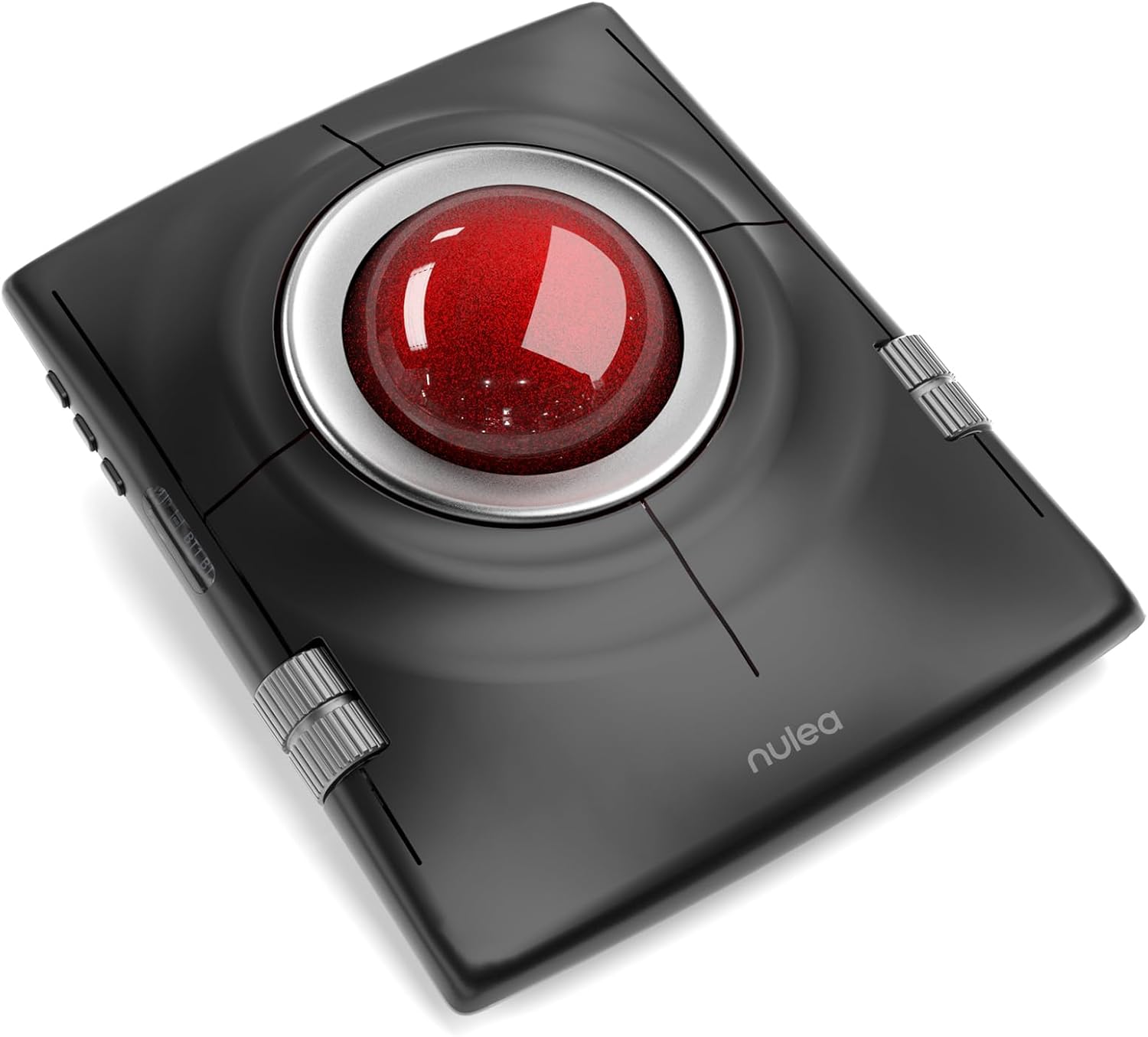
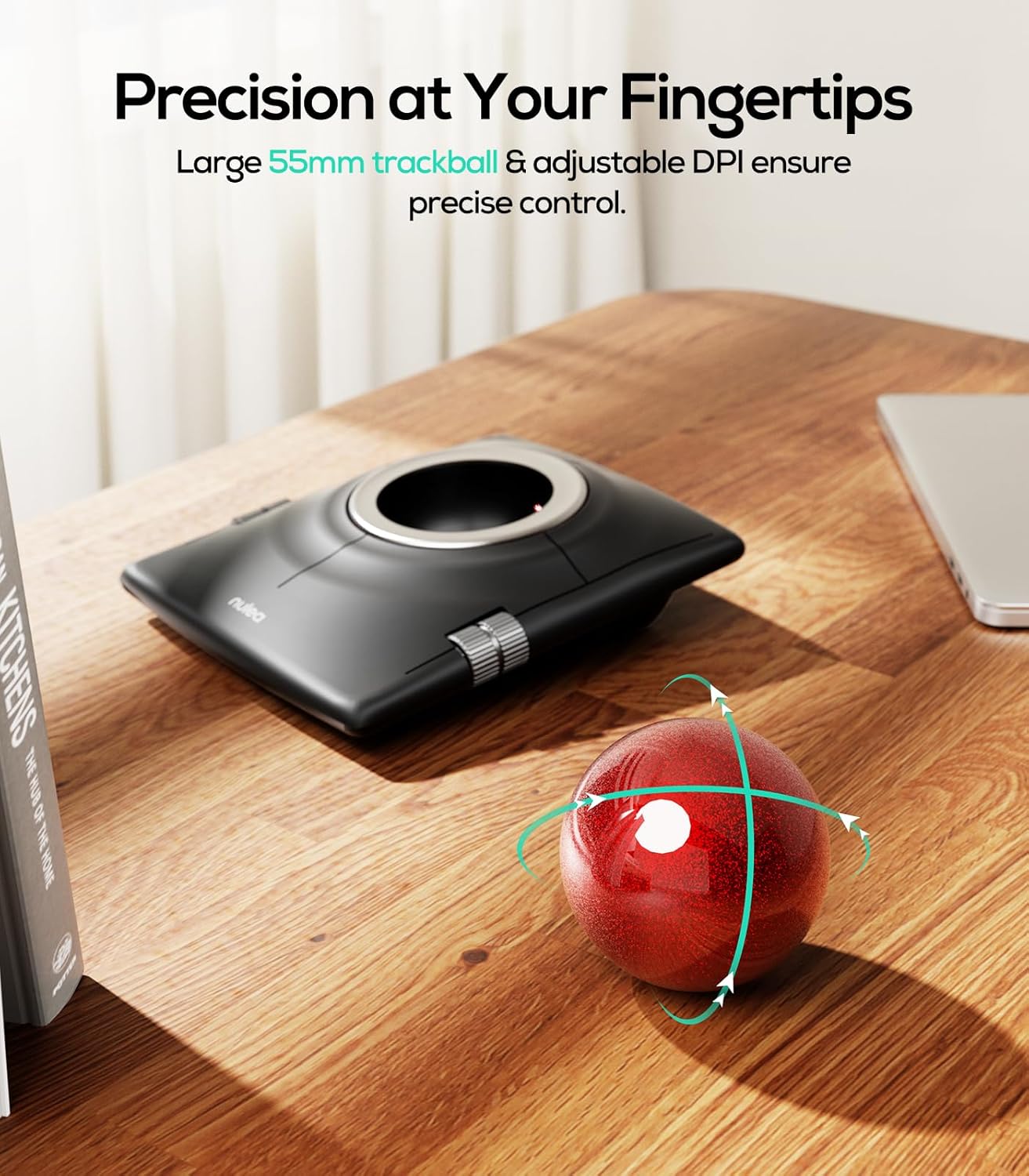
Nulea M512 Wireless Trackball Mouse, Ergonomic 55mm Trackball, 4 Level Adjustable DPI for Precise Control, Left or Right Hand Compatible, Rechargeable, Multi-Device Bluetooth & 2.4GHz for PC, Laptop

4.30

지난 32시간 동안 판매됨 21

$ 48.99
$ 52.00
-6.14%

I have always uses Kensington track balls but when I saw this I wanted to try it out and it's less than half the cost of a Kensington and wireless so I thought it might be a good addition for travel.Well, it tracks very well, though I had to go to the website to get the online manual to figure out how to connect it to my Mac. The manual in the box has such tiny print I didn't even bother trying to read it.It's comfortable to use and the buttons work fine, though are not really programmable like Kensingtons are. The thing for me that makes it only 3 stars is the scroll wheels on the sides, I found them difficult to use, non-intuitive and too different than what I was used to.If you have never used a trackball, and I highly recommend them, this might be a perfect fit, definitely worth trying because it is easy on the had and the has a large track ball. But if you are used to using a Kensington my guess it that it's won't be a good fit for you.I don’t know what this is about your customer support, but they did reach out to me, saying that I was unsatisfied, even though my lack of satisfaction was because of my own preferences not anything wrong with the device. I definitely say give this track ball a try, the company makes a good product and aim to please.

27 현재 누군가가 웹사이트를 탐색 중입니다.

Color
B-Blue A-Red
수량:
- +

예상 배송 시간: 12~26일(국제), 3~6일(미국)

구매일로부터 45일 이내에 반품이 가능합니다. 관세 및 세금은 환불되지 않습니다.

  • ASIN:

    B0FVF1PLL5

  • BEST_SELLERS_RANK:

    #6 in Computer Trackballs

  • CUSTOMER_REVIEWS:

    4.3 4.3 out of 5 stars (147) 4.3 out of 5 stars

  • DATE_FIRST_AVAILABLE:

    October 9, 2025

  • ITEM_MODEL_NUMBER:

    M512

  • ITEM_WEIGHT:

    1.23 pounds

  • LANGUAGE:

    German

  • MANUFACTURER:

    Nulea

  • PACKAGE_DIMENSIONS:

    6.54 x 5.75 x 3.07 inches

안전한 결제를 보장하세요

제품 상세 정보
Perfectly designed for both left and right hands, offering a comfortable and natural grip no matter which hand you use. Connect up to 3 Wireless Devices Seamlessly connect to devices via Bluetooth or USB receiver, and switch between them effortlessly with just one press. Effortless Control on Any Surface No need for a flat surface, just smooth and precise navigation anywhere you go. Bed, Couch, Carpet, Cluttered Desk. M512 is ideally suited for individuals with large-sized hands. How to perform left/right hand mode switching? 1. Press the mode switching key. 2. The following controls will be automatically swapped to match the selected hand control mode: left and right buttons; center and back buttons; up/down buttons and left/right scroll wheel functions. What are the functions of the left and right scroll wheels? In the right-handed state 1、Left wheel controls scrolling up and down. 2、Right wheel controls left and right scrolling. Automatically switch between left and right hand modes by pressing the left and right hand mode switching buttons. How do I switch connection modes? M512 supports 3 channels (1x 2.4G + 2x BT). Short press the mode button to switch paired devices (indicator shows active channel). For Bluetooth pairing, long press until blue light flashes rapidly. How many buttons does the M512 have, and what do they do? 4 buttons total: 1、Top-left: Replaces middle mouse button for smooth scrolling. 2、Top-right: Acts as a back button. 3、Two bottom buttons: Standard left/right clicks (same as regular mice). How to reprogram mouse buttons? 1. All keys are not programmable. 2.The middle and back buttons are not compatible with Mac OS.
고객 리뷰
4.30

(100 점수)

5
4
4
3
3
12
2
19
1
62
댓글 취소
댓글을 남겨주세요

26 논평

Ergonomic and smooth wireless trackball mouse
2026-03-07    -WhistlingKettle

Really nice and sturdy, high quality. It is quite large but that doesn't matter since you don't actually have to move it around your desk. The 55mm trackball is lovely and smooth for scrolling and the buttons are all easy to reach. One small downside is that it has a back button but no forward button which is a bit of a shame for web browsing.It does take a bit of getting used to if you are coming from a standard mouse, but it feels very ergonomic for the wrist. I love that it is rechargeable. Just a quick note that the cable is for charging only as it doesn't have a dedicated wired mode, so you have to use the bluetooth or the wireless dongle to actually connect it to your computer. Works a treat and would recommend for a tidy desk setup.

5.0 out of 5 stars For you it might be a 5 star
2026-01-05    -Thomasaleeds

I have always uses Kensington track balls but when I saw this I wanted to try it out and it's less than half the cost of a Kensington and wireless so I thought it might be a good addition for travel.Well, it tracks very well, though I had to go to the website to get the online manual to figure out how to connect it to my Mac. The manual in the box has such tiny print I didn't even bother trying to read it.It's comfortable to use and the buttons work fine, though are not really programmable like Kensingtons are. The thing for me that makes it only 3 stars is the scroll wheels on the sides, I found them difficult to use, non-intuitive and too different than what I was used to.If you have never used a trackball, and I highly recommend them, this might be a perfect fit, definitely worth trying because it is easy on the had and the has a large track ball. But if you are used to using a Kensington my guess it that it's won't be a good fit for you.I don’t know what this is about your customer support, but they did reach out to me, saying that I was unsatisfied, even though my lack of satisfaction was because of my own preferences not anything wrong with the device. I definitely say give this track ball a try, the company makes a good product and aim to please.

Ergonomic and smooth wireless trackball mouse
2025-12-31    -WhistlingKettle

Really nice and sturdy, high quality. It is quite large but that doesn't matter since you don't actually have to move it around your desk. The 55mm trackball is lovely and smooth for scrolling and the buttons are all easy to reach. One small downside is that it has a back button but no forward button which is a bit of a shame for web browsing.It does take a bit of getting used to if you are coming from a standard mouse, but it feels very ergonomic for the wrist. I love that it is rechargeable. Just a quick note that the cable is for charging only as it doesn't have a dedicated wired mode, so you have to use the bluetooth or the wireless dongle to actually connect it to your computer. Works a treat and would recommend for a tidy desk setup.

5.0 out of 5 stars For you it might be a 5 star
2026-02-15    -Thomasaleeds

I have always uses Kensington track balls but when I saw this I wanted to try it out and it's less than half the cost of a Kensington and wireless so I thought it might be a good addition for travel.Well, it tracks very well, though I had to go to the website to get the online manual to figure out how to connect it to my Mac. The manual in the box has such tiny print I didn't even bother trying to read it.It's comfortable to use and the buttons work fine, though are not really programmable like Kensingtons are. The thing for me that makes it only 3 stars is the scroll wheels on the sides, I found them difficult to use, non-intuitive and too different than what I was used to.If you have never used a trackball, and I highly recommend them, this might be a perfect fit, definitely worth trying because it is easy on the had and the has a large track ball. But if you are used to using a Kensington my guess it that it's won't be a good fit for you.I don’t know what this is about your customer support, but they did reach out to me, saying that I was unsatisfied, even though my lack of satisfaction was because of my own preferences not anything wrong with the device. I definitely say give this track ball a try, the company makes a good product and aim to please.

I really like this mouse. I have limited function in my thumb so having the ability to use several fingers for moving the cursor and the large buttons for right/left and middle/back are really convenient. I love the quality, the trackball is large enough for a 3 finger spin and connection is a breeze with the options of Bluetooth or USB. With the included wrist rest it is comfortable for long sessions, I use it all day every day.My only criticism is that with the width of the mouse the scroll bars on the sides are a bit of a stretch for my hand so can be difficult to use. Something to consider if you have smaller hands.

Takes a bit of getting used to but once you do it is great! I had to buy some software (steermouse) to make it work better on the Mac is the only reason I give it 4 instead of 5 stars. I am not always sure the left click works either as it is very intermittent when it seems to fail and I cannot tell if it is the user or the device. The large wheel is very nice for accuracy of movement. Once you figure out how to use the mouse it is comfortable too.

5.0 out of 5 stars Cool tool...
2026-02-02    -Michael S. Graham

Excellent product. Still learning to use. Not difficult though...

Leider mit Mikrorucklern
2025-12-24    -Roy Schumacher

Der trackball ist ansich toll verarbeitet und wertig. Die tasten sind angenehm leichtgängig wobei das coating Geschmackssache sein wird. Ich fande es nicht so angenehm. Aus meiner sicht kann man aber nicht präzise mit diesem trackball arbeiteten. Beim ersten anrollen gibt es immer einen kleinen ruckler. Dass ist technisch bedingt und lässt sich nicht anpassen. Die Lösung wäre aktive Rädchen für die Auflage, nur wird dann das Laufheräusch sehr viel lauter. Daher wurde es wohl nicht gemacht. So kann man den Trackball leider nicht nutzen.

Comfortable to use.
2026-01-08    -What

I hadn't used a trackball before, but wanted to try one as I'd heard they can be more comfortable to use than a regular mouse.The Nulea ergonomic trackball is larger than I expected, though it fits my hand well, and it feels comfortable to use. The device comes with a separate wrist rest for extra support. The trackball's USB dongle is tucked into the underside of the device. Plug the dongle into your PC or laptop, turn on the trackball, and it'll connect right away.It didn't take long to learn how to use a trackball-- it actually felt quite natural and intuitive-- but I think it'll take me a while to reprogram my brain to reach for the mouse-wheel with my thumb, haha. The biggest improvement I've noticed is that the trackball doesn't need a lot of desk space to have a full range of motion. My keyboard tray is quite small, so switching to the trackball has made a big difference. I'm glad I made the switch!

I purchased my Nulea M512 from Amazon and it is part of Batch Number: F0801.This is yet another finger action trackball that enters the foray. And this M512 is a very capable, but flawed contender.It seems more of a beta, or perhaps a version 0.1, than a finished product. It lacks some fundamental features that seem pretty much standard in today’s market.My daily drivers are the Kensington wired and wireless SlimBlades. No trackball is perfect for everyone.Here’s what I think Nulea/Dongguan . . . Electronics has gotten right:1- The texture of the top panel is matte and has a very comfortable feel. It does not show finger prints easily, or kick back light as those with shinny plastic tops. You can see in the composite shot some oil marks from finger use. (One reviewer claims the coating deteriorates over time, we will see.)2- And speaking of texture, the included palm rest is memory foam covered with pleasant silicone like fabric, with a non-slip bottom. It feels great when resting one’s wrist or palm.3- It uses a 55mm ball for finger control. For my medium sized hand it’s the perfect size. I find I can control the pointer better with a larger ball.4- Be still my heart, out of the box the ball moves like a dream! Every other trackball I have (I have lots, really lots) needs to have the ball conditioned to get smooth movement and no stiction. It remains to be seen how long the delight lasts.5- The ball stays in the well. No fear, if you move or tilt it. You wouldn’t have to chase the ball across the floor. All it takes is a gentle push in the bottom hole to pop it out.6- Not all trackballs have that hole on the bottom, and when they don’t dirt collects there. The M512 has that hole and the smaller bits of my potato chips fall right out.7- The M512 uses separate up/down and left/right scroll controls. Scroll is accomplished by those dull silver (dull is good) slotted barrels at the left and right edge. It takes some practice for the muscle memory to set in, but after a bit of use it feels very natural.8- It has four switchable DPI settings: 400, 800, 1200, 1600. 400 DPI is the default at first turn on.9- The M512 supports three switchable successive connection modes: one 2.4 GHz via a mini USB-A transceiver (stowable under the base) and two independent Bluetooth v5.0 connections. In the composite shot the green one is for 2.4 GHz, and the Blue ones are the two Bluetooth channels.More about that switching bit in a sec.10- It has an ON/OFF switch on the bottom in case you won’t be using it for a while. And, for everyday use it goes to sleep with 30 minutes of inactivity, and comes back alive at a slight movement of the ball.Here’s where I think Nulea/Dongguan . . . Electronics has missed the boat.1- The four topside buttons have, in general, a good feel. But like so many on the market, the force depends on the bending of the plastic case. That means depending on where you do the ‘click’ the force will be different. Better w/ less force toward the center near the ball, more force the further away from center. This results in an inconsistent click feel that momentarily calls attention away from your work at every click.2- With a great non-reflective and nice feeling top, they ruin it with a highly reflective ring around the ball. Why oh why? If your work lighting is at a certain angle that ring will spit the light right back in your eye.3- Many wireless trackballs with rechargeable internal batteries, offer an alternate wired connection by the same USB-C charging connector. The M512 does not. That USB-C connector is for recharging only.4- On the side edge of the trackball body are three buttons and a very small window with four tally LEDs. See my composite shot. One button is to cycle through the 2.4 GHz, BT1, or BT2 connections at every tap. However, the buttons and the tallies need to be on the top deck. As built, it is very difficult to see what connection mode the unit is in without picking up the trackball. And to be sure one taps the correct button, just slow everything down, and be careful what you touch. Sometimes while I use the M512 it slides up against the edge of the keyboard, changing connection mode. Again, these should be on top, where accidental contact is less likely and they would be way easier to see and use.5- The same goes for the DPI switch. No, actually it is worse! As one changes DPI, a LED flashes a code (see the composite shot, the DPI LED is the Red one): One flash for 400 DPI, two flashes for 800 DPI, etc. So not only can that button be accidentally hit, you have to stop, watch, and count the flashes. Again if that button were on the top deck with four different LEDs, one for each DPI setting, that would greatly enhance ease of use. There is no seamless way to switch DPI for tight work without taking eyes away from the screen.6- And, yes, there are three buttons in that side cluster. The third button is to change handedness (right/left hand use.) Really? An accidental tap and you might wonder if the trackball has gone rogue. How often does one need to change handedness? Put that button on the bottom!7- I guess I buried the lead: The top four click buttons and the two scroll rollers are NON-configurable. Yes: NON-configurable. The one exception is to flip right/left handedness. What it lacks and really needs is a loadable driver (Win/Mac) to customize the buttons.I deduct two stars for the poor location of the side switches and the lack of a driver.I should deduct a third star for calling it a Trackball MOUSE. NO! It is a Trackball Pointer, as apposed to a Mouse Pointer. Really! They’re different. They both control the on screen pointer, which allows one to get around the graphical user space. Why confuse things?!All in all it’s a nice trackball. If the M512 fits your hand, and you can live within its non customizable setup it’s a good deal.cheers

댓글을 남겨주세요:

댓글 제목
댓글 내용
배송 및 반품
우리가 당신을 보호하겠습니다

대부분 지역에서는 배송비를 한 번만 지불하시면 됩니다 (주문 및 배송 페이지를 확인해 주세요).

구매 후 14일 이내 무료 반품 가능 (단, 수명이 다한 제품, 맞춤 제작 상품, 마스크, 향수 및 에어로졸과 같이 위험하거나 인화성 물질이 포함된 일부 제품은 제외).

수입 관세 정보

복잡한 절차는 저희가 처리해 드리겠습니다. 카나리아 제도를 제외한 모든 EU 국가, 영국, 미국, 캐나다, 호주, 뉴질랜드, 푸에르토리코, 스위스, 싱가포르, 한국, 쿠웨이트, 멕시코, 카타르, 인도, 노르웨이, 사우디아라비아, 대만, 태국, UAE, 일본, 브라질, 맨섬, 산마리노, 콜롬비아, 칠레, 아르헨티나, 이집트, 레바논, 홍콩 특별행정구, 바레인, 터키로 배송되는 상품 가격에는 모든 수입 관세가 포함되어 있습니다. 표시된 가격이 최종 결제 금액입니다.

예상 배송 시간

특급 배송: 7-10일

해당 창고에서 배송되었습니다.

더 자세한 정보가 필요하신가요?
반품 정책
반품 정책

저희는 제품 품질에 자신 있습니다. 만약 구매하신 제품에 완전히 만족하지 못하신다면, 수령일로부터 30일 이내에 간편하게 반품하실 수 있도록 정책을 마련해 두었습니다.

간편한 교환 또는 환불
  • 다른 사이즈, 색상 또는 스타일의 상품으로 교환하거나 전액 환불받을 수 있습니다.
  • 반품되는 모든 상품은 착용하지 않은 상태여야 하며, 원래 포장 상태 그대로 모든 태그가 손상되지 않은 상태여야 합니다.
간단한 절차
  • 온라인으로 반품을 신청하거나 고객 서비스 팀에 문의하여 도움을 받으실 수 있습니다.
  • 물품을 제대로 포장해 주시고, 원래의 포장 목록도 함께 넣어주세요.
  • 반품하실 상품을 보내주실 때에는 저희가 제공해 드린 선불 배송 라벨을 사용해 주시기 바랍니다.
  • 환불 요청 접수 즉시 처리해 드리겠습니다.

반품과 관련하여 궁금한 점이나 우려 사항이 있으시면 언제든지 저희 전문 고객 서비스 팀에 문의해 주세요. 고객 만족은 저희의 최우선 목표입니다.

범주
차이
제품
모든 제품 지우기