고객 서비스

판매자들은 가입하면 더 많은 혜택을 누릴 수 있습니다.

모든 주문 무료 배송.

복사기

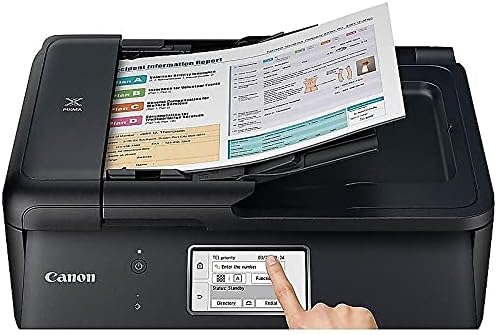
Canon TR8520 All-In-One Printer For Home Office |Wireless | Mobile Printing | Photo and Document Printing, AirPrint(R) and Google Cloud printing, Black

4.10

지난 32시간 동안 판매됨 44

$ 314.57
$ 320.00
-1.73%

I gave this top stars even though it is an ink hog. BUT before you stop reading, when pro to g photos on “ best” as I often do, very few printers are not! For a home office this is spectacular. It’s very compact, it comes with an automatic document feeder, which is very RARE in this price range. Faxes ( YES, some still use faxing), scans, copies. Got good Consumer Report scores.I have seen negative reviews. Mostly on flimsy construction, cost of ink and slowness of printer. Ok I disagree. Why? Yes, the plastic made in this Pixma is not a thick as printers of years past but that said, it doesn’t make one bit of difference! Unless you are particularly rough it will NOT affect ANY functions. I LOVE that this has TWO paper holders. I love that unlike my last non Cannon printer, this DOES co it is to print when other cartridges are out of ink. That’s a big deal for me!!! Again hard to find anymore in this price range AND I paid $ $70 more in December 2020 than its being sold at many internet stores now 4-20). On the cost of ink. I used the Cannon ink XL packs twice and was dismayed at putting out $120 every 46-60 days ( again I do print lots of photos). I researched non Cannon ink. In the past, I had trouble with smearing for DAYS later, color distortion, etc. I decided to try one more time and found an internet company called Comp and Save. I took a chance. The cartridges were an immediate given that this firm produced quality Non OEM ( original equipment mfg) products. The price for all 5 XL cartridges was slightly 50% less than Cannon. The real test came in my print test. I printed 4 different photo types ( landscape, portrait etc) with Cannon ink. Then printed the same photos with the Non OEM ink. IF you were looking closely, you could find a tad difference. ( Blue suit in Cannon print, came out more brown. What’s hilarious is that we NEVER noticed that the actual suit is not BLUE but brown mixed with blue weaves. Our faces were a very TINY bit lighter. I thought it made us look better to be truthful. The point is that the differences would be speculative at best, and too small to pay the full Cannon ink costs. Beautiful fall landscape? No difference! ALSO, using non manufacturer ink does NOT void any mfg warranty. Also make sure you buy from a QUALITY ink company as cheap ink does clog up printers often! BUT since these printers really don’t last like they used to, I strongly recommend you always buy the extra warranty if available. I bought my last printer at Best Buy with a 3 year extra warranty for $34.99. Thank heavens as the printer broke after 2 years. They refunded my purchase price and I bought a different printer. Bought another 3 year warranty and this printer went after 15 months. Unfortunately the Assurion Warranty I bought from Amazon does not refund your money but only gives you an Amazon gift card. None the less, still worth buying with electronics and are really inexpensive these days.

20 현재 누군가가 웹사이트를 탐색 중입니다.

수량:
- +

예상 배송 시간: 12~26일(국제), 3~6일(미국)

구매일로부터 45일 이내에 반품이 가능합니다. 관세 및 세금은 환불되지 않습니다.

  • ADDITIONAL_PRINTER_FUNCTIONS:

    Fax

  • ASIN:

    B074VFW3VX

  • COLOR_DEPTH:

    24 bpp

  • COMPATIBLE_DEVICES:

    Printer

  • CONTROL_METHOD:

    Voice

  • CONTROLLER_TYPE:

    Amazon Alexa, Vera

  • CUSTOMER_REVIEWS:

    4.1 4.1 out of 5 stars (4,052) 4.1 out of 5 stars

  • DATE_FIRST_AVAILABLE:

    August 22, 2017

  • DUAL_SIDED_PRINTING:

    Yes

  • DUPLEX:

    Automatic

  • GLOBAL_TRADE_IDENTIFICATION_NUMBER:

    00013803290745

  • HARDWARE_INTERFACE:

    USB

  • INCLUDED_COMPONENTS:

    Full Set of Standard Ink Tanks, PIXMA TR8520 Wireless Home Office All-In-One Printer, Paper, Power Cord, Setup CD-ROM, Telephone Cord

  • INK_COLOR:

    Cyan, Magenta, Yellow, Black, Gray

  • IS_DISCONTINUED_BY_MANUFACTURER:

    No

  • ITEM_MODEL_NUMBER:

    2233C002

  • ITEM_WEIGHT:

    17.5 pounds

  • MANUFACTURER:

    Canon USA Inc.

  • MAX_COPY_RESOLUTION_BLACK_WHITE:

    4800 x 1200 dpi

  • MAX_COPY_RESOLUTION_COLOR:

    4800 x 1200 dpi

  • MAX_INPUT_SHEET_CAPACITY:

    20

  • MAXIMUM_BLACK_AND_WHITE_PRINT_RESOLUTION:

    4800 x 1200 dpi

  • MAXIMUM_COLOR_PRINT_RESOLUTION:

    4800 x 1200

  • MAXIMUM_COPIES_PER_RUN:

    At least 20

  • MAXIMUM_MEDIA_SIZE:

    8.5 x 14 inch

  • MEMORY_STORAGE_CAPACITY:

    64 MB

  • MODEL_SERIES:

    TR8520

  • NUMBER_OF_TRAYS:

    2

  • NUMBER_OF_USB_2_PORTS:

    1

  • PRINT_MEDIA:

    Glossy photo paper

  • PRINTER_INK_TYPE:

    PGI-280 (Black) / CL-281 (Color) Individual Ink

  • PROCESSOR_COUNT:

    1

  • PRODUCT_DIMENSIONS:

    14.4"D x 17.3"W x 7.5"H

  • SCANNER_TYPE:

    Sheetfed

  • SERIES_NUMBER:

    2233

  • SPECIFIC_USES_FOR_PRODUCT:

    Home, Office, home office

  • TOTAL_USB_PORTS:

    1

  • UPC:

    013803290745

  • WARRANTY_TYPE:

    limited warranty

  • WATTAGE:

    15 watts

안전한 결제를 보장하세요
제품 상세 정보
The home office printer that's powerful, yet compact a home office should boost your efficiency at work, but should also handle all your home needs too. And the Pixma TR8520 does just that. When you need a home office printer that can handle all your work needs like documents, reports, faxing and scanning to your home needs like printing homework assignments, concert tickets and family photos the Pixma TR8520 has you covered. With front and rear paper feeding, a 5 individual ink system, auto 2 sided printing, memory card Slot1, and lots of connectivity options, you'll be able to handle it all.
고객 리뷰
4.10

(100 점수)

5
9
4
4
3
7
2
18
1
62
댓글 취소
댓글을 남겨주세요

16 논평

5.0 out of 5 stars Very simple to add to a Chromebook!
2026-02-13    -Brenda Van Leer

I am so happy with my new printer and I am glad I didn't listen to the reviews that it's hard to wirelessly connect to a Chromebook because it was simple. All I did was goole how to add it to Chomebook and all you have to do is go into your settings, search printers, go to add printer manually and put in the IP address. To get the IP address just click on the internet icon on the printer. I am not very tech savvy and even I thought it was amazingly simple to add. Regular set-up was also simple. First I followed directions from the book it came with, however when it came to adding to my phone I downloaded the app and then the book became hard to follow so I just followed what the printer said because it was much simpler than trying to follow the instructional book. I was very surprised at how much ink it came with since everyone said it was only starter ink but the printer ssys that they are almost full. Not that I have to print a lot but I printed 3 pictures and about 10-15 colored pages and the level has not moved. About the pictures I printed, I think they are wonderful, way better then the ones I print from a store. I loved them so much that I quickly ordered picture paper from Amazon! And can't wait to download the canon picture editor app to see what it has to offer. Onto the people calling it flimsy. I don't believe it to be flismy to me but I do understand what maybe they meant. Since it has so many things you can do with it and so many places to add the paper from it does have folded up plastic pieces that fold out and in depending on your printing needs at that time, so they are on the thinner side but all and all I believe it's very sturdy. If I find out otherwise I will add to my review because I know I highly cosider the reviews when buying something. All and all I believe this Canon printer would be a great choice. I am only using it for household printing so I'm not sure about for home office use but I don't see why not. The only issue I could see might be an issue for a home office would be that you can't load a lot of paper into the tray, it might have fit 50-60 pages into the tray. Oh and you barely have to touch the screen for it to work, I read some reviews that it was a problem. It was also very simple to add the ink, none got on anything, all I did was read the directions and it clicked right in. I also like that you only have to replace the color that is empty.

La mejor compra
2026-01-29    -Tulio D.

Super manejable adaptable a todos los dispositivos

Su diferente modo de conexión
2026-02-11    -GMERS777

Excelente impresora la recomiendo para oficina y casa

It great overall
2026-02-28    -Jean H Paradis

The fact that it shuts down is not good as one has to walk to the printer to put it on from his working station, I have not figure out yet how to configure it so that it stays on,

Very versatile machine.
2026-01-05    -John A Stuart

Works very well, hi quality printing and is compact.

Su diferente modo de conexión
2026-03-04    -GMERS777

Excelente impresora la recomiendo para oficina y casa

5.0 out of 5 stars Very simple to add to a Chromebook!
2026-02-22    -Brenda Van Leer

I am so happy with my new printer and I am glad I didn't listen to the reviews that it's hard to wirelessly connect to a Chromebook because it was simple. All I did was goole how to add it to Chomebook and all you have to do is go into your settings, search printers, go to add printer manually and put in the IP address. To get the IP address just click on the internet icon on the printer. I am not very tech savvy and even I thought it was amazingly simple to add. Regular set-up was also simple. First I followed directions from the book it came with, however when it came to adding to my phone I downloaded the app and then the book became hard to follow so I just followed what the printer said because it was much simpler than trying to follow the instructional book. I was very surprised at how much ink it came with since everyone said it was only starter ink but the printer ssys that they are almost full. Not that I have to print a lot but I printed 3 pictures and about 10-15 colored pages and the level has not moved. About the pictures I printed, I think they are wonderful, way better then the ones I print from a store. I loved them so much that I quickly ordered picture paper from Amazon! And can't wait to download the canon picture editor app to see what it has to offer. Onto the people calling it flimsy. I don't believe it to be flismy to me but I do understand what maybe they meant. Since it has so many things you can do with it and so many places to add the paper from it does have folded up plastic pieces that fold out and in depending on your printing needs at that time, so they are on the thinner side but all and all I believe it's very sturdy. If I find out otherwise I will add to my review because I know I highly cosider the reviews when buying something. All and all I believe this Canon printer would be a great choice. I am only using it for household printing so I'm not sure about for home office use but I don't see why not. The only issue I could see might be an issue for a home office would be that you can't load a lot of paper into the tray, it might have fit 50-60 pages into the tray. Oh and you barely have to touch the screen for it to work, I read some reviews that it was a problem. It was also very simple to add the ink, none got on anything, all I did was read the directions and it clicked right in. I also like that you only have to replace the color that is empty.

Very versatile machine.
2026-01-22    -John A Stuart

Works very well, hi quality printing and is compact.

My old Canon Pixma printer died on me. It worked fine for many years and I would have been happy to buy the same model. Of course, the model numbers change like fashion so I had to pick a new one.I went looking for a replacement and was stunned at all the negative reviews - of pretty much every modestly priced inkjet printer out there, not just Canon. So I crossed my fingers and ordered this one. It's great. It works better than my old one, was easy to set up, connects easily to my laptop and to my mobile devices, and the print quality is fine for my everyman kind of use.Why not 4 stars? The Canon "Garden" app is clumsy to use on my laptop, but I can push through what I need on it. It needs a complete overhaul to be user friendly and intuitive to use. A quirky part is that the printer turns off quickly, and then when you print you're told "Printer offline." You just need to turn it back on but I am surprised that a request to print can't be set up to activate the printer getting back online. These are minor nits. I'd buy this printer again.

La mejor compra
2025-12-31    -Tulio D.

Super manejable adaptable a todos los dispositivos

댓글을 남겨주세요:

댓글 제목
댓글 내용
배송 및 반품
우리가 당신을 보호하겠습니다

대부분 지역에서는 배송비를 한 번만 지불하시면 됩니다 (주문 및 배송 페이지를 확인해 주세요).

구매 후 14일 이내 무료 반품 가능 (단, 수명이 다한 제품, 맞춤 제작 상품, 마스크, 향수 및 에어로졸과 같이 위험하거나 인화성 물질이 포함된 일부 제품은 제외).

수입 관세 정보

복잡한 절차는 저희가 처리해 드리겠습니다. 카나리아 제도를 제외한 모든 EU 국가, 영국, 미국, 캐나다, 호주, 뉴질랜드, 푸에르토리코, 스위스, 싱가포르, 한국, 쿠웨이트, 멕시코, 카타르, 인도, 노르웨이, 사우디아라비아, 대만, 태국, UAE, 일본, 브라질, 맨섬, 산마리노, 콜롬비아, 칠레, 아르헨티나, 이집트, 레바논, 홍콩 특별행정구, 바레인, 터키로 배송되는 상품 가격에는 모든 수입 관세가 포함되어 있습니다. 표시된 가격이 최종 결제 금액입니다.

예상 배송 시간

특급 배송: 7-10일

해당 창고에서 배송되었습니다.

더 자세한 정보가 필요하신가요?
반품 정책
반품 정책

저희는 제품 품질에 자신 있습니다. 만약 구매하신 제품에 완전히 만족하지 못하신다면, 수령일로부터 30일 이내에 간편하게 반품하실 수 있도록 정책을 마련해 두었습니다.

간편한 교환 또는 환불
  • 다른 사이즈, 색상 또는 스타일의 상품으로 교환하거나 전액 환불받을 수 있습니다.
  • 반품되는 모든 상품은 착용하지 않은 상태여야 하며, 원래 포장 상태 그대로 모든 태그가 손상되지 않은 상태여야 합니다.
간단한 절차
  • 온라인으로 반품을 신청하거나 고객 서비스 팀에 문의하여 도움을 받으실 수 있습니다.
  • 물품을 제대로 포장해 주시고, 원래의 포장 목록도 함께 넣어주세요.
  • 반품하실 상품을 보내주실 때에는 저희가 제공해 드린 선불 배송 라벨을 사용해 주시기 바랍니다.
  • 환불 요청 접수 즉시 처리해 드리겠습니다.

반품과 관련하여 궁금한 점이나 우려 사항이 있으시면 언제든지 저희 전문 고객 서비스 팀에 문의해 주세요. 고객 만족은 저희의 최우선 목표입니다.

범주
차이
제품
모든 제품 지우기