고객 서비스

판매자들은 가입하면 더 많은 혜택을 누릴 수 있습니다.

모든 주문 무료 배송.

자동차 전자 장비

THINKWARE U3000 4K Dash Cam Front and Rear 2CH STARVIS 2 Sensor Super Night Vision Dashcam for Car Camera 5GHZ WiFi GPS Radar Buffered Parking Mode CPL Filter Red Light Speed Camera Alerts OBD Cable

4.00

지난 32시간 동안 판매됨 38

$ 459.99
$ 505.00
-9.78%

The U3000 comes with everything you need, including a 64GB microSD card. No paper manual in the box, but the QR code takes you straight to the guide, which worked fine for us. We installed the front and rear cameras ourselves, it took a couple of hours but was manageable. There are plenty of tutorial videos online for installation, which really helped.The footage looks really sharp both during the day and at night. The night vision especially stands out, much clearer than I expected. Parking mode with the built-in radar is also really handy. I’m still getting used to the mobile app, but it’s been easy enough to figure out.So far, it’s been a solid investment and does exactly what we hoped for.

17 현재 누군가가 웹사이트를 탐색 중입니다.

수량:
- +

예상 배송 시간: 12~26일(국제), 3~6일(미국)

구매일로부터 45일 이내에 반품이 가능합니다. 관세 및 세금은 환불되지 않습니다.

  • ASIN:

    B0BTWKS836

  • BEST_SELLERS_RANK:

    #42,435 in Electronics (See Top 100 in Electronics) #603 in Car On-Dash Mounted Cameras

  • COLOR:

    2CH Front & Rear, 64GB, CPL, OBD

  • CONNECTIVITY_TECHNOLOGIES:

    Bluetooth, Wi-Fi

  • CUSTOMER_REVIEWS:

    4.0 4.0 out of 5 stars (250) 4.0 out of 5 stars

  • DATE_FIRST_AVAILABLE:

    February 4, 2023

  • ITEM_MODEL_NUMBER:

    TW-U3000D64CO

  • ITEM_WEIGHT:

    4.6 ounces

  • MANUFACTURER:

    THINKWARE

  • OTHER_DISPLAY_FEATURES:

    Wireless

  • PRODUCT_DIMENSIONS:

    3.86 x 2.75 x 2.19 inches

안전한 결제를 보장하세요

제품 상세 정보
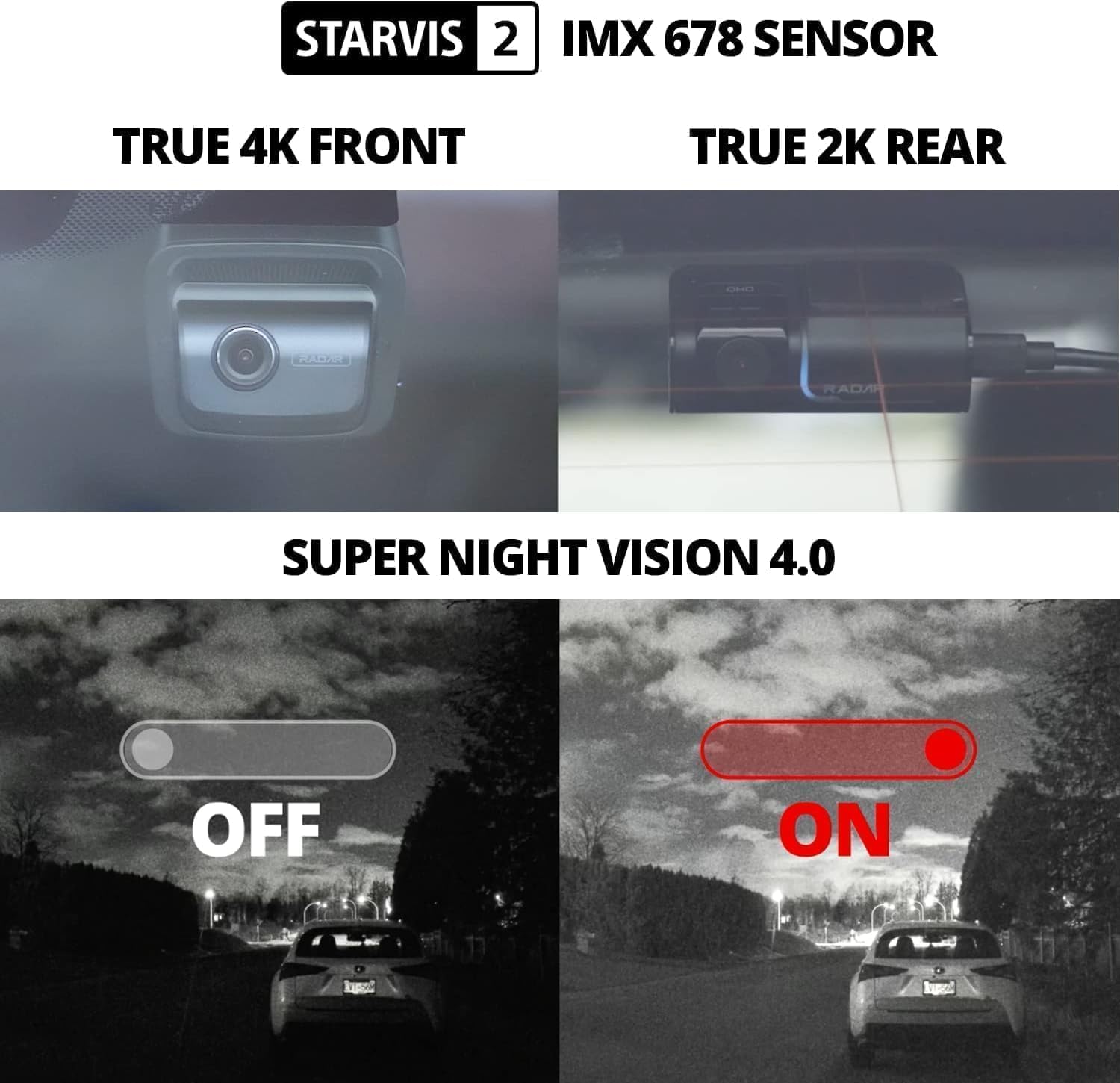
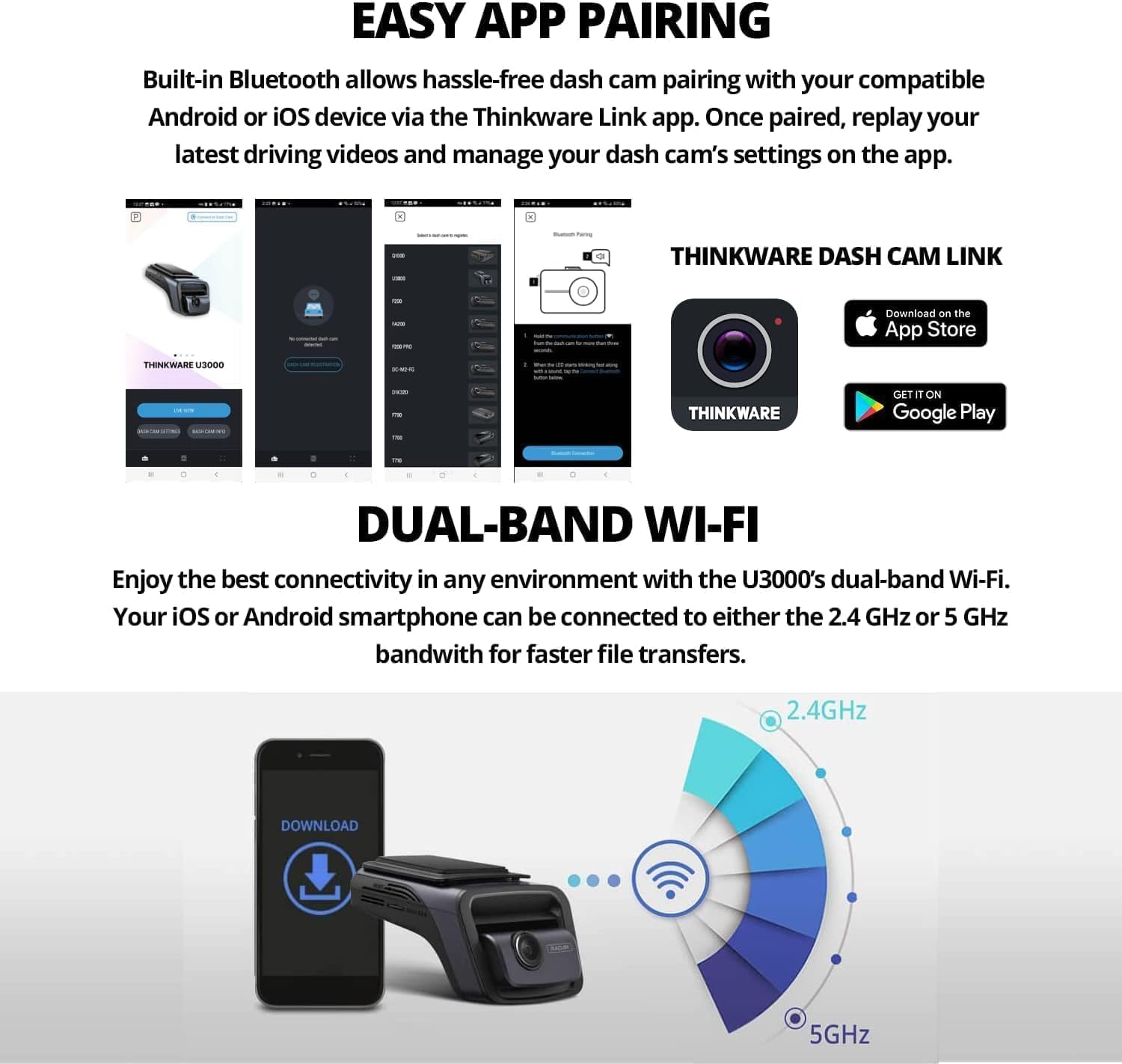
Equipped with an 8MP Sony STARVIS 2 IMX 678 sensor, a wide 158º field of view, and a high-performance Ambarella CPU, the ensures remarkable recording quality. The rear camera, featuring a 5MP Sony STARVIS IMX 335 sensor, captures a generous 128º in 2K QHD at 30fps. How do I enable Parking Mode? Power the dash cam via hardwiring, OBD-II, or iVolt battery. Connect to the app via Wi-Fi or Bluetooth, go to Dash Cam Settings > Record Settings, and select your preferred Parking Surveillance mode. Which THINKWARE Mobile App should I use? Download THINKWARE DASH CAM LINK app to review footage and adjust dash cam settings.To access connected features, download THINKWARE CONNECTED app. *Mobile hotspot required. Data charges may apply. Why won't my dash cam connect to the app? Make sure Wi-Fi and Bluetooth is on and you're connected to the dash cam. Disconnect Apple CarPlay or Android Auto, as they can block the connection. If issue persists, please contact our support team for help. My THINKWARE dash cam will not power on. Test with a 12V car charger cable. If it powers on, check your hardwiring cable, OBD-II cable, or iVolt battery. If you don't have a 12V car charger or the dash cam doesn't power on, contact our support team for help. How do I reset my dash cam? Hold the REC and MIC buttons at the same time until the device begins to beep. The dash cam will then restart, reverting to default, which will erase the microSD card and all recording footage. Be sure to save all crucial footage beforehand.
고객 리뷰
4.00

(100 점수)

5
16
4
3
3
8
2
11
1
62
댓글 취소
댓글을 남겨주세요

22 논평

Parfait
2025-12-30    -Alex

Parfait

Dashcam itself is really great but if you have an EV (certainly the more recent one) you need to buy an additional connector which is a bummer. It's no where mentioned that this is not working on Amazon (on thinkware website it is).So just be prepared to have extra costs in that case.

Endlich gibt es das Kombi-Paket mit ODBII und Rear-Cam.Entgegen aller Befürchtungen funktioniert das Einrichten der Standard-App für die Cam super (Connect-App hat beim Scan des Barcodes nur Fehler gebracht). Die Trennung zwischen Cam-Link-App und Cloud-App (Thinkware Connect) finde ich aber daher eher praktisch als verwirrend (Connect braucht man nicht, auch nicht als erstes, nur für Cloud-Funktionen). So kann jeder genau das nutzen was er möchte. (zum Beispiel wenn er die Cloud-Funktion nicht braucht kann man einfach die Cam "offline" nutzen).Oberfläche, Sprachausgabe und Benutzerhandbuch auf Deutsch.Alles technischen Funktionen gehen auf Anhieb und die App dazu funktioniert auch und ist sinnvoll und praktisch aufgebaut.Toll ist auch der Umfang der Einstellungen (z. B. LEDs kann man ausschalten, Radar kann man getrennt konfigurieren) super.Jetzt kann man eigentlich nur noch Wünsche äußern wie:- Es wäre toll, wenn man die Radar-Bewegungserkennung getrennt auch ausschalten könnte und nicht nur auf "sehr gering", z. B. wenn man Rückwärts an einem Gebüsch steht bei windigen Wetter, löst diese dann auch aus.- Es wäre toll wenn es eine noch viel genauere Anleitung, Beschreibung, Handbuch geben würde die alle Funktionen in den Einstellungen der Cam-App besser erklärt, vor allem wann die besagten Punkte genau auftreten (z. B. FDWS usw. oder viel Meter ist Mittlere Radar-Empfindlichkeit, oder was passiert bei "externer Batterie verwenden" wenn diese leer ist, wird dann Strom über das ODBII Kabel im Parkmodus verwendet oder nie mehr?)Einziger Kritikpunkt ist der Video-Player der CamLink-App, bei der jedes Video beim anschauen am Anfang das Bild in eine graue Fläche wechselt und man immer nochmal zum Anfang zurückspulen muss um gleich ein ordentliches Bild zu sehen; Hier also Achtung, die Videos sind nicht defekt wie andere User vermuten, der Thinkware-eigene Player ist vermutlich einfach schlecht und/oder der PC/Player mancher Benutzer, denn da der Codec H.265 die fortschrittlichste Option ist, kann es sein, dass ältere Hardware nicht mithalten kann und ältere Computermodelle bei der Verarbeitung Probleme haben. TIPP: probiert mal den Player "mpv(dot)net" ^^).

I've been using Thinkware products for many years. Mainly been using the Thinkware F800 2 Channel in my F150. I recently decided to upgrade to the U3000, and am not disappointed at all. It is a very solid upgrade over the previous 1080 generation of dash cameras from Thinkware.The app is much more intuitive then the older one which constantly had connection issues. I did have a few issues at first as I could not get the U3000 to connect to the app for the initial setup. After many hours of trouble shooting I found out it was because I plopped in the older dash camera MicroSD card that was full, and the camera wouldn't function correctly until I reformatted the MicroSD card on the computer. I was then able to plug it in and complete the initial setup and reformat the card on the device directly.Overall the camera quality is great, the parking modes, and the included OBD connection setup is fantastic. Much easier, and don't have to worry about hardwiring this camera directly to the battery/fusebox. The parking modes can be a bit intimidating, but with some tweaking you can get it just right so that you don't have 10+ alerts every time you get in the car.Compared to some other dash camera brands, I was a bit reserved on my purchase, as some online videos were pretty rough on this U3000, regarding quality compared to other 4k models. But in the end, I went ahead with the U3000 just due to the reliability of the parking modes, and experience with the previous camera I've used for many years.On sale, this is a must have for sure if you want something reliable that will function on very hot summer days or very cold winter nights and still function as intended. There are also many online features that I have not yet tested.

5.0 out of 5 stars Fantastic Camera
2026-01-21    -Scott Olea

One of the best cameras I've ever had!! I've went through my fair share of Dash cameras only to be Let down with image quality, Damage from the Heat, And just short life.This has excelled for YEARS, and the quality is supreme! The additional safety features are great and wifi connection ity provides security when im away from the vehicle

Endlich gibt es das Kombi-Paket mit ODBII und Rear-Cam.Entgegen aller Befürchtungen funktioniert das Einrichten der Standard-App für die Cam super (Connect-App hat beim Scan des Barcodes nur Fehler gebracht). Die Trennung zwischen Cam-Link-App und Cloud-App (Thinkware Connect) finde ich aber daher eher praktisch als verwirrend (Connect braucht man nicht, auch nicht als erstes, nur für Cloud-Funktionen). So kann jeder genau das nutzen was er möchte. (zum Beispiel wenn er die Cloud-Funktion nicht braucht kann man einfach die Cam "offline" nutzen).Oberfläche, Sprachausgabe und Benutzerhandbuch auf Deutsch.Alles technischen Funktionen gehen auf Anhieb und die App dazu funktioniert auch und ist sinnvoll und praktisch aufgebaut.Toll ist auch der Umfang der Einstellungen (z. B. LEDs kann man ausschalten, Radar kann man getrennt konfigurieren) super.Jetzt kann man eigentlich nur noch Wünsche äußern wie:- Es wäre toll, wenn man die Radar-Bewegungserkennung getrennt auch ausschalten könnte und nicht nur auf "sehr gering", z. B. wenn man Rückwärts an einem Gebüsch steht bei windigen Wetter, löst diese dann auch aus.- Es wäre toll wenn es eine noch viel genauere Anleitung, Beschreibung, Handbuch geben würde die alle Funktionen in den Einstellungen der Cam-App besser erklärt, vor allem wann die besagten Punkte genau auftreten (z. B. FDWS usw. oder viel Meter ist Mittlere Radar-Empfindlichkeit, oder was passiert bei "externer Batterie verwenden" wenn diese leer ist, wird dann Strom über das ODBII Kabel im Parkmodus verwendet oder nie mehr?)Einziger Kritikpunkt ist der Video-Player der CamLink-App, bei der jedes Video beim anschauen am Anfang das Bild in eine graue Fläche wechselt und man immer nochmal zum Anfang zurückspulen muss um gleich ein ordentliches Bild zu sehen; Hier also Achtung, die Videos sind nicht defekt wie andere User vermuten, der Thinkware-eigene Player ist vermutlich einfach schlecht und/oder der PC/Player mancher Benutzer, denn da der Codec H.265 die fortschrittlichste Option ist, kann es sein, dass ältere Hardware nicht mithalten kann und ältere Computermodelle bei der Verarbeitung Probleme haben. TIPP: probiert mal den Player "mpv(dot)net" ^^).

I've been using Thinkware products for many years. Mainly been using the Thinkware F800 2 Channel in my F150. I recently decided to upgrade to the U3000, and am not disappointed at all. It is a very solid upgrade over the previous 1080 generation of dash cameras from Thinkware.The app is much more intuitive then the older one which constantly had connection issues. I did have a few issues at first as I could not get the U3000 to connect to the app for the initial setup. After many hours of trouble shooting I found out it was because I plopped in the older dash camera MicroSD card that was full, and the camera wouldn't function correctly until I reformatted the MicroSD card on the computer. I was then able to plug it in and complete the initial setup and reformat the card on the device directly.Overall the camera quality is great, the parking modes, and the included OBD connection setup is fantastic. Much easier, and don't have to worry about hardwiring this camera directly to the battery/fusebox. The parking modes can be a bit intimidating, but with some tweaking you can get it just right so that you don't have 10+ alerts every time you get in the car.Compared to some other dash camera brands, I was a bit reserved on my purchase, as some online videos were pretty rough on this U3000, regarding quality compared to other 4k models. But in the end, I went ahead with the U3000 just due to the reliability of the parking modes, and experience with the previous camera I've used for many years.On sale, this is a must have for sure if you want something reliable that will function on very hot summer days or very cold winter nights and still function as intended. There are also many online features that I have not yet tested.

5.0 out of 5 stars Clear view
2026-01-24    -Hao

This dash cam is excellent! The video quality is super clear, even at night. It was very easy to set up myself in just a few minutes. I really like the loop recording feature and the reliable parking mode, which gives me great peace of mind. The mobile app is simple to use for viewing and saving clips. For the price, this is an outstanding value. Highly recommended for any driver!

1.0 out of 5 stars Pass on it
2026-02-05    -Egon Duval

This device is very frustrating to work with. I was so excited to get this and set it up, but after spending several hours messing with it, there are a lot of problems.First, the recommended app will not allow you to register the dash cam at all. After researching, it appears that you cannot register the camera until it has had internet connection at least once. But you need to register it in order to set up the wifi.. so what wasn't very well thought out...More research lead me to an app called Thinkware Dashcam Link. This app allowed me to register the device and give it internet so I could then register it on the app I was supposed to use.After playing around with both apps, it appears that neither app offers full functionality for the camera. If you want to change the settings, or view live view, you have to use the Thinkware Dashcam Link. However if you want to change your account settings, or use the GPS, you have to use the Thinkware Connected app. In order to have full functionality of your camera, you have to keep both apps on your phone. I find this ridiculous and for $500 you should have full functionality in one placeCamera quality is okay, and it seems to record continuously. But getting the videos off the camera using your phone is a pain. The app only connects sometimes, the file transfer speed is slow, there's no video preview so you have to click on each video and watch it to find the one you want.Pulling out the SD card and putting it into a PC works, but my whole reason for spending so much was to have a camera with good parking recording and app functionality.Overall, without improvements to the app, I would pass on this dash cam. Only reason I'm not going to return it is because I hardwired it and I just don't care enough to undo all the wiring.Very disappointed in Thinkware. I was so excited for this camera

1.0 out of 5 stars Pass on it
2025-12-23    -Egon Duval

This device is very frustrating to work with. I was so excited to get this and set it up, but after spending several hours messing with it, there are a lot of problems.First, the recommended app will not allow you to register the dash cam at all. After researching, it appears that you cannot register the camera until it has had internet connection at least once. But you need to register it in order to set up the wifi.. so what wasn't very well thought out...More research lead me to an app called Thinkware Dashcam Link. This app allowed me to register the device and give it internet so I could then register it on the app I was supposed to use.After playing around with both apps, it appears that neither app offers full functionality for the camera. If you want to change the settings, or view live view, you have to use the Thinkware Dashcam Link. However if you want to change your account settings, or use the GPS, you have to use the Thinkware Connected app. In order to have full functionality of your camera, you have to keep both apps on your phone. I find this ridiculous and for $500 you should have full functionality in one placeCamera quality is okay, and it seems to record continuously. But getting the videos off the camera using your phone is a pain. The app only connects sometimes, the file transfer speed is slow, there's no video preview so you have to click on each video and watch it to find the one you want.Pulling out the SD card and putting it into a PC works, but my whole reason for spending so much was to have a camera with good parking recording and app functionality.Overall, without improvements to the app, I would pass on this dash cam. Only reason I'm not going to return it is because I hardwired it and I just don't care enough to undo all the wiring.Very disappointed in Thinkware. I was so excited for this camera

댓글을 남겨주세요:

댓글 제목
댓글 내용
배송 및 반품
우리가 당신을 보호하겠습니다

대부분 지역에서는 배송비를 한 번만 지불하시면 됩니다 (주문 및 배송 페이지를 확인해 주세요).

구매 후 14일 이내 무료 반품 가능 (단, 수명이 다한 제품, 맞춤 제작 상품, 마스크, 향수 및 에어로졸과 같이 위험하거나 인화성 물질이 포함된 일부 제품은 제외).

수입 관세 정보

복잡한 절차는 저희가 처리해 드리겠습니다. 카나리아 제도를 제외한 모든 EU 국가, 영국, 미국, 캐나다, 호주, 뉴질랜드, 푸에르토리코, 스위스, 싱가포르, 한국, 쿠웨이트, 멕시코, 카타르, 인도, 노르웨이, 사우디아라비아, 대만, 태국, UAE, 일본, 브라질, 맨섬, 산마리노, 콜롬비아, 칠레, 아르헨티나, 이집트, 레바논, 홍콩 특별행정구, 바레인, 터키로 배송되는 상품 가격에는 모든 수입 관세가 포함되어 있습니다. 표시된 가격이 최종 결제 금액입니다.

예상 배송 시간

특급 배송: 7-10일

해당 창고에서 배송되었습니다.

더 자세한 정보가 필요하신가요?
반품 정책
반품 정책

저희는 제품 품질에 자신 있습니다. 만약 구매하신 제품에 완전히 만족하지 못하신다면, 수령일로부터 30일 이내에 간편하게 반품하실 수 있도록 정책을 마련해 두었습니다.

간편한 교환 또는 환불
  • 다른 사이즈, 색상 또는 스타일의 상품으로 교환하거나 전액 환불받을 수 있습니다.
  • 반품되는 모든 상품은 착용하지 않은 상태여야 하며, 원래 포장 상태 그대로 모든 태그가 손상되지 않은 상태여야 합니다.
간단한 절차
  • 온라인으로 반품을 신청하거나 고객 서비스 팀에 문의하여 도움을 받으실 수 있습니다.
  • 물품을 제대로 포장해 주시고, 원래의 포장 목록도 함께 넣어주세요.
  • 반품하실 상품을 보내주실 때에는 저희가 제공해 드린 선불 배송 라벨을 사용해 주시기 바랍니다.
  • 환불 요청 접수 즉시 처리해 드리겠습니다.

반품과 관련하여 궁금한 점이나 우려 사항이 있으시면 언제든지 저희 전문 고객 서비스 팀에 문의해 주세요. 고객 만족은 저희의 최우선 목표입니다.

범주
차이
제품
모든 제품 지우기