고객 서비스

판매자들은 가입하면 더 많은 혜택을 누릴 수 있습니다.

모든 주문 무료 배송.

하드디스크

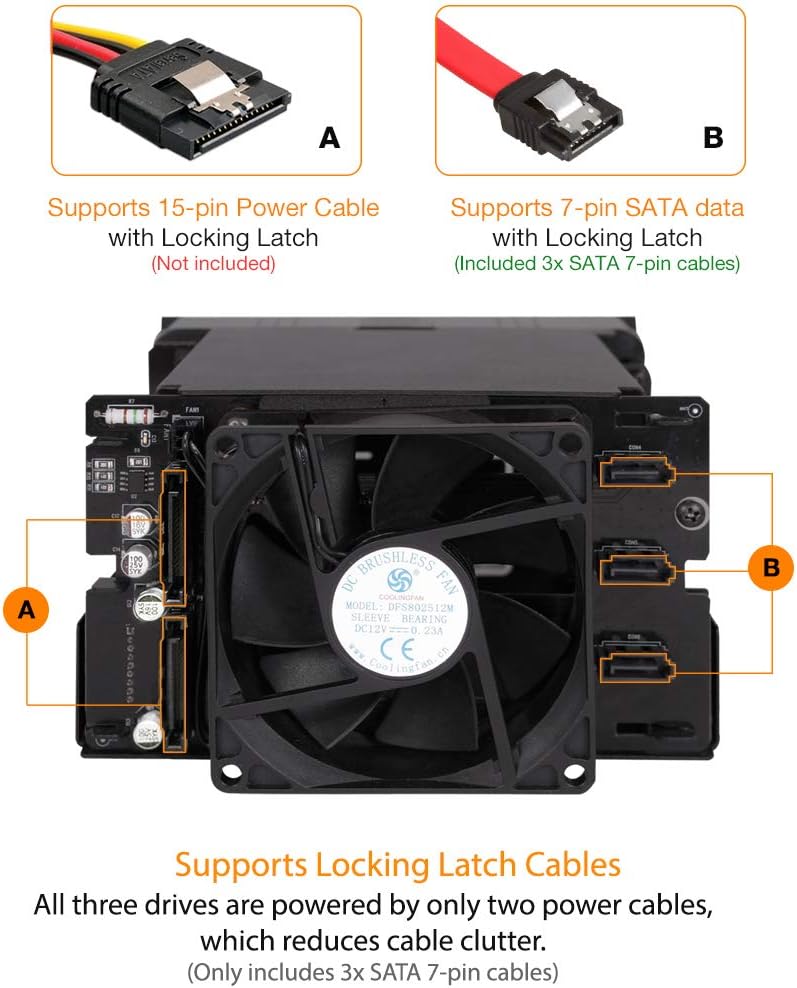
ICY DOCK Hot Swap 3 Bay 3.5 Inch SATA/SAS HDD Docking Enclosure Mobile Rack in 2 x 5.25 Inch Drive Bay (Include 3X SATA Cables) | flexiDOCK MB830SP-B

3.90

지난 32시간 동안 판매됨 48

$ 79.95
$ 86.00
-7.57%

To wit: The little plastic door that covers the drive bay openings appeared to have one broken attachment spoke. I had not planned to leave it in place anyway. The computer I'm using the DuoSwap in is out of the way and drives will be filling those spaces most of the time. Installation was straightforward. I had some spare rails and the attachment screws worked normally. Cable hookup (power and SATA) was unremarkable. I tested a Seagate 3TB HDD and a Seagate 5TB HDD and they both functioned normally. The eject buttons are stiff but workable. (I pushed the HDD eject button with the blunt end of a screwdriver.) The SSD slot was problematic. A 240 GB Crucial drive was recognized, but I had to "press any key" to avoid a disk check each time it loaded. A SanDisk 120 GB SSD was never recognized in spite of efforts to optimize recognition. The SSD drives had identical dimensions. Baffling. For my planned uses (computer backup, movie transfer and editing) it should work nicely.Update - 2018 0220 - The Dock is working just as before and is functionally FANTASTIC. No more worries about having to get into the computer case to add/remove storage drives. Backups are faster than when I was using USB3 external drives. Along the way, I discovered that some of the "failed" USB3-case hard disk drives in my Dead Drives box in fact just had a failed SATA bridge card or a controller or interface card problem, and the hard drive itself worked fine after removal from the USB3 case. These still-functioning drives (always test first!) could now be used for whatever an internal hard drive can do, and at the same speeds and swappable in seconds. Testing SSD vs HDD performance for a variety of tasks is easily performed. I wish I had gotten the DuoSwap Drive Caddy years ago. Upgrade to 5 stars.

14 현재 누군가가 웹사이트를 탐색 중입니다.

Model
MB971SP-B MB975SP-B R1 MB971SPO-B MB171SP-1B MB830SP-B
수량:
- +

예상 배송 시간: 12~26일(국제), 3~6일(미국)

구매일로부터 45일 이내에 반품이 가능합니다. 관세 및 세금은 환불되지 않습니다.

  • ASIN:

    B07YQKHL8N

  • BEST_SELLERS_RANK:

    #154 in Enclosures

  • COMPATIBLE_DEVICES:

    Laptop

  • CUSTOMER_REVIEWS:

    3.9 3.9 out of 5 stars (398) 3.9 out of 5 stars

  • DATA_TRANSFER_RATE:

    6 Gigabits Per Second

  • DATE_FIRST_AVAILABLE:

    October 5, 2019

  • GLOBAL_TRADE_IDENTIFICATION_NUMBER:

    00884826508199

  • HARD_DISK_FORM_FACTOR:

    3.5 Inches

  • ITEM_MODEL_NUMBER:

    MB830SP-B

  • ITEM_WEIGHT:

    1 pounds

  • MANUFACTURER:

    ICYDOCK

  • MAX_NUMBER_OF_SUPPORTED_DEVICES:

    3

  • PRODUCT_DIMENSIONS:

    8.6 x 11.6 x 6.2 inches

  • UPC:

    884826508199

안전한 결제를 보장하세요
제품 상세 정보
ICY DOCK is a global leader in the computer data storage industry We deliver the highest quality products to exceed customer expectation and offers one of kind product to satisfy customers’ need. Our company provides improvements and convenience in computer data management for small businesses, media professionals, home server/NAS builders, government, industrial, military, and medical industry.
고객 리뷰
3.90

(100 점수)

5
11
4
7
3
12
2
18
1
52
댓글 취소
댓글을 남겨주세요

16 논평

Awesome
2026-01-09    -Joao Carlos de Oliveira Alves os Santos

Think of making any hard drive a "external storage" like a usb flash drive... with several Tb....

Simple and Reliable
2026-01-26    -S.N.

This is the third one I tried recently and it meets my expectation - simple and reliable. I returned the previous two similar products. It has full metal structure and is highly recommended!

5.0 out of 5 stars Great unit, bootable too!
2026-01-25    -acejavelin

I have been a tech for a long time, and always seem to be swapping drives or testing them or whatever using USB docks, cannibalized portable enclosures, or opening the case... But when I built my new Linux gaming PC I wasn't going to continue that and I went on a hunt and found this device and after reading reviews, ordered it.It is quite sturdy and solid, although I was surprised the top of the drive was wide open and at first I had an issue with spare power cables getting in the way until I moved my optical drive to be immediately above it. I have inserted and removed dozens of drives and there doesn't seem to be any issue with build quality or longevity being an issue. I know other reviews mentioned that they had issues ejecting various drives, but even with the thinnest 2.5" SSD drives, I have not had any issues. I am not going to bother talking about the backside connectivity, that has been mentioned in many reviews.The independent power and eject buttons are a really nice touch, although I will admit at first I didn't understand why there were two circle buttons and two rectangular buttons, it seemed like an odd contrast, but after using it I understand... the circles are for the 3.5" drive slot and the rectangles are for the 2.5" drive slot.I was mildly surprised that I could boot from drives installed in the dock as well by selecting them as boot devices in the UEFI/BIOS boot select menu, a very handy feature for someone who likes to test out different operating systems or occasionally (even though I don't like too) boot up Windows.I do want to touch specifically on some Linux issues though. When I first installed this and booted up with no drives in it, I was on the desktop and popped in a 500GB drive and... Wait for it a minute... Maybe a minute more... Nothing... No pop up, nothing in drive manager or anywhere in /dev/sd* to mount, just nothing but the drive spinning up. I popped in a 2.5" drive that I knew was good and the same thing occurred, meaning nothing happened at all. I was a little perplexed by this since these are nothing but standard SATA drives on a standard interface. I poked around in the OS, ejecting and reinserting, trying different things but nothing worked. Finally, although this isn't normal Linux behavior (Linux doesn't normally need a reboot for anything), I rebooted the system with the drives installed to see if the BIOS recognized them, which it did, so I continued to reboot into Linux Mint, and low and behold they were there now! I mounted them, read/wrote, tested, formatted, re-partitioned, etc and everything worked fine. At this point I was worried I would have to reboot every time, but that was not the case. I tried several different drive, rebooted with drives installed and with the bays empty, and had zero issues going forward. I don't know why I had the initial problems, but they are gone and the unit now works as expected. The best guess I have is that something needed to be created in /dev before they could be used, and it was the first time it wasbooted with drives installed.Anyway, I am extremely happy with my purchase, I would buy this again, and would recommend it to others. I likely will try other ICY DOCK products if the situation arises for them.

alright product, poor airflow
2026-03-04    -carlos

Good product but a bit pricey. My drives get considerably hotter (average 5-7 degrees) than any other drives that are not in the cage. I'd recommend replacing the fan for a NOCTUA or similar as it's quite noisy, particularly if set for full speed mode instead of auto. Having owned this product for a while, I can't help the thought that a 5-drive is over-ambitious for this form factor (3x5.25") a 4-drive cage might allow for much better airflow.

I bought several ICY DOCK MB971SP-B HDD units some years back and was greatly impressed with the performance reliability and ruggedness. The units are designed to mount like a conventional CD/DVD ROM and HDDs can be accessed from the front computer face, just like a typical CD and will work with 2.5 and 3.5 SATA drives. No more opening up the computer to change out or swap drives! Just slide them in or out as needed. Both 2.5 and 3.5 drives can be used simultaneously individually or neither, if desired. Front panel switches allow either or both of the HDD units to be turned on or off. My experience with these units is so good I just bought 3 more. I only gave the unit 4 stars because the internal "flip up" drive port "dust door" is fragile and broke off on one of the older units during normal use. The unit still worked but the maker needs to improve the flip up port dust cover to make it more sturdy. Other than that, this is a great product. Don't hesitate to buy it if you work with different HDDs swapped in or out of your computer or just want an easy way to use your hard drives. In my opinion, all computers ought to come from the OEM with these units installed.

Leider haben viele moderne PC-Gehäuse kaum noch 5,25" Laufwerkseinschübe, aber mit diesem kann mensch nicht nur 3,5" SATA-Festplatten [und mit nem passenden Adapter auch 2,5"] nutzen sondern auch noch ein Ultra - Slimline ODD [9,5mm Bauhöhe] drunter packen und somit noch ggf. nen Brenner verbaun...Ideal, wenn Platz knapp ist...Der trägerlose Wechselrahmen bedient sich quasi wie ein 3,5" Diskettenlaufwerk, nur mit extra Anschalter um eingesteckte Festplatten vor Auswurf abzuschalten.Ideal wenn es darum geht, Betriebssysteme zu wechseln oder Daten zu sichern...

Awesome
2026-02-28    -Joao Carlos de Oliveira Alves os Santos

Think of making any hard drive a "external storage" like a usb flash drive... with several Tb....

To wit: The little plastic door that covers the drive bay openings appeared to have one broken attachment spoke. I had not planned to leave it in place anyway. The computer I'm using the DuoSwap in is out of the way and drives will be filling those spaces most of the time. Installation was straightforward. I had some spare rails and the attachment screws worked normally. Cable hookup (power and SATA) was unremarkable. I tested a Seagate 3TB HDD and a Seagate 5TB HDD and they both functioned normally. The eject buttons are stiff but workable. (I pushed the HDD eject button with the blunt end of a screwdriver.) The SSD slot was problematic. A 240 GB Crucial drive was recognized, but I had to "press any key" to avoid a disk check each time it loaded. A SanDisk 120 GB SSD was never recognized in spite of efforts to optimize recognition. The SSD drives had identical dimensions. Baffling. For my planned uses (computer backup, movie transfer and editing) it should work nicely.Update - 2018 0220 - The Dock is working just as before and is functionally FANTASTIC. No more worries about having to get into the computer case to add/remove storage drives. Backups are faster than when I was using USB3 external drives. Along the way, I discovered that some of the "failed" USB3-case hard disk drives in my Dead Drives box in fact just had a failed SATA bridge card or a controller or interface card problem, and the hard drive itself worked fine after removal from the USB3 case. These still-functioning drives (always test first!) could now be used for whatever an internal hard drive can do, and at the same speeds and swappable in seconds. Testing SSD vs HDD performance for a variety of tasks is easily performed. I wish I had gotten the DuoSwap Drive Caddy years ago. Upgrade to 5 stars.

Leider haben viele moderne PC-Gehäuse kaum noch 5,25" Laufwerkseinschübe, aber mit diesem kann mensch nicht nur 3,5" SATA-Festplatten [und mit nem passenden Adapter auch 2,5"] nutzen sondern auch noch ein Ultra - Slimline ODD [9,5mm Bauhöhe] drunter packen und somit noch ggf. nen Brenner verbaun...Ideal, wenn Platz knapp ist...Der trägerlose Wechselrahmen bedient sich quasi wie ein 3,5" Diskettenlaufwerk, nur mit extra Anschalter um eingesteckte Festplatten vor Auswurf abzuschalten.Ideal wenn es darum geht, Betriebssysteme zu wechseln oder Daten zu sichern...

I bought several ICY DOCK MB971SP-B HDD units some years back and was greatly impressed with the performance reliability and ruggedness. The units are designed to mount like a conventional CD/DVD ROM and HDDs can be accessed from the front computer face, just like a typical CD and will work with 2.5 and 3.5 SATA drives. No more opening up the computer to change out or swap drives! Just slide them in or out as needed. Both 2.5 and 3.5 drives can be used simultaneously individually or neither, if desired. Front panel switches allow either or both of the HDD units to be turned on or off. My experience with these units is so good I just bought 3 more. I only gave the unit 4 stars because the internal "flip up" drive port "dust door" is fragile and broke off on one of the older units during normal use. The unit still worked but the maker needs to improve the flip up port dust cover to make it more sturdy. Other than that, this is a great product. Don't hesitate to buy it if you work with different HDDs swapped in or out of your computer or just want an easy way to use your hard drives. In my opinion, all computers ought to come from the OEM with these units installed.

댓글을 남겨주세요:

댓글 제목
댓글 내용
배송 및 반품
우리가 당신을 보호하겠습니다

대부분 지역에서는 배송비를 한 번만 지불하시면 됩니다 (주문 및 배송 페이지를 확인해 주세요).

구매 후 14일 이내 무료 반품 가능 (단, 수명이 다한 제품, 맞춤 제작 상품, 마스크, 향수 및 에어로졸과 같이 위험하거나 인화성 물질이 포함된 일부 제품은 제외).

수입 관세 정보

복잡한 절차는 저희가 처리해 드리겠습니다. 카나리아 제도를 제외한 모든 EU 국가, 영국, 미국, 캐나다, 호주, 뉴질랜드, 푸에르토리코, 스위스, 싱가포르, 한국, 쿠웨이트, 멕시코, 카타르, 인도, 노르웨이, 사우디아라비아, 대만, 태국, UAE, 일본, 브라질, 맨섬, 산마리노, 콜롬비아, 칠레, 아르헨티나, 이집트, 레바논, 홍콩 특별행정구, 바레인, 터키로 배송되는 상품 가격에는 모든 수입 관세가 포함되어 있습니다. 표시된 가격이 최종 결제 금액입니다.

예상 배송 시간

특급 배송: 7-10일

해당 창고에서 배송되었습니다.

더 자세한 정보가 필요하신가요?
반품 정책
반품 정책

저희는 제품 품질에 자신 있습니다. 만약 구매하신 제품에 완전히 만족하지 못하신다면, 수령일로부터 30일 이내에 간편하게 반품하실 수 있도록 정책을 마련해 두었습니다.

간편한 교환 또는 환불
  • 다른 사이즈, 색상 또는 스타일의 상품으로 교환하거나 전액 환불받을 수 있습니다.
  • 반품되는 모든 상품은 착용하지 않은 상태여야 하며, 원래 포장 상태 그대로 모든 태그가 손상되지 않은 상태여야 합니다.
간단한 절차
  • 온라인으로 반품을 신청하거나 고객 서비스 팀에 문의하여 도움을 받으실 수 있습니다.
  • 물품을 제대로 포장해 주시고, 원래의 포장 목록도 함께 넣어주세요.
  • 반품하실 상품을 보내주실 때에는 저희가 제공해 드린 선불 배송 라벨을 사용해 주시기 바랍니다.
  • 환불 요청 접수 즉시 처리해 드리겠습니다.

반품과 관련하여 궁금한 점이나 우려 사항이 있으시면 언제든지 저희 전문 고객 서비스 팀에 문의해 주세요. 고객 만족은 저희의 최우선 목표입니다.

범주
차이
제품
모든 제품 지우기