고객 서비스

판매자들은 가입하면 더 많은 혜택을 누릴 수 있습니다.

모든 주문 무료 배송.

소켓

Lumary Smart Outlet with USB, Standard Electrical Outlets in Wall Work with Alexa Google Home 15 Amp ETL FCC, 2.4G WiFi Home Office, 4 Pack

4.30

지난 32시간 동안 판매됨 46

$ 89.99
$ 91.00
-1.12%

Fair price for the 4 smart outlets. Standard electrical installation. Supremely easy to connect to WiFi. Within 5 minutes I had all connected. Linking to Alexa was so smooth and easy also. Excellent App.Really like the Blue power/wifi button right in the middle. Now have smart outlets with USB connections. Super convenient.BEST BUY!!

26 현재 누군가가 웹사이트를 탐색 중입니다.

Style
USB Outlet 1 Pack TypeC Outlet 4 Pack Outlet 4 Pack USB Outlet 4 Pack Simple
수량:
- +

예상 배송 시간: 12~26일(국제), 3~6일(미국)

구매일로부터 45일 이내에 반품이 가능합니다. 관세 및 세금은 환불되지 않습니다.

  • ASIN:

    B0882Z2XGW

  • BEST_SELLERS_RANK:

    #70,879 in Tools & Home Improvement (See Top 100 in Tools & Home Improvement) #290 in Standard Electrical Outlets

  • DATE_FIRST_AVAILABLE:

    July 2, 2020

  • IS_DISCONTINUED_BY_MANUFACTURER:

    No

  • ITEM_MODEL_NUMBER:

    L-WOSU100

  • ITEM_WEIGHT:

    1.55 pounds

  • MANUFACTURER:

    iLintek

  • PRODUCT_DIMENSIONS:

    4.5 x 2.75 x 1.8 inches

안전한 결제를 보장하세요

제품 상세 정보
Smart Outlet Type C Smart Outlet Type C 4 Pcs Smart Outlet 2 Plug 4Pcs Smart Outlet 2 USB 4Pcs Smart Outlet 2 Plug
고객 리뷰
4.30

(100 점수)

5
7
4
2
3
10
2
14
1
67
댓글 취소
댓글을 남겨주세요

12 논평

5.0 out of 5 stars Great smart outlets
2025-12-29    -Nalita

I installed smart outlets throughout my home, and it's great to ask Google assistant to do things for you, set scenes, etc. The usb ports are a bonus as well, but now I don't know what to do with the 2 usb hubs I bought! :-) That's a good problem. I especially like the fact that I can turn off outlets when I'm not using them and thus reduce my energy consumption. I like that (in theory) the outlets that control my AC units can be turned on and off for temperature adjustment prior to returning home. This quasi home automation is great, but it got me thinking about motion sensors because having to have a Nest (which I do not) or other smart home hub OR having my phone on me when I need a light on, is 25% annoying.I have a remote controlled light in my bed room linked to my smart outlet and have it programmed to turn on when my alarm goes off in the morning (because it's usually still dark out). After Google assistant greets me, tells me the weather and what's on my agenda, I have it programmed to turn off my bedroom light. Thing is, the switch doesn't turn off *the light* it turns off *the outlet* which means that if Google shuts down the outlet, the remote cannot turn the light on.However, if Google has the outlet on, the remote can turn the light off and on. BUT if initially google has the outlet on and you use the remote to turn the light off, Google cannot turn the light back on. Requires some planning if there's no other light in the room.

Fair price for the 4 smart outlets. Standard electrical installation. Supremely easy to connect to WiFi. Within 5 minutes I had all connected. Linking to Alexa was so smooth and easy also. Excellent App.Really like the Blue power/wifi button right in the middle. Now have smart outlets with USB connections. Super convenient.BEST BUY!!

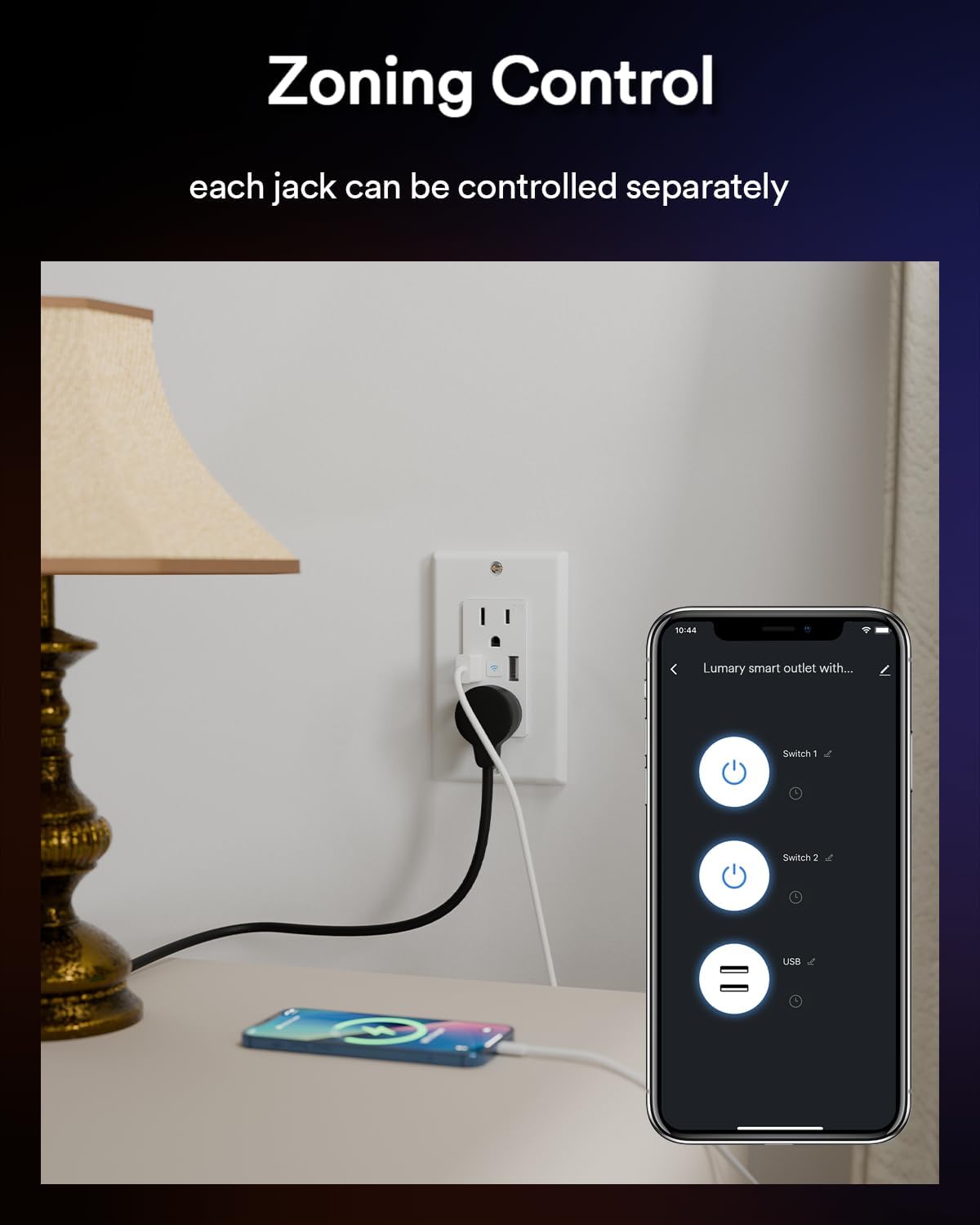
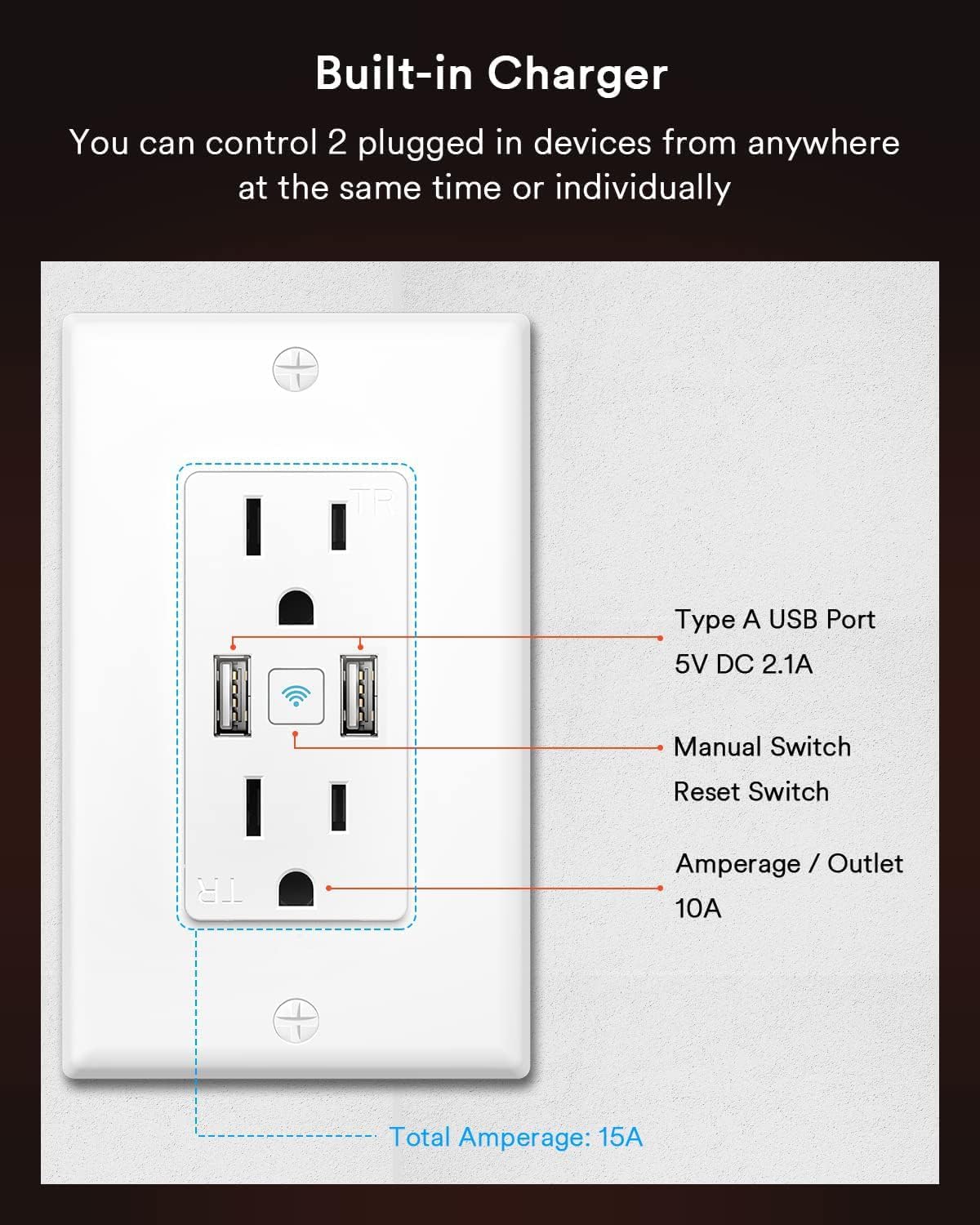
I hit on this unlikely brand when I needed a smart double outlet - it was like the only one I found, zwave or wifi (most/all single outlet). The outlet is state of the art, electrically and electronically, and works great across platforms (more below), but it has a couple design/ installation issues that I knocked one star off for. However, if I had it to do again, I would definitely choose this receptacle!First the design/ install Cons -- the outlet is very deep (and very cubic) so, in my case, I ended up having to install a new 2" deep box (minimum depth.) It has a lot of smarts packed in there, and it takes space!- the TamperResistant outlet slots are The Most Annoying I have ever had to plug into, even after repeated in/outs. The good news is, if you're using a polarized plug, they will slide right in. If you're using a grounded cord, which do not have polarized plugs, you will struggle... This could be a little less finicky (and a little less safe-from-ourselves lol)The Pros are way better!- high quality construction of the receptacle - and face plate!-very clear, printed color instruction booklet in perfect English- uses the new wire connections that are easy, safe and cannot come loose.- Installs under SmartLife (and I'm sure Tuya), in addition to their own app, if you use that already.- takes a smidge less than one second to add into SL - instant! Just confirm wifi password and name it!-I use SmartThings as a hub, and SmartLife is a Linked Service to ST, and this receptacle pulled over into ST by the time I had that app open!- this means, zwave or wifi, all these linked devices are seamlessly interoperable for automations and scenes!- cool blue glow wifi button right on the front middle of the switch lets you turn it on/ off manually super easy.- under SL (and I'm sure Tuya and their own app) there's one button on top to control both outlets, and in the device you can control either outlet independently. You can also create automations for both or either outlet. (It installs as like 3 separate outlets, not confusing. )For just what I needed, very well designed electronically - smart! - 5+ stars!! For some annoying physical inconvenience, 4- stars. If you're forewarned about that at least you won't be badly surprised.

What a cool concept, an outlet that you can monitor and turn on and off. This is not a knock on the outlet at all, but the one thing that it’s missing is a surge-protector. All of the devices that I really want to connect to this outlet require surge protectors, and having a bulky protector on the wall or on the floor in front of this outlet ruins its cool and sleek design.Installation is pretty basic. Make sure you’ve turned off the power, and then just connect the hot and neutral leads, and don’t forget to ground it as well. Although it looks like the terminals are quick-connect, they’re not. They’re a strange combination of quick-connect-like receptacle, coupled with a screw-pressure-plate tightening system. As you can see in the photo, there are two receptacles for both hot and neutral so you can use this outlet in pass-through situations.Once connected, I know that the instructions want you to download and create an account on some proprietary software, but I was able to connect it to my Smart Life app. Just go to add new device and select outlet. If you’ve already filled-in all of your information it’s pretty automatic from that point. You can then rename the whole outlet and each individual plug, save for the USB which work as a pair. The one thing I can’t do from the Smart Life app (and perhaps it is possible from their app), is turn off the WiFi indicator light on the front of the outlet. Not a deal-breaker for me, but it could be annoying depending on its location.

What a cool concept, an outlet that you can monitor and turn on and off. This is not a knock on the outlet at all, but the one thing that it’s missing is a surge-protector. All of the devices that I really want to connect to this outlet require surge protectors, and having a bulky protector on the wall or on the floor in front of this outlet ruins its cool and sleek design.Installation is pretty basic. Make sure you’ve turned off the power, and then just connect the hot and neutral leads, and don’t forget to ground it as well. Although it looks like the terminals are quick-connect, they’re not. They’re a strange combination of quick-connect-like receptacle, coupled with a screw-pressure-plate tightening system. As you can see in the photo, there are two receptacles for both hot and neutral so you can use this outlet in pass-through situations.Once connected, I know that the instructions want you to download and create an account on some proprietary software, but I was able to connect it to my Smart Life app. Just go to add new device and select outlet. If you’ve already filled-in all of your information it’s pretty automatic from that point. You can then rename the whole outlet and each individual plug, save for the USB which work as a pair. The one thing I can’t do from the Smart Life app (and perhaps it is possible from their app), is turn off the WiFi indicator light on the front of the outlet. Not a deal-breaker for me, but it could be annoying depending on its location.

Enchufe inteligente Lumary
2026-01-20    -Juan Pablo Perea

Funcionó correctamente. Pude utilizarlo con la aplicación de Lumary desde mi celphone. Solo me gustaría ver un tutorial para poder configurar diferentes horarios de encendido apagado con la misma aplicación. No se hasta cuantos ciclos de encendido apagado se puedan programar.

I hit on this unlikely brand when I needed a smart double outlet - it was like the only one I found, zwave or wifi (most/all single outlet). The outlet is state of the art, electrically and electronically, and works great across platforms (more below), but it has a couple design/ installation issues that I knocked one star off for. However, if I had it to do again, I would definitely choose this receptacle!First the design/ install Cons -- the outlet is very deep (and very cubic) so, in my case, I ended up having to install a new 2" deep box (minimum depth.) It has a lot of smarts packed in there, and it takes space!- the TamperResistant outlet slots are The Most Annoying I have ever had to plug into, even after repeated in/outs. The good news is, if you're using a polarized plug, they will slide right in. If you're using a grounded cord, which do not have polarized plugs, you will struggle... This could be a little less finicky (and a little less safe-from-ourselves lol)The Pros are way better!- high quality construction of the receptacle - and face plate!-very clear, printed color instruction booklet in perfect English- uses the new wire connections that are easy, safe and cannot come loose.- Installs under SmartLife (and I'm sure Tuya), in addition to their own app, if you use that already.- takes a smidge less than one second to add into SL - instant! Just confirm wifi password and name it!-I use SmartThings as a hub, and SmartLife is a Linked Service to ST, and this receptacle pulled over into ST by the time I had that app open!- this means, zwave or wifi, all these linked devices are seamlessly interoperable for automations and scenes!- cool blue glow wifi button right on the front middle of the switch lets you turn it on/ off manually super easy.- under SL (and I'm sure Tuya and their own app) there's one button on top to control both outlets, and in the device you can control either outlet independently. You can also create automations for both or either outlet. (It installs as like 3 separate outlets, not confusing. )For just what I needed, very well designed electronically - smart! - 5+ stars!! For some annoying physical inconvenience, 4- stars. If you're forewarned about that at least you won't be badly surprised.

Fácil de instalar
2026-02-28    -Justo E Zaragoza Camacho

Opera sin titubeos

Enchufe inteligente Lumary
2026-02-09    -Juan Pablo Perea

Funcionó correctamente. Pude utilizarlo con la aplicación de Lumary desde mi celphone. Solo me gustaría ver un tutorial para poder configurar diferentes horarios de encendido apagado con la misma aplicación. No se hasta cuantos ciclos de encendido apagado se puedan programar.

5.0 out of 5 stars Great smart outlets
2026-02-22    -Nalita

I installed smart outlets throughout my home, and it's great to ask Google assistant to do things for you, set scenes, etc. The usb ports are a bonus as well, but now I don't know what to do with the 2 usb hubs I bought! :-) That's a good problem. I especially like the fact that I can turn off outlets when I'm not using them and thus reduce my energy consumption. I like that (in theory) the outlets that control my AC units can be turned on and off for temperature adjustment prior to returning home. This quasi home automation is great, but it got me thinking about motion sensors because having to have a Nest (which I do not) or other smart home hub OR having my phone on me when I need a light on, is 25% annoying.I have a remote controlled light in my bed room linked to my smart outlet and have it programmed to turn on when my alarm goes off in the morning (because it's usually still dark out). After Google assistant greets me, tells me the weather and what's on my agenda, I have it programmed to turn off my bedroom light. Thing is, the switch doesn't turn off *the light* it turns off *the outlet* which means that if Google shuts down the outlet, the remote cannot turn the light on.However, if Google has the outlet on, the remote can turn the light off and on. BUT if initially google has the outlet on and you use the remote to turn the light off, Google cannot turn the light back on. Requires some planning if there's no other light in the room.

댓글을 남겨주세요:

댓글 제목
댓글 내용
배송 및 반품
우리가 당신을 보호하겠습니다

대부분 지역에서는 배송비를 한 번만 지불하시면 됩니다 (주문 및 배송 페이지를 확인해 주세요).

구매 후 14일 이내 무료 반품 가능 (단, 수명이 다한 제품, 맞춤 제작 상품, 마스크, 향수 및 에어로졸과 같이 위험하거나 인화성 물질이 포함된 일부 제품은 제외).

수입 관세 정보

복잡한 절차는 저희가 처리해 드리겠습니다. 카나리아 제도를 제외한 모든 EU 국가, 영국, 미국, 캐나다, 호주, 뉴질랜드, 푸에르토리코, 스위스, 싱가포르, 한국, 쿠웨이트, 멕시코, 카타르, 인도, 노르웨이, 사우디아라비아, 대만, 태국, UAE, 일본, 브라질, 맨섬, 산마리노, 콜롬비아, 칠레, 아르헨티나, 이집트, 레바논, 홍콩 특별행정구, 바레인, 터키로 배송되는 상품 가격에는 모든 수입 관세가 포함되어 있습니다. 표시된 가격이 최종 결제 금액입니다.

예상 배송 시간

특급 배송: 7-10일

해당 창고에서 배송되었습니다.

더 자세한 정보가 필요하신가요?
반품 정책
반품 정책

저희는 제품 품질에 자신 있습니다. 만약 구매하신 제품에 완전히 만족하지 못하신다면, 수령일로부터 30일 이내에 간편하게 반품하실 수 있도록 정책을 마련해 두었습니다.

간편한 교환 또는 환불
  • 다른 사이즈, 색상 또는 스타일의 상품으로 교환하거나 전액 환불받을 수 있습니다.
  • 반품되는 모든 상품은 착용하지 않은 상태여야 하며, 원래 포장 상태 그대로 모든 태그가 손상되지 않은 상태여야 합니다.
간단한 절차
  • 온라인으로 반품을 신청하거나 고객 서비스 팀에 문의하여 도움을 받으실 수 있습니다.
  • 물품을 제대로 포장해 주시고, 원래의 포장 목록도 함께 넣어주세요.
  • 반품하실 상품을 보내주실 때에는 저희가 제공해 드린 선불 배송 라벨을 사용해 주시기 바랍니다.
  • 환불 요청 접수 즉시 처리해 드리겠습니다.

반품과 관련하여 궁금한 점이나 우려 사항이 있으시면 언제든지 저희 전문 고객 서비스 팀에 문의해 주세요. 고객 만족은 저희의 최우선 목표입니다.

범주
차이
제품
모든 제품 지우기