고객 서비스

판매자들은 가입하면 더 많은 혜택을 누릴 수 있습니다.

모든 주문 무료 배송.

입력 장치

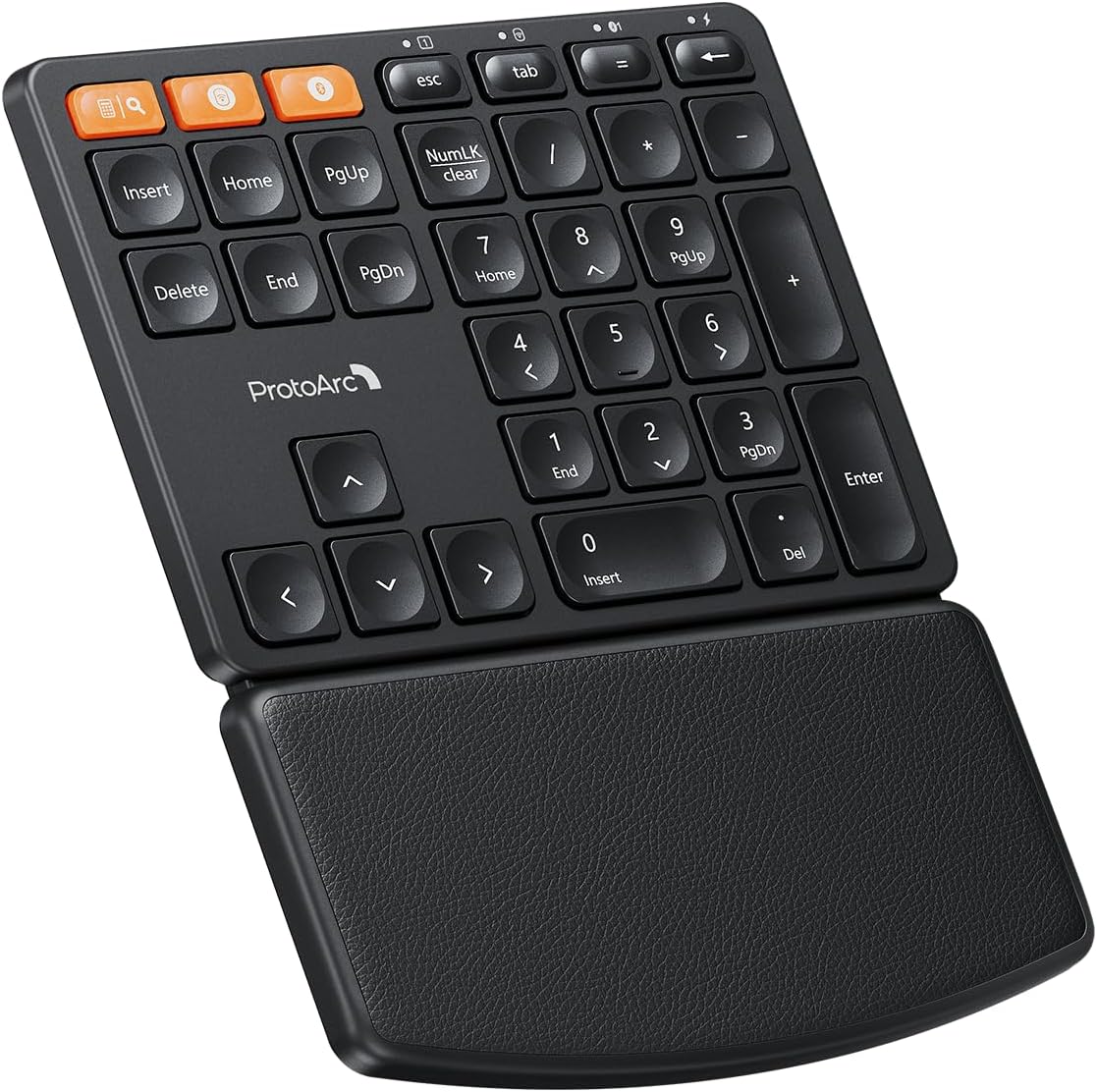
ProtoArc Wireless Number Pad, EK04 N Ergonomic Numeric Keypad with Wrist Rest, Bluetooth and USB, Rechargeable, for Windows PC/Laptop, Mac OS

4.60

지난 32시간 동안 판매됨 35

$ 34.99
$ 35.00
-0.03%

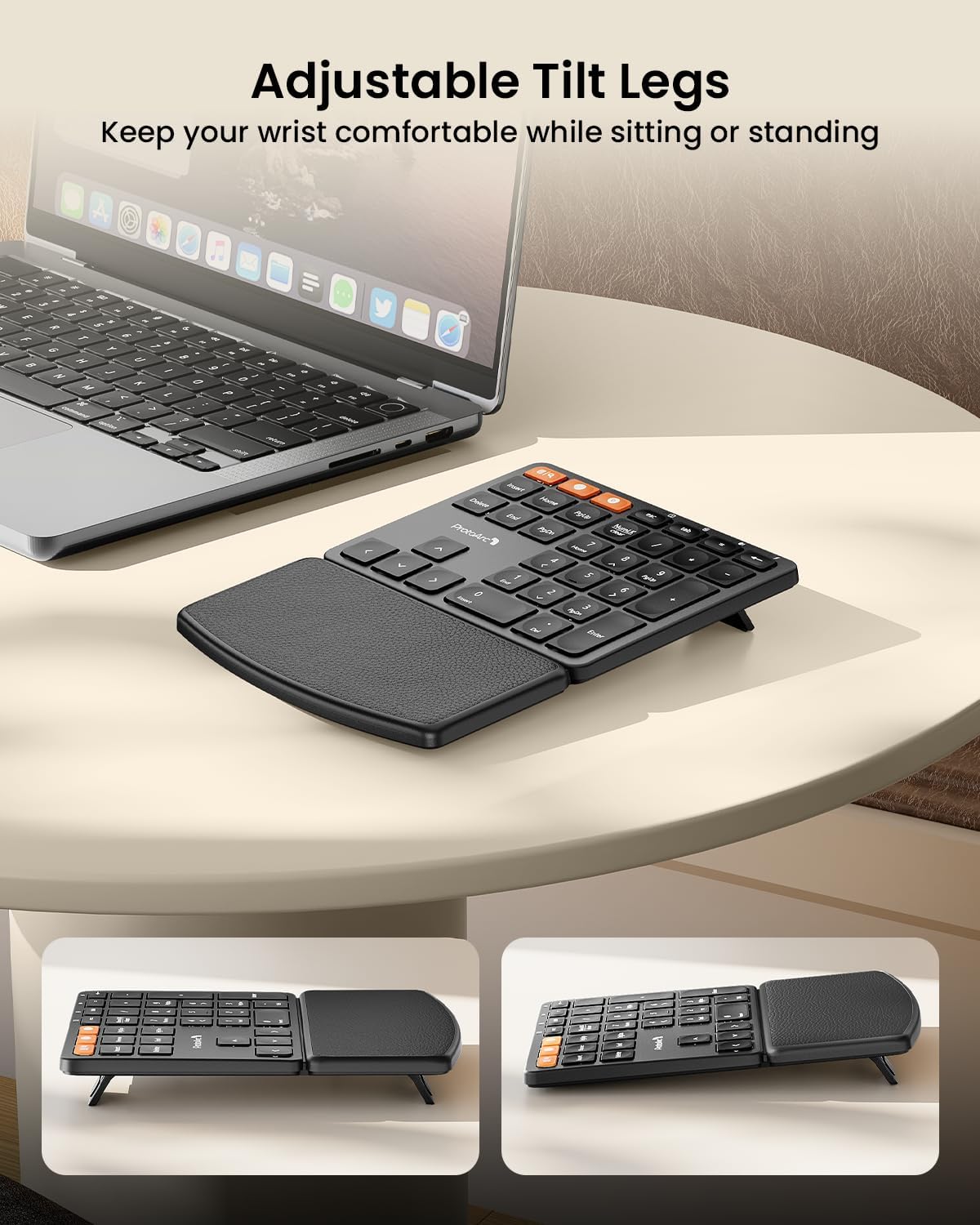
Please read instructions unless you want to be like me and have a wonderful interaction with their customer care, either way 10/10.You get all that was promised, Bluetooth connection and the wireless connection between with the USB receiver. I use this number pad to type in numbers on a tablet and as simple as the press of a button I can switch back over to the laptop. There is a few millisecond between the switch but honestly not even noticeable. The num pad comes with little legs you can extend on the bottom to help with angle and orientation. I love the wrist rest, and the membrane keys are nice for fast typing entries. I have seen more expensive num pads that don't even come close, so this has it all. Plus, if you have not experienced the Proarc welcome card and instructions, you are missing out, packaged nice, and always bringing what was promised -- it's a steal in the best way!

26 현재 누군가가 웹사이트를 탐색 중입니다.

수량:
- +

예상 배송 시간: 12~26일(국제), 3~6일(미국)

구매일로부터 45일 이내에 반품이 가능합니다. 관세 및 세금은 환불되지 않습니다.

  • ASIN:

    B0FB2VLQM7

  • BATTERIES:

    1 Nonstandard Battery batteries required. (included)

  • BEST_SELLERS_RANK:

    #20 in Numeric Keypads

  • CUSTOMER_REVIEWS:

    4.6 4.6 out of 5 stars (74) 4.6 out of 5 stars

  • DATE_FIRST_AVAILABLE:

    June 11, 2025

  • ITEM_MODEL_NUMBER:

    EK04 N

  • ITEM_WEIGHT:

    1.08 pounds

  • MANUFACTURER:

    ProtoArc

  • PACKAGE_DIMENSIONS:

    10.43 x 6.85 x 1.14 inches

안전한 결제를 보장하세요

제품 상세 정보
Non-removable, hard palm rest with leather surface offers more wrist support than a cushioned one. EK04 N ergonomic number pad with hard palm rest provides better wrist support and keep your wrist and forearm in a relaxed posture, perfect for financial accountants, students, office specialists and spreadsheet experts. EK04 Mini compact ergonomic keyboard offers a space-saving solution to maximize workspace efficiency without sacrificing comfort and functionality. If you have other ProtoArc dual-mode products (Bluetooth & 2.4G modes), in 2.4G mode, here are the steps how to connect this numeric keypad to your existing ProtoArc USB Receiver: - For a dual-mode numeric keypad, ensure the numeric keypad is switched to 2.4G channel. - During pairing, ensure the numeric keypad is placed within 15cm of the USB receiver. - Turn on the numeric keypad. - Press and hold the 2.4G channel button for 3-5 seconds, the 2.4G indicator will flash rapidly to indicate pairing mode. - Insert the USB receiver into your device, the numeric keypad will connect automatically within a few seconds. Is the wrist rest removable? No, the wrist rest is non-removable. Is the wrist rest a soft cushioned one? No, it is a hard wrist rest with leather surface on it, which will provide more wrist support and durability than a cushioned one. What systems the Calculator, Search and Clear keys are compatible with? The Calculator function only works in Windows system, Search and Clear function only work in Mac OS. What is the dimensions of the number pad? The dimension of the number pad is 5.8 inch long and 7.5 inch wide. Using an ergonomic number pad with wrist rest can enhance work efficiency and typing comfort, but it may occupy more workspace, please measure your desk dimensions for better fit. At ProtoArc, our mission is to deliver innovative workspace solutions that enhance comfort, boost productivity, and foster overall wellness. We believe that everyone deserves a workspace that not only meets their functional needs but also empowers them to thrive. Our vision is a world where work environments promote health, happiness, and high performance.
고객 리뷰
4.60

(100 점수)

5
0
4
4
3
5
2
15
1
76
댓글 취소
댓글을 남겨주세요

26 논평

It’s so handy for excel or any data entry function, really well made, metal top and looks really good with logi mx is that’s what you use.

Once again, ProtoArc knocks presentation out of the park. The packaging for the unit is excellent, all necessary accessories included.As to the numpad itself, there's a lot to love - all the wireless connectivity options you could want, an easy way to keep it charged, and a lot of additional buttons a normal numpad doesn't come with like arrow keys and some bonus maths/shortcut options.Those extra keys in particular make it an excellent compliment to my reduced-size mechanical keyboard. As a work from home, that's been very useful for my ergonomics too, keeps me entering phone and account numbers at speed without my carpal tunnel getting worse.The only real gripe I have is the power on/off switch looks really cheap. That said, it's not "bad", and does do the job. I don't think it's going to encounter problems with the actual quality there. The ability to raise it on feet in staged heights would be nice too - it only has one slope option.Anyway, ProtoArc has a whole suite of hardware... if you find you may prefer an integrated keyboard for instance, consider taking a look for that. But if you don't mind it and need only the numpad, you've got a great option in front of you.

I really like theProtoArc Wireless Numeric Keypad.The buttons are very quiet and soft. The included wrist support is comfortable. What's additionally nice is that the way this the ProtoArc Wireless Numeric Keypad is made, it looks classy.Connectivity is very good and responsive on 2.4GHz and BT (5.1). Noteworthy to mention are the LED lights and Bluetooth pairing process. Pres one button to connect on 2.4GHz with the included USB-A dongle. Or, you can press another button to connect vis Bluetooth v5.1. There are white LEDs to indicate how you are connecting. Because the keypad is black it's hard to see any markings on the keypad and the markings on the buttons were a bit difficult to see (for me) but once you figure it out (or read the user manual) it's easier.When connecting via Bluetooth, the keypad first needs to be paired. TO put it in pairing mode, you must hold the Bluetooth button for 305 seconds. The white Bluetooth light will flash quickly. THEN you can pair with it and use it. The Bluetooth mode does not have a blue LED or a change in color LED to indicate Bluetooth or Bluetooth Pairing.It's nice that it is rechargeable via USB-C. Charging was fast and only time will how long the battery lasts.Other wise I have nothing but praise for the ProtoArc Wireless Numeric Keypad.If I could suggest some changes it would be the following. Make the buttons more easy to read (bigger, or have bigger markings), and have more indicative LED colors to let users know what's going on (Blluetooth).Great keypad otherwise!⭐⭐⭐⭐⭐

I really like ProtoArc. The way they package really feels like they are proud of the product they are selling. This keypad feels very sturdy and it looks great. I have a really nice wireless mouse from ProtoArc that arrived the same way and totally ended up being as great as I hoped. Im expecting the same here. Will update after some use or if there is any failures

Arrived in a branded box, well packed, inside another branded box. Included 'quick card' connection instructions, very basic extra instructions, 2.4ghz dongle and USBc to USB charging cord.ProtoArc has a number of keyboard items under the same model number EK04. I previously acquired the wireless 'alice' keyboard style, which is the split 'ergonomic' keyboard set-up. It included a separate numpad that you could use with/or without the keyboard.This unit appears to be that '34 key' separate number pad, updated with a slight key re-arrangement, being sold as EK04N.Solid PROs= The big plus - this version has a backspace key. Not in the most ergonomic position but it has one. Using direction keys and delete is just NOT as useful as a dedicated backspace key when dealing with a LOT of numerical sequences.= The 2.4ghz dongle connects right away, even without the included 'pairing' instructions. It has a magnetic slot in the back of the numpad to store it when not in use.I find the dongle works better than bluetooth for a laptop, but bluetooth becomes needed when working off a phone/tablet.= There's an actual on/off switch.= rechargeable by USBc.= you can plug in the numpad and use it while charging.= the entire point of a separate numpad is being able to use it or not on either side of a keyboard that doesn't have a built in dedicated numpad.Somewhat PROs- It has a calculator button that opens any software calculator/likely Windows, that your computer has loaded. This button allegedly shares its function with search, but I am too lame an end-user to figure out myself how to use the 'secondary' functions.- There's an integrated wrist rest. It's textured plastic. YMMV on how much you'd like this. Easy to clean at least.- The scissor function keys offer a bit better bounce than just plain old membrane underlay. YMMV. They're a bit 'rattle-ish'.CONs - (which is why -2 stars)= I cannot figure out how to use 2ndary functions like 'clear', search, etc. The instructions don't address any of this at all. Nor can I find any instructions on the internet. Searching on the model number returns several different keyboard types and nothing on the stand alone number pad.= There's a momentary light up when you engage NumLk. but then it goes out within 10 seconds, so...you need to press a number key to find out if the numbers are active.= There aren't any position feet underneath, just little rubber nubs. YMMV on the need for this.

5.0 out of 5 stars Easy to charge and use
2026-02-17    -DWynt54

If, like me, you have purchased a laptop that no longer incorporates a number keypad to the side, but want one for your own convenience, look no further. This has all the features you need, is easy to set up and functions flawlessly. Ergonomic too! I highly recommend.

This is a wireless/Bluetooth 10-key add-on for a PC/tablet from ProtoArc. They sell a few keyboards that do not come with the 10-key and having the ability to add this in is nice if you decide you want it later, as it's definitely cheaper than buying a whole new keyboard.That said, while the setup and functionality are fine and work well, there are a few pitfalls that are worth noting.Number one, this thing is HUGE. The included photo shows the numpad next to one of their ergonomic keyboards that does not include the numpad. It is HALF THE SIZE of the full keyboard. Granted this adds a second set of Arrow keys as well as your "Home, Insert, Del, (etc)" keys, but it's a lot of space.Number two, this does not have kickstands on the back to help it match the other ergonomic devices, meaning you don't get the same benefits from using this as you would with the full ergonomic keyboard. If you crunch numbers to the point that this device is necessary, it should would be nice to have elevation options! Seems crazy that it's missing it.Number three, and this is one of the few complaints I have about every ProtoArc product: there is no way to connect this to your existing ProtoArc USB Dongle. This means for each device, you need a separate dongle or Bluetooth connection. This means if you want to mix and match products, you could end up with 3+ USB adapters for your wireless keyboard/mouse products. Something like the Logitech Unifying Software of old (replaced by Logitech Options+ I think?) that allows you to pair your new ProtoArc products with your existing USB adapter would not only simplify connections and troubleshooting, but help cut down on eWaste as well...a true win-win for everyone!Ok, that said, these are overall minor complaints. This is a really well-made product and functions fantastically. Keeps up with my rapid number typing and was super easy to set up and work with. Seems to hold a battery charge forever! Really good product with a few minor annoyances keeping it from being a solid five stars.

Please read instructions unless you want to be like me and have a wonderful interaction with their customer care, either way 10/10.You get all that was promised, Bluetooth connection and the wireless connection between with the USB receiver. I use this number pad to type in numbers on a tablet and as simple as the press of a button I can switch back over to the laptop. There is a few millisecond between the switch but honestly not even noticeable. The num pad comes with little legs you can extend on the bottom to help with angle and orientation. I love the wrist rest, and the membrane keys are nice for fast typing entries. I have seen more expensive num pads that don't even come close, so this has it all. Plus, if you have not experienced the Proarc welcome card and instructions, you are missing out, packaged nice, and always bringing what was promised -- it's a steal in the best way!

Good product but not incredible ergonomics
2026-03-05    -Ludovic Perreault

With this being sold with ergonomics as a feature, I think it falls a bit of that. The wrist rest isn't very comfortable, as it has no padding. The second issue I have with the wrist rest is its length. I feel it is too short for me comfortably use and have my finger in a relaxed position like the individual in the second product photo. I don't have long fingers or very big hands so I suspect this could be an issue for quite a few people. This means my fingers have to be in a claw'ish shape like I'm holding a mouse when using this or I have to back up my arm, at which point my wrist is off the wrist rest.On the other hand, I think this is a good stand alone numpad, that can be used as an occasional companion to a TKL or 60% keyboard or most likely a laptop keyboard. It being stand alone means one could put it on the left or right depending on their preferences. The keys feel nice and the little contoured shape is nice on your fingers.Battery life and connectivity are very good.Overall, I think this is a miss on the ergo front but a hit on the standalone numpad side of things. For people looking for an ergonomic option, I'd consider other products, but for people who want a good numpad, I'd give this a good look.

I really like theProtoArc Wireless Numeric Keypad.The buttons are very quiet and soft. The included wrist support is comfortable. What's additionally nice is that the way this the ProtoArc Wireless Numeric Keypad is made, it looks classy.Connectivity is very good and responsive on 2.4GHz and BT (5.1). Noteworthy to mention are the LED lights and Bluetooth pairing process. Pres one button to connect on 2.4GHz with the included USB-A dongle. Or, you can press another button to connect vis Bluetooth v5.1. There are white LEDs to indicate how you are connecting. Because the keypad is black it's hard to see any markings on the keypad and the markings on the buttons were a bit difficult to see (for me) but once you figure it out (or read the user manual) it's easier.When connecting via Bluetooth, the keypad first needs to be paired. TO put it in pairing mode, you must hold the Bluetooth button for 305 seconds. The white Bluetooth light will flash quickly. THEN you can pair with it and use it. The Bluetooth mode does not have a blue LED or a change in color LED to indicate Bluetooth or Bluetooth Pairing.It's nice that it is rechargeable via USB-C. Charging was fast and only time will how long the battery lasts.Other wise I have nothing but praise for the ProtoArc Wireless Numeric Keypad.If I could suggest some changes it would be the following. Make the buttons more easy to read (bigger, or have bigger markings), and have more indicative LED colors to let users know what's going on (Blluetooth).Great keypad otherwise!⭐⭐⭐⭐⭐

댓글을 남겨주세요:

댓글 제목
댓글 내용
배송 및 반품
우리가 당신을 보호하겠습니다

대부분 지역에서는 배송비를 한 번만 지불하시면 됩니다 (주문 및 배송 페이지를 확인해 주세요).

구매 후 14일 이내 무료 반품 가능 (단, 수명이 다한 제품, 맞춤 제작 상품, 마스크, 향수 및 에어로졸과 같이 위험하거나 인화성 물질이 포함된 일부 제품은 제외).

수입 관세 정보

복잡한 절차는 저희가 처리해 드리겠습니다. 카나리아 제도를 제외한 모든 EU 국가, 영국, 미국, 캐나다, 호주, 뉴질랜드, 푸에르토리코, 스위스, 싱가포르, 한국, 쿠웨이트, 멕시코, 카타르, 인도, 노르웨이, 사우디아라비아, 대만, 태국, UAE, 일본, 브라질, 맨섬, 산마리노, 콜롬비아, 칠레, 아르헨티나, 이집트, 레바논, 홍콩 특별행정구, 바레인, 터키로 배송되는 상품 가격에는 모든 수입 관세가 포함되어 있습니다. 표시된 가격이 최종 결제 금액입니다.

예상 배송 시간

특급 배송: 7-10일

해당 창고에서 배송되었습니다.

더 자세한 정보가 필요하신가요?
반품 정책
반품 정책

저희는 제품 품질에 자신 있습니다. 만약 구매하신 제품에 완전히 만족하지 못하신다면, 수령일로부터 30일 이내에 간편하게 반품하실 수 있도록 정책을 마련해 두었습니다.

간편한 교환 또는 환불
  • 다른 사이즈, 색상 또는 스타일의 상품으로 교환하거나 전액 환불받을 수 있습니다.
  • 반품되는 모든 상품은 착용하지 않은 상태여야 하며, 원래 포장 상태 그대로 모든 태그가 손상되지 않은 상태여야 합니다.
간단한 절차
  • 온라인으로 반품을 신청하거나 고객 서비스 팀에 문의하여 도움을 받으실 수 있습니다.
  • 물품을 제대로 포장해 주시고, 원래의 포장 목록도 함께 넣어주세요.
  • 반품하실 상품을 보내주실 때에는 저희가 제공해 드린 선불 배송 라벨을 사용해 주시기 바랍니다.
  • 환불 요청 접수 즉시 처리해 드리겠습니다.

반품과 관련하여 궁금한 점이나 우려 사항이 있으시면 언제든지 저희 전문 고객 서비스 팀에 문의해 주세요. 고객 만족은 저희의 최우선 목표입니다.
범주
차이
제품
모든 제품 지우기