고객 서비스

판매자들은 가입하면 더 많은 혜택을 누릴 수 있습니다.

모든 주문 무료 배송.

입력 장치

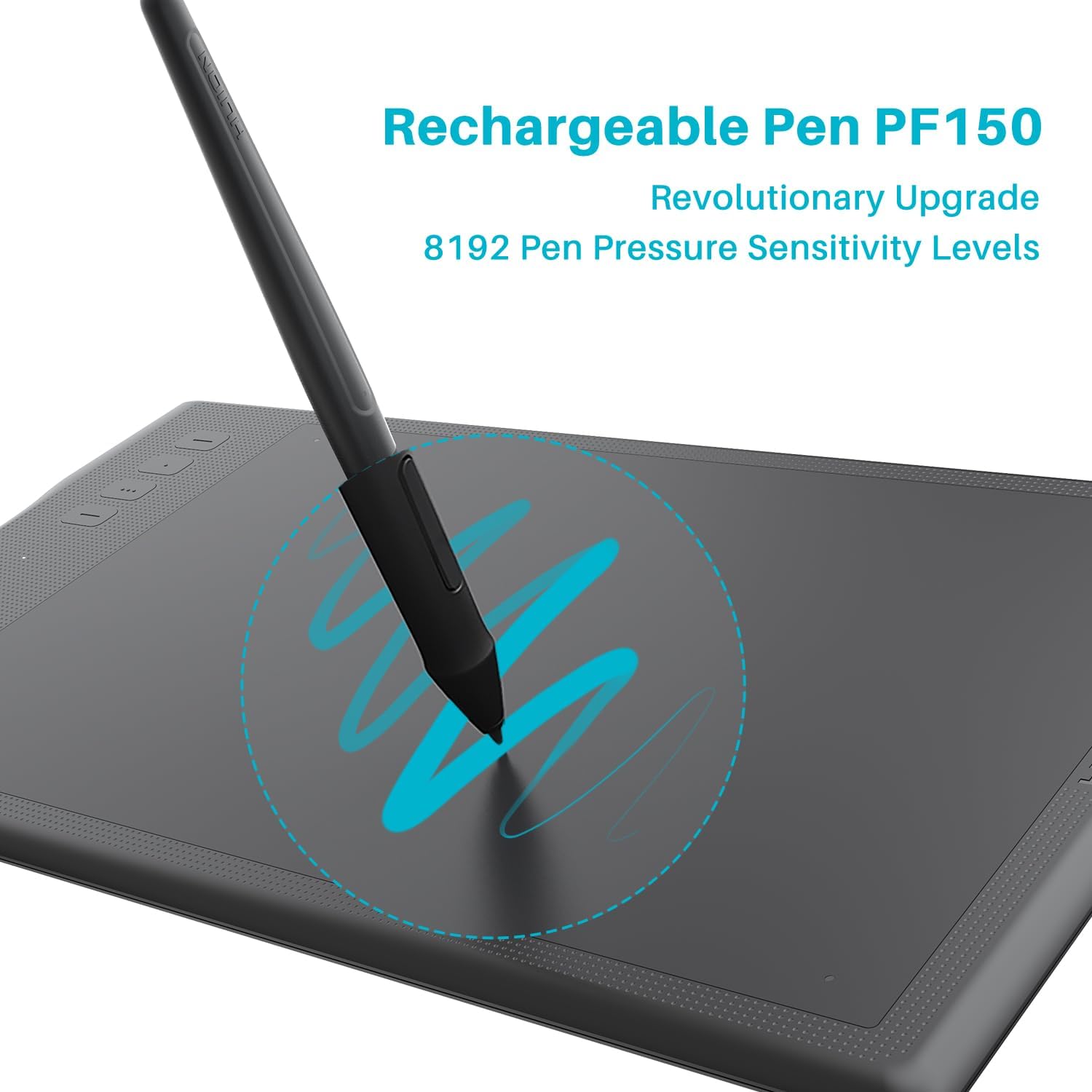
HUION Inspiroy Q11K Wireless Graphic Drawing Tablets with 8192 Pressure Sensitivity 8 Customizable Shortcut Keys, 11 x 6.87 inches Digital Pen Tablet for Mac, Windows PC

4.40

지난 32시간 동안 판매됨 21

$ 49.99
$ 51.00
-2.02%

I could not be any happier with this graphics tablet and I am not normally a person to post product reviews. I've been a hobby artist my whole life, for the majority of my youth I wanted to be a comic book artist then a graphic designer, but I changed career paths in high school. I started drawing again a few years ago, though, and really fell back in love. One thing I have always been intentional about with my art, though, is to use high quality materials. All of my drawing in recent years has been on high quality mixed media paper, using sakura pens and copic markers. I took graphic design in high school a long time ago, back when tablets were thousands of dollars and you could only purchase photoshop with hundreds upon hundreds of dollars....I never even though of a drawing tablet as a reasonable option, but when I did a little research I saw that the world has changed a lot since I was in high school in 2006 and that drawing tablets can be affordable and that you can have photoshop for 10 bux a month like netflix or something! That absolutely blew my mind, so I got a subscription to photoshop and then began doing research on tablets....I obviously considered Wacom....but the more I thought about my uses and how much I wanted to spend on it, the Huion Inspiroy Q11K seemed like a great choice and initially I was assuming it would be mediocre quality that I would just have to get used to....After the first few hours of use, I can not overstate how much this tablet has changed my life. it is probably the most important purchase I have made in years, for improving quality of life....this tablet has afforded me the capacity to pursue my art in a way I was never able to and I am stunned by how well it operates every single day. My art has improved, my confidence has improved, the amount of risks I am willing to take iwth my art has increased, and I can say as someone that even though I am not a professional, I do have high standards I think...and this tablet absolutely matches those standards.I love the quick access keys, the connectivity is fantastic with minor glitches that don't make me think any less of the product, and the best part is the workspace size - it is HUGE. I feel utter freeodm when using this tablet, knowing I have more than enough space to do what I want. Also, I have never experienced any charge loss or anything....I probably only charge both the tablet and pen once a week and it typically takes me about 15 hours to finish a single piece. I probably do a piece of art once a week.If you are in the market for a tablet that can help you produce high quality work without an exorbitant and unnecessary price-point, you will NOT be disappointed by purchasing this. I'm attaching all of the art I've worked on in the past month since purchasing so you can see what I've done with the tablet.

27 현재 누군가가 웹사이트를 탐색 중입니다.

Size
11x6.87 inch 13.6x8.5 inch 13.8x8.6 inch
수량:
- +

예상 배송 시간: 12~26일(국제), 3~6일(미국)

구매일로부터 45일 이내에 반품이 가능합니다. 관세 및 세금은 환불되지 않습니다.

  • ASIN:

    B071CFC3RG

  • BATTERIES:

    1 Lithium Ion batteries required.

  • BEST_SELLERS_RANK:

    #65 in Computer Graphics Tablets

  • CUSTOMER_REVIEWS:

    4.4 4.4 out of 5 stars (1,700) 4.4 out of 5 stars

  • DATE_FIRST_AVAILABLE:

    April 13, 2017

  • IS_DISCONTINUED_BY_MANUFACTURER:

    No

  • ITEM_MODEL_NUMBER:

    Q11K

  • ITEM_WEIGHT:

    1.94 pounds

  • MANUFACTURER:

    ShenZhen Huion Animation Technology Co., LTD

  • PRODUCT_DIMENSIONS:

    15.35 x 8.78 x 0.43 inches

안전한 결제를 보장하세요

제품 상세 정보
고객 리뷰
4.40

(100 점수)

5
4
4
4
3
8
2
16
1
68
댓글 취소
댓글을 남겨주세요

14 논평

Nice drawing tab
2026-01-25    -Varun namdev

Very good but a bit over pricy

Good product and Respectable Seller
2026-01-13    -Abdou

First I would like to thank Seller, I purchased the product and after test found issue then I returned and received the replacement one with one day after reordering, the price is very good even comparing with international market, this the second time using product from Huion and really Inspiroy Giano drawing board is very good

5.0 out of 5 stars Good one!
2026-02-22    -Nicole D

I switched to Huion as an alternative option because I wasn't really pleased with the newest Wacom Intuos Pro series. Was a little nervous at firstsince I have always used Wacom for like more than 10 years, but the experience with the Q11K was quiteee good so far :)Pros:+ HUGE drawing area. Total new experience compared to working with smaller area.+ Stylus: the pen needs charging, but one charge of an hour-ish would last around a week, and I'm quite an extensive user LOL+ Surface: SMOOTH! So I know there're people prefer paper-like surface, but I like to press the pen slightly to make quick light strokes, so the smoother the more comfortable to me, anyone feels the same? And undeniably NIB-SAVER!+ Design: slick design+ Compatible with: Photoshop, Illustrator, ... for some reasons I couldn't get it to work with Paint Tool Sai (sigh) (heard that there's a way to work around though)+ Price: GOOD deal. Only 1/3 of Wacom's Intuos Pro medium but the stats were comparable.Cons:+ My Wifi receiver has some issue, so far the customer service team has been very responsive and helpful+ The 4 rubber-like pieces at the back that supposed to keep the tablet non-sliding came off not long after, probably because I have been carrying the tablet around+ Pen needs charging, and you have one pen, but it charges fast.If you are looking for an affordable good alternative for Wacom tablet I'd recommend this one. I don't know how long it shall last (I've got my first one for around a year with some minor technical issues). But so far it does its job. I actually enjoy the smooth surface than the rougher ones, and the smooth yet slightly grainy feeling I got on this tablet was just perfect. I'm pretty picky when it comes to tablet's quality and the feeling of the pen when drawing, because I'll draw for hours, :p and I like Huion's pen so far! I hope Huion improve the design and its driver a bit more though. BTW, i'm PC user, haven't tried it on MacOS. But yeah, this one is a good alternative if you both want a +8000-level-sensitivity and a medium-size drawing tablet.

The GOAT
2026-02-05    -m

This is the best screen-less tablet I've ever used.Whatever features other tablets might have cannot compete with the massive space you get with this one. If you have room for it on your desk it offers an un paralleled drawing experience. Working on a large monitor 16+ inches the Tablet will map very organically to the monitors dimensions meaning you can freely use your arm when drawing and avoid cramps.Aside from a screen based monitor this device is a must for those who prefer to sit at 90 degrees upright and draw. For digital painting I vastly prefer it to any screen Tablet or cintiq like.This is the king.

Wonderful. I am already using 4 more tabs from Huion. I bought Giano 14 inch long time back and still that's the best one I was using. I take online mathematics classes and kept the smaller Huion at home, hence the upgrade and must say what an upgrade.The drivers are updated for Mac and works like charm now. Bluetooth connects so fast that you cant even detect. As soon as you switch it on, very fast and smooth. When you connect this for the first time and install drivers, you connect through bluetooth is my advice to get the hardware detected. Then go for all the settings.The key settings works wornderfully. You can program them for different purposes. Not only you can control keyboard shortcuts, but you can run programs as well. I have allocated 3rd and 4th key to open zoom and open Goodnotes respectively and believe me, it takes not even a second to open. Quite impressed with the performance so far.I have used it for the first time for consecutive 5 hours for my classes back to back and it drained 30% of the battery, so seems it will satisfy the promise of their 18 hours of battery backup too.I don't see any cons but you need a big table to use it with your laptop and it does show scratches when you write on it but diminishes when you clean with a wet microfibre cloth.

I could not be any happier with this graphics tablet and I am not normally a person to post product reviews. I've been a hobby artist my whole life, for the majority of my youth I wanted to be a comic book artist then a graphic designer, but I changed career paths in high school. I started drawing again a few years ago, though, and really fell back in love. One thing I have always been intentional about with my art, though, is to use high quality materials. All of my drawing in recent years has been on high quality mixed media paper, using sakura pens and copic markers. I took graphic design in high school a long time ago, back when tablets were thousands of dollars and you could only purchase photoshop with hundreds upon hundreds of dollars....I never even though of a drawing tablet as a reasonable option, but when I did a little research I saw that the world has changed a lot since I was in high school in 2006 and that drawing tablets can be affordable and that you can have photoshop for 10 bux a month like netflix or something! That absolutely blew my mind, so I got a subscription to photoshop and then began doing research on tablets....I obviously considered Wacom....but the more I thought about my uses and how much I wanted to spend on it, the Huion Inspiroy Q11K seemed like a great choice and initially I was assuming it would be mediocre quality that I would just have to get used to....After the first few hours of use, I can not overstate how much this tablet has changed my life. it is probably the most important purchase I have made in years, for improving quality of life....this tablet has afforded me the capacity to pursue my art in a way I was never able to and I am stunned by how well it operates every single day. My art has improved, my confidence has improved, the amount of risks I am willing to take iwth my art has increased, and I can say as someone that even though I am not a professional, I do have high standards I think...and this tablet absolutely matches those standards.I love the quick access keys, the connectivity is fantastic with minor glitches that don't make me think any less of the product, and the best part is the workspace size - it is HUGE. I feel utter freeodm when using this tablet, knowing I have more than enough space to do what I want. Also, I have never experienced any charge loss or anything....I probably only charge both the tablet and pen once a week and it typically takes me about 15 hours to finish a single piece. I probably do a piece of art once a week.If you are in the market for a tablet that can help you produce high quality work without an exorbitant and unnecessary price-point, you will NOT be disappointed by purchasing this. I'm attaching all of the art I've worked on in the past month since purchasing so you can see what I've done with the tablet.

5.0 out of 5 stars Good one!
2026-01-30    -Nicole D

I switched to Huion as an alternative option because I wasn't really pleased with the newest Wacom Intuos Pro series. Was a little nervous at firstsince I have always used Wacom for like more than 10 years, but the experience with the Q11K was quiteee good so far :)Pros:+ HUGE drawing area. Total new experience compared to working with smaller area.+ Stylus: the pen needs charging, but one charge of an hour-ish would last around a week, and I'm quite an extensive user LOL+ Surface: SMOOTH! So I know there're people prefer paper-like surface, but I like to press the pen slightly to make quick light strokes, so the smoother the more comfortable to me, anyone feels the same? And undeniably NIB-SAVER!+ Design: slick design+ Compatible with: Photoshop, Illustrator, ... for some reasons I couldn't get it to work with Paint Tool Sai (sigh) (heard that there's a way to work around though)+ Price: GOOD deal. Only 1/3 of Wacom's Intuos Pro medium but the stats were comparable.Cons:+ My Wifi receiver has some issue, so far the customer service team has been very responsive and helpful+ The 4 rubber-like pieces at the back that supposed to keep the tablet non-sliding came off not long after, probably because I have been carrying the tablet around+ Pen needs charging, and you have one pen, but it charges fast.If you are looking for an affordable good alternative for Wacom tablet I'd recommend this one. I don't know how long it shall last (I've got my first one for around a year with some minor technical issues). But so far it does its job. I actually enjoy the smooth surface than the rougher ones, and the smooth yet slightly grainy feeling I got on this tablet was just perfect. I'm pretty picky when it comes to tablet's quality and the feeling of the pen when drawing, because I'll draw for hours, :p and I like Huion's pen so far! I hope Huion improve the design and its driver a bit more though. BTW, i'm PC user, haven't tried it on MacOS. But yeah, this one is a good alternative if you both want a +8000-level-sensitivity and a medium-size drawing tablet.

I could not be any happier with this graphics tablet and I am not normally a person to post product reviews. I've been a hobby artist my whole life, for the majority of my youth I wanted to be a comic book artist then a graphic designer, but I changed career paths in high school. I started drawing again a few years ago, though, and really fell back in love. One thing I have always been intentional about with my art, though, is to use high quality materials. All of my drawing in recent years has been on high quality mixed media paper, using sakura pens and copic markers. I took graphic design in high school a long time ago, back when tablets were thousands of dollars and you could only purchase photoshop with hundreds upon hundreds of dollars....I never even though of a drawing tablet as a reasonable option, but when I did a little research I saw that the world has changed a lot since I was in high school in 2006 and that drawing tablets can be affordable and that you can have photoshop for 10 bux a month like netflix or something! That absolutely blew my mind, so I got a subscription to photoshop and then began doing research on tablets....I obviously considered Wacom....but the more I thought about my uses and how much I wanted to spend on it, the Huion Inspiroy Q11K seemed like a great choice and initially I was assuming it would be mediocre quality that I would just have to get used to....After the first few hours of use, I can not overstate how much this tablet has changed my life. it is probably the most important purchase I have made in years, for improving quality of life....this tablet has afforded me the capacity to pursue my art in a way I was never able to and I am stunned by how well it operates every single day. My art has improved, my confidence has improved, the amount of risks I am willing to take iwth my art has increased, and I can say as someone that even though I am not a professional, I do have high standards I think...and this tablet absolutely matches those standards.I love the quick access keys, the connectivity is fantastic with minor glitches that don't make me think any less of the product, and the best part is the workspace size - it is HUGE. I feel utter freeodm when using this tablet, knowing I have more than enough space to do what I want. Also, I have never experienced any charge loss or anything....I probably only charge both the tablet and pen once a week and it typically takes me about 15 hours to finish a single piece. I probably do a piece of art once a week.If you are in the market for a tablet that can help you produce high quality work without an exorbitant and unnecessary price-point, you will NOT be disappointed by purchasing this. I'm attaching all of the art I've worked on in the past month since purchasing so you can see what I've done with the tablet.

The GOAT
2026-01-30    -m

This is the best screen-less tablet I've ever used.Whatever features other tablets might have cannot compete with the massive space you get with this one. If you have room for it on your desk it offers an un paralleled drawing experience. Working on a large monitor 16+ inches the Tablet will map very organically to the monitors dimensions meaning you can freely use your arm when drawing and avoid cramps.Aside from a screen based monitor this device is a must for those who prefer to sit at 90 degrees upright and draw. For digital painting I vastly prefer it to any screen Tablet or cintiq like.This is the king.

Wonderful. I am already using 4 more tabs from Huion. I bought Giano 14 inch long time back and still that's the best one I was using. I take online mathematics classes and kept the smaller Huion at home, hence the upgrade and must say what an upgrade.The drivers are updated for Mac and works like charm now. Bluetooth connects so fast that you cant even detect. As soon as you switch it on, very fast and smooth. When you connect this for the first time and install drivers, you connect through bluetooth is my advice to get the hardware detected. Then go for all the settings.The key settings works wornderfully. You can program them for different purposes. Not only you can control keyboard shortcuts, but you can run programs as well. I have allocated 3rd and 4th key to open zoom and open Goodnotes respectively and believe me, it takes not even a second to open. Quite impressed with the performance so far.I have used it for the first time for consecutive 5 hours for my classes back to back and it drained 30% of the battery, so seems it will satisfy the promise of their 18 hours of battery backup too.I don't see any cons but you need a big table to use it with your laptop and it does show scratches when you write on it but diminishes when you clean with a wet microfibre cloth.

댓글을 남겨주세요:

댓글 제목
댓글 내용
배송 및 반품
우리가 당신을 보호하겠습니다

대부분 지역에서는 배송비를 한 번만 지불하시면 됩니다 (주문 및 배송 페이지를 확인해 주세요).

구매 후 14일 이내 무료 반품 가능 (단, 수명이 다한 제품, 맞춤 제작 상품, 마스크, 향수 및 에어로졸과 같이 위험하거나 인화성 물질이 포함된 일부 제품은 제외).

수입 관세 정보

복잡한 절차는 저희가 처리해 드리겠습니다. 카나리아 제도를 제외한 모든 EU 국가, 영국, 미국, 캐나다, 호주, 뉴질랜드, 푸에르토리코, 스위스, 싱가포르, 한국, 쿠웨이트, 멕시코, 카타르, 인도, 노르웨이, 사우디아라비아, 대만, 태국, UAE, 일본, 브라질, 맨섬, 산마리노, 콜롬비아, 칠레, 아르헨티나, 이집트, 레바논, 홍콩 특별행정구, 바레인, 터키로 배송되는 상품 가격에는 모든 수입 관세가 포함되어 있습니다. 표시된 가격이 최종 결제 금액입니다.

예상 배송 시간

특급 배송: 7-10일

해당 창고에서 배송되었습니다.

더 자세한 정보가 필요하신가요?
반품 정책
반품 정책

저희는 제품 품질에 자신 있습니다. 만약 구매하신 제품에 완전히 만족하지 못하신다면, 수령일로부터 30일 이내에 간편하게 반품하실 수 있도록 정책을 마련해 두었습니다.

간편한 교환 또는 환불
  • 다른 사이즈, 색상 또는 스타일의 상품으로 교환하거나 전액 환불받을 수 있습니다.
  • 반품되는 모든 상품은 착용하지 않은 상태여야 하며, 원래 포장 상태 그대로 모든 태그가 손상되지 않은 상태여야 합니다.
간단한 절차
  • 온라인으로 반품을 신청하거나 고객 서비스 팀에 문의하여 도움을 받으실 수 있습니다.
  • 물품을 제대로 포장해 주시고, 원래의 포장 목록도 함께 넣어주세요.
  • 반품하실 상품을 보내주실 때에는 저희가 제공해 드린 선불 배송 라벨을 사용해 주시기 바랍니다.
  • 환불 요청 접수 즉시 처리해 드리겠습니다.

반품과 관련하여 궁금한 점이나 우려 사항이 있으시면 언제든지 저희 전문 고객 서비스 팀에 문의해 주세요. 고객 만족은 저희의 최우선 목표입니다.

범주
차이
제품
모든 제품 지우기