고객 서비스

판매자들은 가입하면 더 많은 혜택을 누릴 수 있습니다.

모든 주문 무료 배송.

무정전 전원 공급 장치

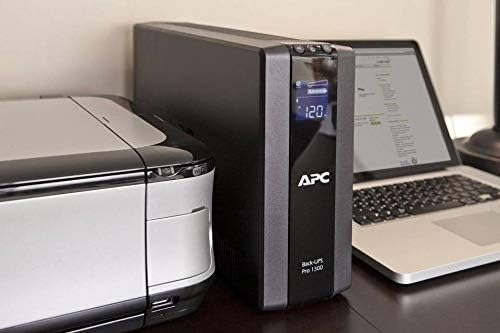
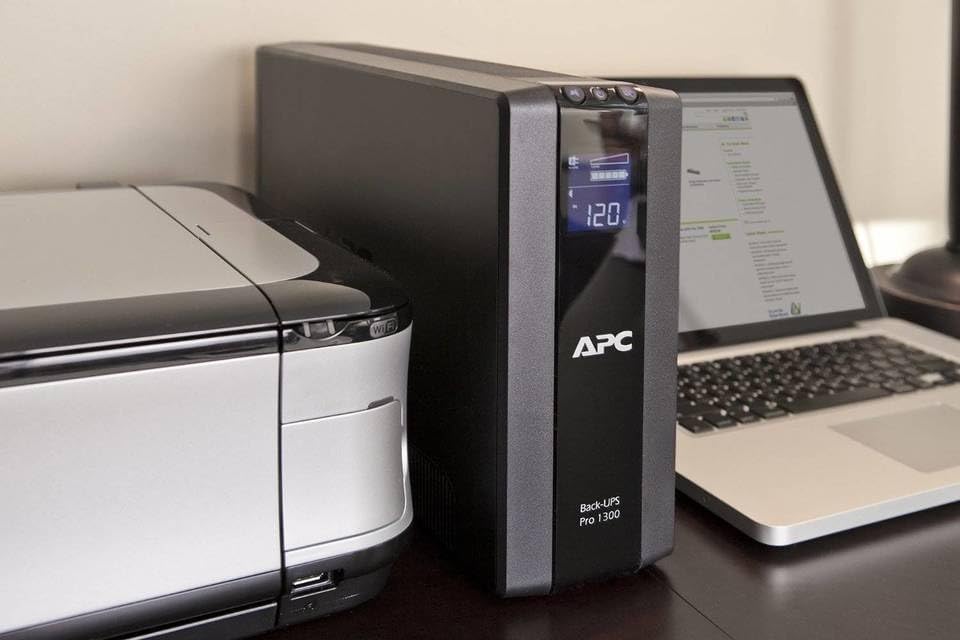
APC UPS 1500VA Battery Backup Surge Protector, BR1500G Backup Battery Power Supply with AVR

4.40

지난 32시간 동안 판매됨 31

$ 303.99
$ 333.00
-9.54%

I've owned one BR1500G for a few years and just bought a second one for another computer. The first one was bought directly from APC, as an upgrade, were the price included return shipping for disposal of the old unit. There was a significant software problem with that BR1500G. The computer thought the UPS was a battery as in laptop battery and Windows XP tried to manage the unit quite incorrectly. The problem was that the APC-supplied software needed to be installed BEFORE the battery control was connected to the computer via a USB cable. The kicker was that APC directions said to do things in the opposite order. This led to multiple telephone conversations with APC support to first return the computer to standard power management and second to properly install the control software. I want to report that the support was knowledgeable and outstanding.Once the battery was properly hooked up to the computer and the software properly installed I was quite impressed by the total setup. That software (a minor version earlier than their current software) does several good things: 1) periodic self-test of the battery, 2) gives good and coherent options to mange problem power, 3) uses hibernate to shut down the computer in emergencies even on non-laptop machines, and 4) can remove/restore power to equipment when the computer suspends itself/wakes up.I was happy enough with the APC hardware and software to order a second BR1500G when it was time to replace another UPS. The software installation problems have disappeared and bringing up the second system took a total of ten minutes; the battery was shipped here charged.This UPS actually provides five functionally different sets of plugs: 1) the main component, i.e., your computer, is the sole user in the first set - the battery "knows" when it is powered up versus suspended of powered down - and power is supplied with battery backup; 2) there is a second set of components that are supplied with battery backup that are powered up when your computer is powered/woken up and powered down when your computer goes to sleep/is powered down; 3) another set of component are supplied with battery backup power independent of whether your computer is powered or not; 4) this set is powered or not as the computer but only enjoys surge protection, not battery backup; 5) this set is always powered but enjoys only surge protection, not battery backup. There is only one plug for set 1 and one plug for set 2. If you want to put more than one component in set 2 (don't think about more than one in set 1), use a splitter cable. This is a great arrangement to manage power sensibly. My computers go to sleep (S3 suspend) when not used for a while and proper usage of the plug sets can save the price of the BR1500G in about a year! (By my back of the envelope computations.)Here are some examples of components that would properly be plugged in to each plug set: 1) your computer, 2) the monitor on that computer, 3) your network router - the network shouldn't be cutoff just because one computer is off, 4) a printer connected directly to your computer, and 5) a printer on your LAN.The hardware works; the software has some very good control features and some very informative sub-applications. I've now been using at least one BR1500G for several years and am delighted. All in all, I've been using multiple APC products for a decade or more (as well as trying competitors products) and have been very satisfied. A few new capabilities have been added in APC's latest products that are good for me, e.g., the plug sets and better energy/green tracking. Finally, when I had a problem, APC support was there and competent.

18 현재 누군가가 웹사이트를 탐색 중입니다.

Size
BR24BPG BR1500G
수량:
- +

예상 배송 시간: 12~26일(국제), 3~6일(미국)

구매일로부터 45일 이내에 반품이 가능합니다. 관세 및 세금은 환불되지 않습니다.

  • ASIN:

    B003Y24DEU

  • BATTERIES:

    1 Lithium Polymer batteries required.

  • BEST_SELLERS_RANK:

    #40 in Computer Uninterruptible Power Supply Units

  • CUSTOMER_REVIEWS:

    4.4 4.4 out of 5 stars (3,056) 4.4 out of 5 stars

  • DATE_FIRST_AVAILABLE:

    April 2, 2004

  • DEPARTMENT:

    SURGE PROTECTORS/IUPS -> COMPUTER ACCESSORIES

  • IS_DISCONTINUED_BY_MANUFACTURER:

    No

  • ITEM_MODEL_NUMBER:

    BR1500G

  • ITEM_WEIGHT:

    21 pounds

  • LANGUAGE:

    English

  • MANUFACTURER:

    APC

  • NATIONAL_STOCK_NUMBER:

    6130-01-546-2532

  • PRODUCT_DIMENSIONS:

    15 x 4.4 x 11.9 inches

안전한 결제를 보장하세요

제품 상세 정보
This APC battery back up power supply offers guaranteed power and surge protection for wireless networks, computers, and other electronics in your home or business. Backup battery power supply is designed for use during outages and unsafe voltage fluctuations, and provides surge protector with battery backup in the event of damaging power surges and spikes. The APC Back-UPS PRO series of Uninterruptible Power Supply are the perfect battery backup for computer, external harddrive and routers to protect your data and keep you connected. This APC 1500VA UPS offers AVR, is active PFC compatible, and has a User-replaceable battery to prolong the life of your UPS by APC.
고객 리뷰
4.40

(100 점수)

5
7
4
3
3
3
2
10
1
77
댓글 취소
댓글을 남겨주세요

14 논평

I've owned one BR1500G for a few years and just bought a second one for another computer. The first one was bought directly from APC, as an upgrade, were the price included return shipping for disposal of the old unit. There was a significant software problem with that BR1500G. The computer thought the UPS was a battery as in laptop battery and Windows XP tried to manage the unit quite incorrectly. The problem was that the APC-supplied software needed to be installed BEFORE the battery control was connected to the computer via a USB cable. The kicker was that APC directions said to do things in the opposite order. This led to multiple telephone conversations with APC support to first return the computer to standard power management and second to properly install the control software. I want to report that the support was knowledgeable and outstanding.Once the battery was properly hooked up to the computer and the software properly installed I was quite impressed by the total setup. That software (a minor version earlier than their current software) does several good things: 1) periodic self-test of the battery, 2) gives good and coherent options to mange problem power, 3) uses hibernate to shut down the computer in emergencies even on non-laptop machines, and 4) can remove/restore power to equipment when the computer suspends itself/wakes up.I was happy enough with the APC hardware and software to order a second BR1500G when it was time to replace another UPS. The software installation problems have disappeared and bringing up the second system took a total of ten minutes; the battery was shipped here charged.This UPS actually provides five functionally different sets of plugs: 1) the main component, i.e., your computer, is the sole user in the first set - the battery "knows" when it is powered up versus suspended of powered down - and power is supplied with battery backup; 2) there is a second set of components that are supplied with battery backup that are powered up when your computer is powered/woken up and powered down when your computer goes to sleep/is powered down; 3) another set of component are supplied with battery backup power independent of whether your computer is powered or not; 4) this set is powered or not as the computer but only enjoys surge protection, not battery backup; 5) this set is always powered but enjoys only surge protection, not battery backup. There is only one plug for set 1 and one plug for set 2. If you want to put more than one component in set 2 (don't think about more than one in set 1), use a splitter cable. This is a great arrangement to manage power sensibly. My computers go to sleep (S3 suspend) when not used for a while and proper usage of the plug sets can save the price of the BR1500G in about a year! (By my back of the envelope computations.)Here are some examples of components that would properly be plugged in to each plug set: 1) your computer, 2) the monitor on that computer, 3) your network router - the network shouldn't be cutoff just because one computer is off, 4) a printer connected directly to your computer, and 5) a printer on your LAN.The hardware works; the software has some very good control features and some very informative sub-applications. I've now been using at least one BR1500G for several years and am delighted. All in all, I've been using multiple APC products for a decade or more (as well as trying competitors products) and have been very satisfied. A few new capabilities have been added in APC's latest products that are good for me, e.g., the plug sets and better energy/green tracking. Finally, when I had a problem, APC support was there and competent.

Excelente
2026-01-11    -rafasnake

Despues de dos meses de uso no he tenido ningun inconveniente, tengo una desktop de alto rendimiento y el tiempo de respaldo que me da es bastante buenoPros- Excelente suprecion de picos- Excelente tiempo de respaldo- Excelentes estadisticas (te indica cuanta energia se esta consumiendo y cuanto durara el respaldo, entro otras)Contras- Tiene el tamaño de una pc micro atx- Un poco caro (aunque lo vale)

Ha praticamente triplicato la durata di mantenimento dell'energia in caso di assenza di corrente del mio BR1500GI, quindi è decisamente efficace.Probabilmente verserò lacrime amare il giorno in cui dovrò sostituire 5 batterie anzichè 2 :)

Un "must have" per i possessori di BR1500GI
2026-01-05    -Chiedi a Stefano

Già soddisfatto del gruppo Back-UPS Pro 1500, questo upgrade ha permesso di estendere l'autonomia di oltre il doppio (nel mio scenario di utilizzo). Installazione semplicissima:- Spegnere Back-UPS Pro 1500- Collegare il connettore del BR24BPG al BR1500GI- Avviare il Back-UPS Pro 1500Piccola nota: una volta avviato l'UPS col BR24BPG si è azionata la ventola interna; una volta che la batteria supplementare si è caricata la ventola si è spenta ed è tornato tutto nell'estremo silenzio a cui i prodotti APC mi hanno abituato.

Ha praticamente triplicato la durata di mantenimento dell'energia in caso di assenza di corrente del mio BR1500GI, quindi è decisamente efficace.Probabilmente verserò lacrime amare il giorno in cui dovrò sostituire 5 batterie anzichè 2 :)

Un "must have" per i possessori di BR1500GI
2026-03-05    -Chiedi a Stefano

Già soddisfatto del gruppo Back-UPS Pro 1500, questo upgrade ha permesso di estendere l'autonomia di oltre il doppio (nel mio scenario di utilizzo). Installazione semplicissima:- Spegnere Back-UPS Pro 1500- Collegare il connettore del BR24BPG al BR1500GI- Avviare il Back-UPS Pro 1500Piccola nota: una volta avviato l'UPS col BR24BPG si è azionata la ventola interna; una volta che la batteria supplementare si è caricata la ventola si è spenta ed è tornato tutto nell'estremo silenzio a cui i prodotti APC mi hanno abituato.

Have used APC for well over a decade and though I have tried others, I seem to keep coming back to APC. Solid, reliable, expensive (unfortunately), but well wirth the price. My config is a 27" imac (late 2011 vintage), pair of Lacie 2 TB Firewire 800 drives, a few other varied items. Not a heave load for the likes of this size of UPS. I saw the display saying I had an estimated 120 mins of run time on battery, so I decided to test it. BTW, you can silence the alarm when it is running on battery.I pulled the ups power plug and was shocked to see that that the run time estimate wasn't falling faster than real time, so their estimate appeared like it might actually be real. Then I let it go and decided to check in on it periodically. When I cam back 30 mins later, the estimated time was up to like 188 mins? What? how did that happen? So I looked over at my imac and realized it had gone into sleep mode (it is set to do that after 20 mins in power management on the imac), so the power draw fell and hence the run time estimate went up. Ugg, I wasn't going to wait 3 hours to see how accurate the time estimate was so I decided to increase the load. I plugged in my Canon MX850 into the UPS, put unless it is printing it doesn't draw much either. So I put in a dvd and let it roll at full brightness. All that finally got the runtime down to about 90 mins.I came back after 75 or so mins to see if it was still on track to shut down in about 15 mins and it was. I let it go down to about 4 mins and then I shut down the imac and kept cycling the power on the printer and the usb drives to cause them to keep drawing as much as possible. I finally got it down to about 1 min and thought great, I am close now. However the unit just kept going and going. I am sure it is because my load dropped so much that it the time estimate was to tough to get right. So after about 5 minutes of watching the 1 minute run time estimate stay on the ups, I decided to see if I could kill this zombie like undying ups, so I plugged in an 1800 hair dryer my wife uses. About 20 seconds of that finally killed the 1 minute of life.In summary, I am impresses, very impressed. As long as the load on the ups stays relatively consistent, the time estimate is very good. All my gear ran happilly on the battery power and the unit is quiet while idle, relatively quiet while on battery and quiet while charging. The only minor complaint (and it is minor) is that they don;t have powerchute software for the mac os x. This isn't a big thing since the mac will and does (in my case) talk with the ups and has its own built in battery management settings, but I would have hoped APC would have realized that not all their customer base uses Windows. Powerchute is a cool program and I would use it if it worked with Lion.

There are times when a bigger UPS is just not affordable or practical for several reasons. I am running a small home lab and needed for up time. 2200VA UPS is expensive and you need access to a higher capacity electrical circuit. This unit contains 4 batteries and connects to the external battery connecter on the BR1500G UPS. I like the pure sine wave of the APC 1500MS2 UPS but, they don't have option of connecting an external battery pack.

I've owned one BR1500G for a few years and just bought a second one for another computer. The first one was bought directly from APC, as an upgrade, were the price included return shipping for disposal of the old unit. There was a significant software problem with that BR1500G. The computer thought the UPS was a battery as in laptop battery and Windows XP tried to manage the unit quite incorrectly. The problem was that the APC-supplied software needed to be installed BEFORE the battery control was connected to the computer via a USB cable. The kicker was that APC directions said to do things in the opposite order. This led to multiple telephone conversations with APC support to first return the computer to standard power management and second to properly install the control software. I want to report that the support was knowledgeable and outstanding.Once the battery was properly hooked up to the computer and the software properly installed I was quite impressed by the total setup. That software (a minor version earlier than their current software) does several good things: 1) periodic self-test of the battery, 2) gives good and coherent options to mange problem power, 3) uses hibernate to shut down the computer in emergencies even on non-laptop machines, and 4) can remove/restore power to equipment when the computer suspends itself/wakes up.I was happy enough with the APC hardware and software to order a second BR1500G when it was time to replace another UPS. The software installation problems have disappeared and bringing up the second system took a total of ten minutes; the battery was shipped here charged.This UPS actually provides five functionally different sets of plugs: 1) the main component, i.e., your computer, is the sole user in the first set - the battery "knows" when it is powered up versus suspended of powered down - and power is supplied with battery backup; 2) there is a second set of components that are supplied with battery backup that are powered up when your computer is powered/woken up and powered down when your computer goes to sleep/is powered down; 3) another set of component are supplied with battery backup power independent of whether your computer is powered or not; 4) this set is powered or not as the computer but only enjoys surge protection, not battery backup; 5) this set is always powered but enjoys only surge protection, not battery backup. There is only one plug for set 1 and one plug for set 2. If you want to put more than one component in set 2 (don't think about more than one in set 1), use a splitter cable. This is a great arrangement to manage power sensibly. My computers go to sleep (S3 suspend) when not used for a while and proper usage of the plug sets can save the price of the BR1500G in about a year! (By my back of the envelope computations.)Here are some examples of components that would properly be plugged in to each plug set: 1) your computer, 2) the monitor on that computer, 3) your network router - the network shouldn't be cutoff just because one computer is off, 4) a printer connected directly to your computer, and 5) a printer on your LAN.The hardware works; the software has some very good control features and some very informative sub-applications. I've now been using at least one BR1500G for several years and am delighted. All in all, I've been using multiple APC products for a decade or more (as well as trying competitors products) and have been very satisfied. A few new capabilities have been added in APC's latest products that are good for me, e.g., the plug sets and better energy/green tracking. Finally, when I had a problem, APC support was there and competent.

Have used APC for well over a decade and though I have tried others, I seem to keep coming back to APC. Solid, reliable, expensive (unfortunately), but well wirth the price. My config is a 27" imac (late 2011 vintage), pair of Lacie 2 TB Firewire 800 drives, a few other varied items. Not a heave load for the likes of this size of UPS. I saw the display saying I had an estimated 120 mins of run time on battery, so I decided to test it. BTW, you can silence the alarm when it is running on battery.I pulled the ups power plug and was shocked to see that that the run time estimate wasn't falling faster than real time, so their estimate appeared like it might actually be real. Then I let it go and decided to check in on it periodically. When I cam back 30 mins later, the estimated time was up to like 188 mins? What? how did that happen? So I looked over at my imac and realized it had gone into sleep mode (it is set to do that after 20 mins in power management on the imac), so the power draw fell and hence the run time estimate went up. Ugg, I wasn't going to wait 3 hours to see how accurate the time estimate was so I decided to increase the load. I plugged in my Canon MX850 into the UPS, put unless it is printing it doesn't draw much either. So I put in a dvd and let it roll at full brightness. All that finally got the runtime down to about 90 mins.I came back after 75 or so mins to see if it was still on track to shut down in about 15 mins and it was. I let it go down to about 4 mins and then I shut down the imac and kept cycling the power on the printer and the usb drives to cause them to keep drawing as much as possible. I finally got it down to about 1 min and thought great, I am close now. However the unit just kept going and going. I am sure it is because my load dropped so much that it the time estimate was to tough to get right. So after about 5 minutes of watching the 1 minute run time estimate stay on the ups, I decided to see if I could kill this zombie like undying ups, so I plugged in an 1800 hair dryer my wife uses. About 20 seconds of that finally killed the 1 minute of life.In summary, I am impresses, very impressed. As long as the load on the ups stays relatively consistent, the time estimate is very good. All my gear ran happilly on the battery power and the unit is quiet while idle, relatively quiet while on battery and quiet while charging. The only minor complaint (and it is minor) is that they don;t have powerchute software for the mac os x. This isn't a big thing since the mac will and does (in my case) talk with the ups and has its own built in battery management settings, but I would have hoped APC would have realized that not all their customer base uses Windows. Powerchute is a cool program and I would use it if it worked with Lion.

댓글을 남겨주세요:

댓글 제목
댓글 내용
배송 및 반품
우리가 당신을 보호하겠습니다

대부분 지역에서는 배송비를 한 번만 지불하시면 됩니다 (주문 및 배송 페이지를 확인해 주세요).

구매 후 14일 이내 무료 반품 가능 (단, 수명이 다한 제품, 맞춤 제작 상품, 마스크, 향수 및 에어로졸과 같이 위험하거나 인화성 물질이 포함된 일부 제품은 제외).

수입 관세 정보

복잡한 절차는 저희가 처리해 드리겠습니다. 카나리아 제도를 제외한 모든 EU 국가, 영국, 미국, 캐나다, 호주, 뉴질랜드, 푸에르토리코, 스위스, 싱가포르, 한국, 쿠웨이트, 멕시코, 카타르, 인도, 노르웨이, 사우디아라비아, 대만, 태국, UAE, 일본, 브라질, 맨섬, 산마리노, 콜롬비아, 칠레, 아르헨티나, 이집트, 레바논, 홍콩 특별행정구, 바레인, 터키로 배송되는 상품 가격에는 모든 수입 관세가 포함되어 있습니다. 표시된 가격이 최종 결제 금액입니다.

예상 배송 시간

특급 배송: 7-10일

해당 창고에서 배송되었습니다.

더 자세한 정보가 필요하신가요?
반품 정책
반품 정책

저희는 제품 품질에 자신 있습니다. 만약 구매하신 제품에 완전히 만족하지 못하신다면, 수령일로부터 30일 이내에 간편하게 반품하실 수 있도록 정책을 마련해 두었습니다.

간편한 교환 또는 환불
  • 다른 사이즈, 색상 또는 스타일의 상품으로 교환하거나 전액 환불받을 수 있습니다.
  • 반품되는 모든 상품은 착용하지 않은 상태여야 하며, 원래 포장 상태 그대로 모든 태그가 손상되지 않은 상태여야 합니다.
간단한 절차
  • 온라인으로 반품을 신청하거나 고객 서비스 팀에 문의하여 도움을 받으실 수 있습니다.
  • 물품을 제대로 포장해 주시고, 원래의 포장 목록도 함께 넣어주세요.
  • 반품하실 상품을 보내주실 때에는 저희가 제공해 드린 선불 배송 라벨을 사용해 주시기 바랍니다.
  • 환불 요청 접수 즉시 처리해 드리겠습니다.

반품과 관련하여 궁금한 점이나 우려 사항이 있으시면 언제든지 저희 전문 고객 서비스 팀에 문의해 주세요. 고객 만족은 저희의 최우선 목표입니다.

범주
차이
제품
모든 제품 지우기