고객 서비스

판매자들은 가입하면 더 많은 혜택을 누릴 수 있습니다.

모든 주문 무료 배송.

미니

Beelink Mini S13 Mini PC,13th Intel Twin Lake-N150 (up to 3.6GHz, Upgraded N100), 16GB DDR4 500GB M.2 SSD, Mini Desktop Computer Support 4K Dual Display/USB 3.2/WiFi 6/BT 5.2 for HTPC/Office/Business

4.40

지난 32시간 동안 판매됨 39

$ 279.00
$ 301.00
-7.89%

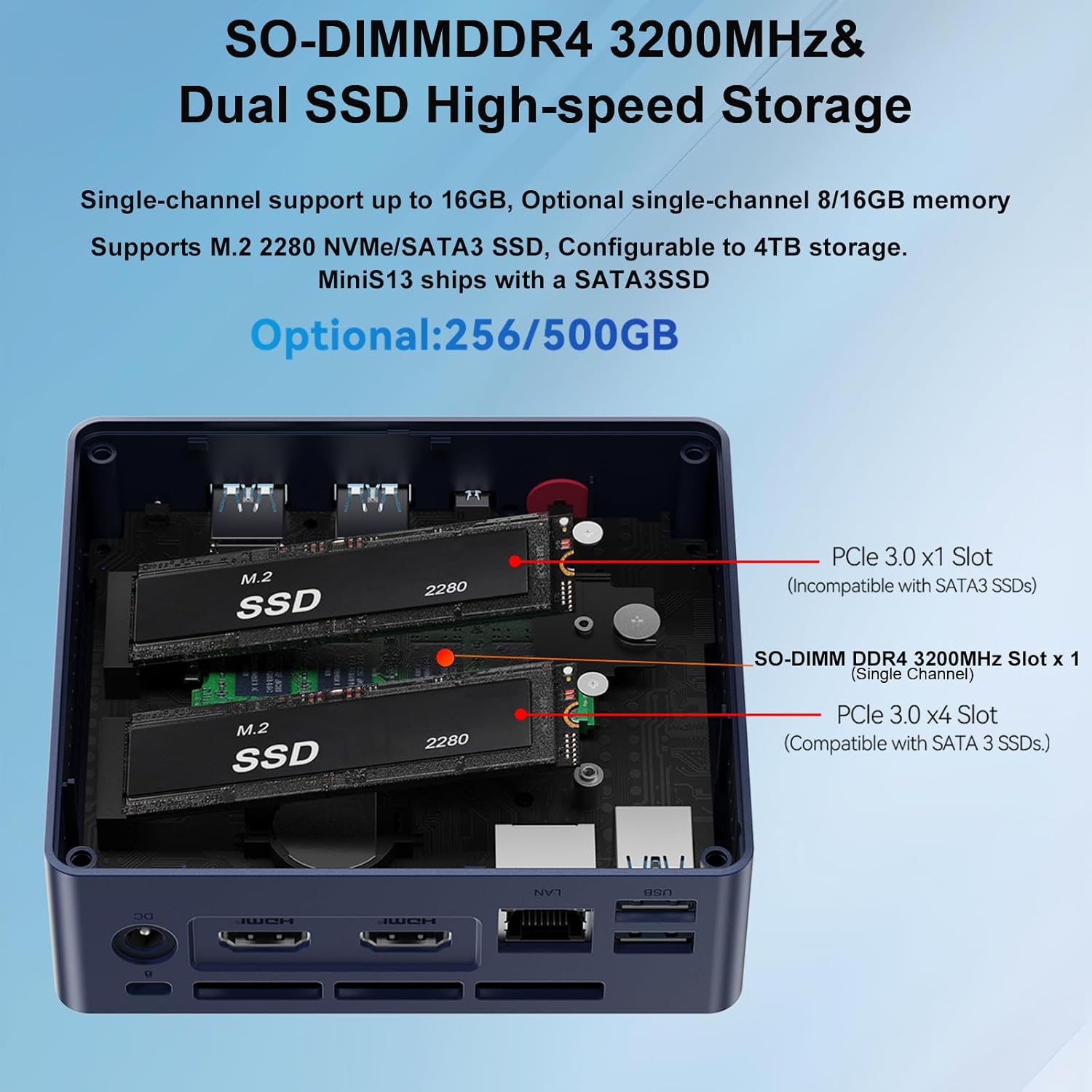
The small format and capabilities of this S13 Mini PC make it a fairly versatile option for a wide range of small server applications. It shipped with 1 500MB NVME & 16GB of RAM. It can support up to 2 NVME sticks - and I later needed that.I skipped the included Window 11 Pro, and installed what I needed for the project: Ubuntu Server. No issues for the install & Ubuntu Server runs fine on the S13. Boots Linux amazingly fast.For a project, I needed two 1TB NVME drives. So, I upgraded the storage to two 1TB WD Black SN7100s. Yikes! When just idling, the NVME temps climbed beyond 70C.So the issue is the bottom compartment of the S13 case is where the DRAM & NVMEs are installed. Air ventilation there is inadequate for dual SN7100s - in my opinion.So I scrapped the standard S13 base and created a replacement base and printed it on a 3D printer. The design includes a small 5V Noctua fan (60mm x 15mm) that plugs into one of the USB ports. The fan adds a bit of noise but I doesn't seem too loud to me. The fan blows directly on the NVME sticks.I also attached thin heatsinks to the NVMEs. I found heatsinks 6mm thick (or less) will fit. Anything thicker surely won't. But keep in mind: this is with my custom baseplate. Also, getting the heatsinks to fit best did require some fiddling with the NVME mounting hardware.The S13 has some jumpers in the bottom compartment that control when the USB ports are powered. Either always on (even powered down) or only on when powered up. I chose the latter.Anyway, this keeps the NVME sticks around 38-42C. Much better. But please consider: the standard 1 stick setup ran fine as the single NVME stick stayed well below 60C at idle.All-in-all I love these things as mini servers. I believe the graphics are probably good enough for a HTPC or a simple desktop PC.

28 현재 누군가가 웹사이트를 탐색 중입니다.

Size
N95 8G+256G N150 16G+500G
수량:
- +

예상 배송 시간: 12~26일(국제), 3~6일(미국)

구매일로부터 45일 이내에 반품이 가능합니다. 관세 및 세금은 환불되지 않습니다.

  • ASIN:

    B0DP2SGVVY

  • BEST_SELLERS_RANK:

    #1,253 in Computers & Accessories (See Top 100 in Computers & Accessories) #39 in Mini Computers

  • BRAND:

    Beelink

  • CARD_DESCRIPTION:

    Integrated

  • CHIPSET_BRAND:

    Intel

  • COLOR:

    Navy Blue

  • COMPUTER_MEMORY_TYPE:

    DDR4 SDRAM

  • CUSTOMER_REVIEWS:

    4.4 4.4 out of 5 stars (732) 4.4 out of 5 stars

  • DATE_FIRST_AVAILABLE:

    July 20, 2022

  • GRAPHICS_COPROCESSOR:

    Intel UHD Graphics

  • HARD_DRIVE:

    500 GB SSD

  • HARD_DRIVE_INTERFACE:

    Gigabit Ethernet

  • HARDWARE_PLATFORM:

    PC

  • ITEM_DIMENSIONS_LXWXH:

    4.88 x 4.45 x 1.65 inches

  • ITEM_MODEL_NUMBER:

    MINIS

  • ITEM_WEIGHT:

    1.57 pounds

  • MAX_SCREEN_RESOLUTION:

    3840x2160

  • NUMBER_OF_PROCESSORS:

    4

  • OPERATING_SYSTEM:

    Windows 11 Home

  • PROCESSOR:

    3.6 GHz none

  • PROCESSOR_BRAND:

    Intel

  • PRODUCT_DIMENSIONS:

    4.88 x 4.45 x 1.65 inches

  • RAM:

    16 GB DDR4

  • SCREEN_RESOLUTION:

    3840 x 2160

  • SERIES:

    MINIS

  • WIRELESS_TYPE:

    802.11ax, Bluetooth

안전한 결제를 보장하세요

제품 상세 정보
Beelink focuses on the definition, research and development, production and sales of home entertainment equipment and productivity tool. MINI PC products have been loved by users for a long time, and Beelink has been using innovative and high-quality services to attract users. 13th Intel N150 Mini PC AMD SER8 8745HS Mini PC AMD SER5 MAX Mini PC AMD SER5 MAX Mini PC AMD SER5 PRO Mini PC AMD SER9 Mini PC
고객 리뷰
4.40

(100 점수)

5
8
4
2
3
4
2
13
1
73
댓글 취소
댓글을 남겨주세요

16 논평

Great little computer for the price! Starts pretty quickly and Win 11 Pro runs well for basic web tasks. Mounted to the back of a 27" monitor. Being used for a small office mostly for drivers to be able to look up and print their work tickets/route info/etc. I like the dual hdmi but am only using one. Tested the wifi (worked well in my relatively close range test with an ax router) for fallback but am using wired network. This setup has a nice small footprint and pretty low power usage.I've used a couple of a previous model (with N100) for a couple clients- a home user with light web usage and a business front desk mostly used for web lookups, parts ordering, etc. Both happy.Just ordered another to replace a 10 year old office computer, hoping for happy results for that user but plan to post a separate review.

Tasarımı ve güç tüketimi çok iyi
2026-01-16    -doğan çırakoğlu

Ev kullanımı için çok ideal.Düşük güç tüketimi sessiz

This thing is awesome! The value is fantastic, with such good performance for the price. I opened it up, and the construction is top notch. I'm using this a a dedicated computer for running Home Assistant. It couldn't have been easier to install Home Assistant on it, and it works like a charm!It does have a fan that runs all the time (I was hoping the fan would turn off when the CPU isn't under load), but maybe the CPU needs active cooling even when not under load.I didn't have the ability to load test, but the most power I saw during boot was 12W. When idling with Home Assistant running, it only consumes 8-9W. These numbers are AC input into AC adapter. I don't know the efficiency of the adapter so wanted to also measure the DC input with a benchtop supply, but I couldn't find a suitable DC jack. It has an unusually large center pin on the power input, so pay attention to that if you power from another source. While the AC adapter input is 8-9W, it's 17VA so power factor is only about 0.51. Not very good! So best if you have a very high PF 12V supply in your system to hook this into. One nice thing about the low power consumption is that it can be powered by a PoE adapter that splits out Ethernet / DC power.I was leaning towards a Raspberry Pi 5 for this application to keep power consumption low, but so glad I went this route since it's also very low power consumption, but much better value when you figure in the more powerful processor, memory, and SSD.Note that it does not have a USB-C port, but luckily I don't need one for my application so would hate for the cost to be driven up to add one.

Great little computer for the price! Starts pretty quickly and Win 11 Pro runs well for basic web tasks. Mounted to the back of a 27" monitor. Being used for a small office mostly for drivers to be able to look up and print their work tickets/route info/etc. I like the dual hdmi but am only using one. Tested the wifi (worked well in my relatively close range test with an ax router) for fallback but am using wired network. This setup has a nice small footprint and pretty low power usage.I've used a couple of a previous model (with N100) for a couple clients- a home user with light web usage and a business front desk mostly used for web lookups, parts ordering, etc. Both happy.Just ordered another to replace a 10 year old office computer, hoping for happy results for that user but plan to post a separate review.

The small format and capabilities of this S13 Mini PC make it a fairly versatile option for a wide range of small server applications. It shipped with 1 500MB NVME & 16GB of RAM. It can support up to 2 NVME sticks - and I later needed that.I skipped the included Window 11 Pro, and installed what I needed for the project: Ubuntu Server. No issues for the install & Ubuntu Server runs fine on the S13. Boots Linux amazingly fast.For a project, I needed two 1TB NVME drives. So, I upgraded the storage to two 1TB WD Black SN7100s. Yikes! When just idling, the NVME temps climbed beyond 70C.So the issue is the bottom compartment of the S13 case is where the DRAM & NVMEs are installed. Air ventilation there is inadequate for dual SN7100s - in my opinion.So I scrapped the standard S13 base and created a replacement base and printed it on a 3D printer. The design includes a small 5V Noctua fan (60mm x 15mm) that plugs into one of the USB ports. The fan adds a bit of noise but I doesn't seem too loud to me. The fan blows directly on the NVME sticks.I also attached thin heatsinks to the NVMEs. I found heatsinks 6mm thick (or less) will fit. Anything thicker surely won't. But keep in mind: this is with my custom baseplate. Also, getting the heatsinks to fit best did require some fiddling with the NVME mounting hardware.The S13 has some jumpers in the bottom compartment that control when the USB ports are powered. Either always on (even powered down) or only on when powered up. I chose the latter.Anyway, this keeps the NVME sticks around 38-42C. Much better. But please consider: the standard 1 stick setup ran fine as the single NVME stick stayed well below 60C at idle.All-in-all I love these things as mini servers. I believe the graphics are probably good enough for a HTPC or a simple desktop PC.

Compre sem medo. Excepcional
2025-12-29    -Matheus Mota

Podem pesquisar. Melhor alternativa custo-benefício que existe para NAS. Eu já tinha um ugreen mas esse se tornou o principal. Está funcionando perfeitamente com TrueNAS

Product review.
2025-12-31    -Joe Mann

Value for money, system mid range.Highly recommended.

A truly mini PC
2026-01-23    -Happy Nomad

The size of the mini PC is so perfect that I can hide it behind my monitor which makes my monitor a "all in one PC". This is enough powerful for my needs. Recommended.

A truly mini PC
2026-02-25    -Happy Nomad

The size of the mini PC is so perfect that I can hide it behind my monitor which makes my monitor a "all in one PC". This is enough powerful for my needs. Recommended.

This thing is awesome! The value is fantastic, with such good performance for the price. I opened it up, and the construction is top notch. I'm using this a a dedicated computer for running Home Assistant. It couldn't have been easier to install Home Assistant on it, and it works like a charm!It does have a fan that runs all the time (I was hoping the fan would turn off when the CPU isn't under load), but maybe the CPU needs active cooling even when not under load.I didn't have the ability to load test, but the most power I saw during boot was 12W. When idling with Home Assistant running, it only consumes 8-9W. These numbers are AC input into AC adapter. I don't know the efficiency of the adapter so wanted to also measure the DC input with a benchtop supply, but I couldn't find a suitable DC jack. It has an unusually large center pin on the power input, so pay attention to that if you power from another source. While the AC adapter input is 8-9W, it's 17VA so power factor is only about 0.51. Not very good! So best if you have a very high PF 12V supply in your system to hook this into. One nice thing about the low power consumption is that it can be powered by a PoE adapter that splits out Ethernet / DC power.I was leaning towards a Raspberry Pi 5 for this application to keep power consumption low, but so glad I went this route since it's also very low power consumption, but much better value when you figure in the more powerful processor, memory, and SSD.Note that it does not have a USB-C port, but luckily I don't need one for my application so would hate for the cost to be driven up to add one.

댓글을 남겨주세요:

댓글 제목
댓글 내용
배송 및 반품
우리가 당신을 보호하겠습니다

대부분 지역에서는 배송비를 한 번만 지불하시면 됩니다 (주문 및 배송 페이지를 확인해 주세요).

구매 후 14일 이내 무료 반품 가능 (단, 수명이 다한 제품, 맞춤 제작 상품, 마스크, 향수 및 에어로졸과 같이 위험하거나 인화성 물질이 포함된 일부 제품은 제외).

수입 관세 정보

복잡한 절차는 저희가 처리해 드리겠습니다. 카나리아 제도를 제외한 모든 EU 국가, 영국, 미국, 캐나다, 호주, 뉴질랜드, 푸에르토리코, 스위스, 싱가포르, 한국, 쿠웨이트, 멕시코, 카타르, 인도, 노르웨이, 사우디아라비아, 대만, 태국, UAE, 일본, 브라질, 맨섬, 산마리노, 콜롬비아, 칠레, 아르헨티나, 이집트, 레바논, 홍콩 특별행정구, 바레인, 터키로 배송되는 상품 가격에는 모든 수입 관세가 포함되어 있습니다. 표시된 가격이 최종 결제 금액입니다.

예상 배송 시간

특급 배송: 7-10일

해당 창고에서 배송되었습니다.

더 자세한 정보가 필요하신가요?
반품 정책
반품 정책

저희는 제품 품질에 자신 있습니다. 만약 구매하신 제품에 완전히 만족하지 못하신다면, 수령일로부터 30일 이내에 간편하게 반품하실 수 있도록 정책을 마련해 두었습니다.

간편한 교환 또는 환불
  • 다른 사이즈, 색상 또는 스타일의 상품으로 교환하거나 전액 환불받을 수 있습니다.
  • 반품되는 모든 상품은 착용하지 않은 상태여야 하며, 원래 포장 상태 그대로 모든 태그가 손상되지 않은 상태여야 합니다.
간단한 절차
  • 온라인으로 반품을 신청하거나 고객 서비스 팀에 문의하여 도움을 받으실 수 있습니다.
  • 물품을 제대로 포장해 주시고, 원래의 포장 목록도 함께 넣어주세요.
  • 반품하실 상품을 보내주실 때에는 저희가 제공해 드린 선불 배송 라벨을 사용해 주시기 바랍니다.
  • 환불 요청 접수 즉시 처리해 드리겠습니다.

반품과 관련하여 궁금한 점이나 우려 사항이 있으시면 언제든지 저희 전문 고객 서비스 팀에 문의해 주세요. 고객 만족은 저희의 최우선 목표입니다.

범주
차이
제품
모든 제품 지우기