

인쇄기
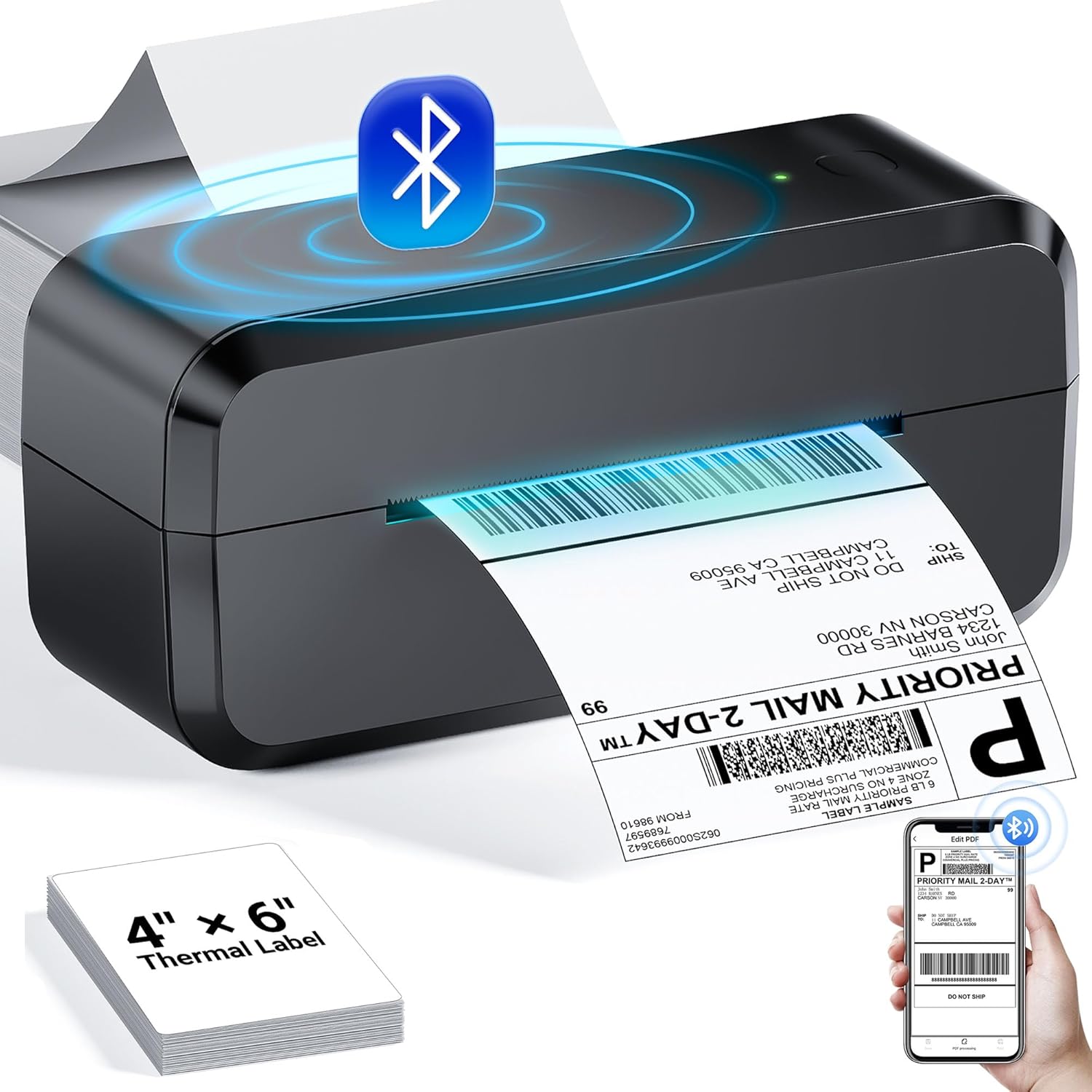
Bluetooth Thermal Shipping Label Printer, Wireless 4x6 Label Printer for Shipping Packages & Small Business, Compatible with Android, IOS, Windows and Mac, Widely Used for Ebay, Amazon, Shopify, Etsy
4.40
지난 32시간 동안 판매됨 27
$ 39.98
$ 41.00
-2.55%
I’m really impressed with this thermal label maker! The print speed is surprisingly quick, producing clean and clear labels in just seconds, which saves so much time during busy tasks. The durability is outstanding—the unit feels solid and well-built, able to handle frequent use without any issues.The size is compact and easy to store, yet still comfortable to hold and operate. It’s perfect for home, office, or organizing projects without taking up much space. Considering the performance and build quality, this label maker offers great value for the price. Whether you need labels for shipping, organizing, or everyday tasks, this is a reliable tool worth purchasing!
23 현재 누군가가 웹사이트를 탐색 중입니다.
수량:
-
+
예상 배송 시간: 12~26일(국제), 3~6일(미국)
구매일로부터 45일 이내에 반품이 가능합니다. 관세 및 세금은 환불되지 않습니다.
-
ADDITIONAL_PRINTER_FUNCTIONS:
Print Only
-
ASIN:
B0CZDVVSJX
-
BATTERIES:
1 12V batteries required.
-
BEST_SELLERS_RANK:
#2,186 in Office Products (See Top 100 in Office Products) #13 in Desktop Label Printers
-
COMPATIBLE_CARTRIDGE:
thermal label
-
COMPATIBLE_DEVICES:
Android/iOS and MAC/Win 10 or newer
-
CONTROL_METHOD:
App
-
CONTROLLER_TYPE:
Android
-
CUSTOMER_REVIEWS:
4.4 4.4 out of 5 stars (1,536) 4.4 out of 5 stars
-
DATE_FIRST_AVAILABLE:
March 25, 2024
-
DUAL_SIDED_PRINTING:
No
-
DUPLEX:
Automatic
-
HARDWARE_INTERFACE:
USB
-
INCLUDED_COMPONENTS:
243BT Bluetooth Label Printer, Power Cable, USB Cable, Power Adapter, Type-C Adapter, Random Thermal Labels, User Manual
-
INITIAL_PAGE_PRINT_TIME:
2 Seconds
-
ITEM_MODEL_NUMBER:
243BT-BK
-
ITEM_WEIGHT:
2.84 pounds
-
MANUFACTURER:
Label Printer
-
MAX_COPY_RESOLUTION_BLACK_WHITE:
203dpi
-
MAX_COPY_SPEED_BLACK_WHITE:
72 ppm
-
MAX_INPUT_SHEET_CAPACITY:
500
-
MAXIMUM_BLACK_AND_WHITE_PRINT_RESOLUTION:
203dpi Dots Per Inch
-
MAXIMUM_COLOR_PRINT_RESOLUTION:
203 Dots Per Inch
-
MAXIMUM_COPIES_PER_RUN:
50
-
MAXIMUM_MEDIA_SIZE:
4 x 6 inch
-
MEMORY_STORAGE_CAPACITY:
8 MB
-
MODEL_SERIES:
243BT-BK
-
OUTPUT_SHEET_CAPACITY:
72
-
PRINT_MEDIA:
Labels
-
PROCESSOR_COUNT:
1
-
PRODUCT_DIMENSIONS:
3.15 x 8.39 x 3.74 inches
-
SCANNER_TYPE:
Portable
-
SHEET_SIZE:
Paper Width: 1.54"-4.1"; 4"x6", 3"x2", 3"x1", 2"x1" inches Inches
-
SPECIFIC_USES_FOR_PRODUCT:
Printing
-
TOTAL_USB_PORTS:
1
-
WARRANTY_TYPE:
Limited
안전한 결제를 보장하세요






제품 상세 정보
Download the driver and choose the Bluetooth connection installation method.
1. Supports online printing of documents.
2. Supports connecting one printer to multiple computers.
Please note: thermal printers can only print in black and white.
Printing blank
1. Please check if the paper is installed correctly.
2. Tear the paper to see which side has adhesive; the adhesive side is the printing side and should be on top.
3. Please use thermal label paper.
Unable to connect Bluetooth
1. Download the latest "labelife" app from the App Store and enable Bluetooth pairing for printing
2. Restart the printer and the Labelife software
3. check if there are any other devices connected to the printer
4. Try connecting with another phone.
Red light on the printer
1. Please download the Labelife software on your phone or computer.
2. Connect the software to the printer and follow the steps below to send us a screenshot of the firmware version and SN number
Print offset or incomplete
1.Check if the newly created label size is the same as the actual label size being used.
2.To print a self-test page, when the printer is on and the blue light is steady, press and hold the feed button until the blue light flashes once, then release.
Print is unclear
1. Please provide a photo of your print for analysis.
2. Check the print head and roller for dust that may cause blurriness.
3. Use a 70% alcohol cloth to clean the print head and roller, and wait 10 minutes before printing again.
Portable Thermal Printer
Thermal Label Printer
4x6 Thermal Label
Black Label Holder
2 Inch Circle Sticker
4*6 Thermal Label
2 Inch Circle Sticker
고객 리뷰
4.40
(100 점수)
댓글 취소
댓글을 남겨주세요

배송 및 반품
우리가 당신을 보호하겠습니다
대부분 지역에서는 배송비를 한 번만 지불하시면 됩니다 (주문 및 배송 페이지를 확인해 주세요).
구매 후 14일 이내 무료 반품 가능 (단, 수명이 다한 제품, 맞춤 제작 상품, 마스크, 향수 및 에어로졸과 같이 위험하거나 인화성 물질이 포함된 일부 제품은 제외).
수입 관세 정보
복잡한 절차는 저희가 처리해 드리겠습니다. 카나리아 제도를 제외한 모든 EU 국가, 영국, 미국, 캐나다, 호주, 뉴질랜드, 푸에르토리코, 스위스, 싱가포르, 한국, 쿠웨이트, 멕시코, 카타르, 인도, 노르웨이, 사우디아라비아, 대만, 태국, UAE, 일본, 브라질, 맨섬, 산마리노, 콜롬비아, 칠레, 아르헨티나, 이집트, 레바논, 홍콩 특별행정구, 바레인, 터키로 배송되는 상품 가격에는 모든 수입 관세가 포함되어 있습니다. 표시된 가격이 최종 결제 금액입니다.
예상 배송 시간
특급 배송: 7-10일
해당 창고에서 배송되었습니다.
반품 정책
반품 정책
저희는 제품 품질에 자신 있습니다. 만약 구매하신 제품에 완전히 만족하지 못하신다면, 수령일로부터 30일 이내에 간편하게 반품하실 수 있도록 정책을 마련해 두었습니다.
간편한 교환 또는 환불
- 다른 사이즈, 색상 또는 스타일의 상품으로 교환하거나 전액 환불받을 수 있습니다.
- 반품되는 모든 상품은 착용하지 않은 상태여야 하며, 원래 포장 상태 그대로 모든 태그가 손상되지 않은 상태여야 합니다.
간단한 절차
- 온라인으로 반품을 신청하거나 고객 서비스 팀에 문의하여 도움을 받으실 수 있습니다.
- 물품을 제대로 포장해 주시고, 원래의 포장 목록도 함께 넣어주세요.
- 반품하실 상품을 보내주실 때에는 저희가 제공해 드린 선불 배송 라벨을 사용해 주시기 바랍니다.
- 환불 요청 접수 즉시 처리해 드리겠습니다.
반품과 관련하여 궁금한 점이나 우려 사항이 있으시면 언제든지 저희 전문 고객 서비스 팀에 문의해 주세요. 고객 만족은 저희의 최우선 목표입니다.