고객 서비스

판매자들은 가입하면 더 많은 혜택을 누릴 수 있습니다.

모든 주문 무료 배송.

인쇄기

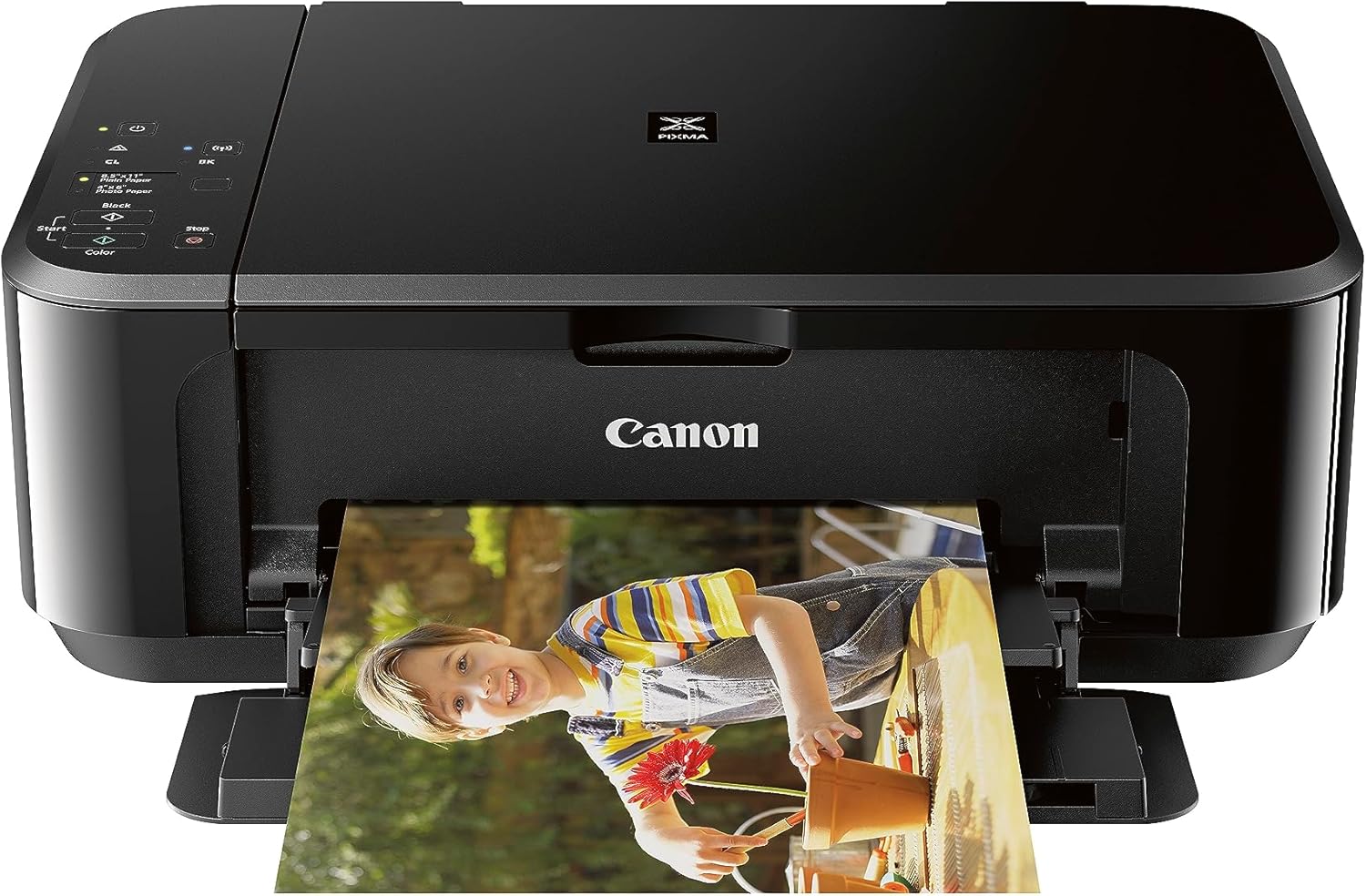
Canon Pixma MG3620 Wireless All-in-One Color Inkjet Printer with Mobile and Tablet Printing, Black

3.90

지난 32시간 동안 판매됨 49

$ 79.99
$ 87.00
-8.76%

A perfect printer, very easy to set up, with excellent wireless connectivity, and an affordable price. Superb printer and easy to use. And prints directly from phone or tablets. It is also the perfect size, neither too big nor bulky, yet very durable and designed for small spaces as well.

20 현재 누군가가 웹사이트를 탐색 중입니다.

수량:
- +

예상 배송 시간: 12~26일(국제), 3~6일(미국)

구매일로부터 45일 이내에 반품이 가능합니다. 관세 및 세금은 환불되지 않습니다.

  • ADDITIONAL_PRINTER_FUNCTIONS:

    Copy, Scan

  • ASIN:

    B010A7TZ76

  • BEST_SELLERS_RANK:

    #6,065 in Office Products (See Top 100 in Office Products) #18 in Ink Tank Printers

  • COLOR_DEPTH:

    48-bit Input / 24-bit Output Bits

  • COMPATIBLE_DEVICES:

    Smartphones

  • CONTROL_METHOD:

    App

  • CONTROLLER_TYPE:

    Android

  • CUSTOMER_REVIEWS:

    3.9 3.9 out of 5 stars (27,430) 3.9 out of 5 stars

  • DATE_FIRST_AVAILABLE:

    July 1, 2015

  • DUAL_SIDED_PRINTING:

    Yes

  • DUPLEX:

    Automatic

  • GLOBAL_TRADE_IDENTIFICATION_NUMBER:

    00013803256192

  • HARDWARE_INTERFACE:

    USB 2.0

  • INCLUDED_COMPONENTS:

    Pixma Mg3620 Photo Printer (black)

  • INK_COLOR:

    Tri-Color; Black

  • IS_DISCONTINUED_BY_MANUFACTURER:

    No

  • ITEM_MODEL_NUMBER:

    0515C002

  • ITEM_WEIGHT:

    11.9 pounds

  • MANUFACTURER:

    Canon USA Inc.

  • MAX_COPY_RESOLUTION_BLACK_WHITE:

    4800 x 1200 dpi

  • MAX_COPY_RESOLUTION_COLOR:

    4800 x 1200 dpi

  • MAX_COPY_SPEED_BLACK_WHITE:

    9.9 ppm

  • MAX_INPUT_SHEET_CAPACITY:

    100

  • MAXIMUM_BLACK_AND_WHITE_PRINT_RESOLUTION:

    600 x 600 Dots Per Inch

  • MAXIMUM_COLOR_PRINT_RESOLUTION:

    4800 x 1200 Dots Per Inch

  • MAXIMUM_MEDIA_SIZE:

    8.5 x 14 inch

  • MEMORY_STORAGE_CAPACITY:

    64 MB

  • MODEL_SERIES:

    PIXMA MG3620

  • NUMBER_OF_TRAYS:

    1

  • NUMBER_OF_USB_2_PORTS:

    1

  • OUTPUT_SHEET_CAPACITY:

    100

  • POWER_CONSUMPTION:

    16 Watts

  • PRINT_MEDIA:

    Envelopes, Paper (plain)

  • PRINTER_INK_TYPE:

    Dye-Based Ink, Pigment-Based Ink

  • PROCESSOR_COUNT:

    1

  • PRODUCT_DIMENSIONS:

    12"D x 17.7"W x 6"H

  • SCANNER_TYPE:

    Flatbed

  • SERIES_NUMBER:

    515

  • SHEET_SIZE:

    4 x 6, 5 x 7, 8 x 10 Inches

  • SPECIFIC_USES_FOR_PRODUCT:

    Home

  • TOTAL_USB_PORTS:

    1

  • UPC:

    013803256192

  • WARRANTY_TYPE:

    1 Year Warranty

안전한 결제를 보장하세요

제품 상세 정보
Wireless all in one printer with scanner and copier: Mobile and Tablet Printing with Airprint and Google Cloud Print compatible. OS Compatibility - Windows:19 Windows 10, Windows 8, Windows 8.1, Windows 7, Windows 7 SP1, Windows Vista SP1, Vista SP2, Windows XP SP3 32-bit,Mac:20 Mac OS X v10.7.5 - 10.10.
고객 리뷰
3.90

(100 점수)

5
18
4
4
3
7
2
13
1
58
댓글 취소
댓글을 남겨주세요

20 논평

I am giving this printer five starts but that does not include the the wifi connection capabilities of this printer because I don't use the wifi. I use a USB connection and it and the wifi cannot both be used at the same time. This is not the case with some other printers, those made by both Brother and Epson. In all other aspects this is a very good printer which I purchased on Amazon for 39 dollars new. Previously I had a new Canon TS 3722 which I did not keep long due to it not printing 8x10 borderless photos. The MG3620 does a bang up job of printing anything in color especially photos which can be 8x10 borderless on many kinds of paper. It prints them brilliantly and fast too. The replacement ink is expensive, but not as trouble prone as a tank printer. I prefer a front loading printer with no tray to mess with and this fits that as well. I set this printer up for print sharing on my network which doesn't allow printing from mobile devices but that is not important to me as it might be for other users. I am very pleased with this printer so far.

A perfect printer, very easy to set up, with excellent wireless connectivity, and an affordable price. Superb printer and easy to use. And prints directly from phone or tablets. It is also the perfect size, neither too big nor bulky, yet very durable and designed for small spaces as well.

I have owned a couple of other Canon PIXMA models. And I am quite pleased with the brand. My latest is currently in storage, out of state. Purchased this one, as a low cost replacement.This model required a download of Canon software, to integrate it into the home wifi network. The app for it, requires permissions for usage statistics that I don't feel are any of Canon's business, and I very much did not want to give it.The instructions are no longer printed out. Have to follow a QR code, to an online video. A video with advertising interruptions. Which SUCKS, -1 star. Because if I ever have to set this up again, I have to go through that video again. My other models had PRINTED instructions. -1 star.However, once set up, installing the app again, on my tablet this time, took no effort, other than those permissions. So it's considerably easier, after that first time.It's not a professional grade printer. It's not a specialized printer. It does what it does, no more, no less, and does it quite well enough for the average user to be happy and pleased.Ink quality is good. This model has a very easy method for loading the ink cartridges. Including a lever that brings them out and forward, which my other 2 did not.Ink is not cheap. And Canon gives you a smaller cartridge in the printer, than they sell for replacements. So it runs out sooner than the replacements.At time of writing, I am seeing the inks at about 42 dollars for sets of color and black and white. And pretty much exactly half that for REFURBISHED single packs.Pretty much cheaper just to buy another printer.On Android, this was a learning experience to use. The Canon App has functionality to print straight from file. But. OneNote and other note apps don't save this as PDF format, or don't save them as such right away.Instead, have to go into my note app, share the file to Canon Print, and then it starts up the task.Also- DO NOT share a document that is in dark mode, if you don't want to waste a lot of that expensive black ink!! It will print it EXACTLY as it looks on your screen. Dark mode and all!!This model runs a diagnostic when it starts up, including the paper tray. That's a nice feature, but also a pain. I leave it unplugged when not using it. So when I plug it in, I'm ready to use it. Not turn it on, and wait.The app does not provide a measure to password the printer. Living in an apartment complex, with a lot of neighbors, I wish this was included.Yes, I'm only writing about the negatives. Simply because all the positives are pretty much exactly what you want to get, when buying a printer, scanner, and copier. It does them well, quietly, and in a timely manner.

I have had several of these printers and I have to say my experiences with them are highly varied.- It is a wonderful printer- It is a terrible printerFrom what I can tell these printers self-destruct after awhile. The self-destruct process is invoked by the printer dumping ink by its ink sensor THEN after a certain amount of ink flow, the ink sensor renders the printer inoperative.The idea is that Canon thinks that if you print a lot and flush ink past the sensor, after some amount of volume is flushed the printer is no good anymore. Now you can open the printer easily and suck the ink out of the overage trays. Not hard to do. But I _think_ the sensor is closer to the head itself so even if you clean the printer out the device is going to fail.These printers do require occasional cleaning and you have to be careful not to jar anything loose when cleaning ink slop out of the printer. It also seems to be the case that if you print your photos with white borders [ie no ink], the amount of ink shed into the trays will be lessened. If you print with black borders it appears the printer is much more likely to dump ink into the trays, shortening the printer's usable lifespan! Interesting design.I do not know if a factory reset of the printer before it is disabled due to ink being tossed into the bins will fix the problem. Could be.On the flip side...This printer can be had for a very good price, especially at certain times of the year.The quality of output (in both color photos and black+white) is stellar, for an inkjet printer. Really amazing!For this reason I have gone from satsified, to incensed, to almost satisfied again after owning two of these printers.If you can get this printer for a good price or are going to only use it for occasional printing I think it's a very nice deal.I will add that I only had luck with USB printing. I do not try and use this printer wirelessly. If you are going to use it wirelessly you may want to read the comments on doing so. I set up my first printer to do wireless printing and was not happy. Neither was my computer w/ the new drivers, etc.Eventually I did a factory reset+restored the printer to as-arrived firmware and it worked better for me.With a little work, Canon could make provide a workhorse printer that lasts for years. Further, if they turned off the ink overflow counter it would be possible to come up with a modified case that lets you drain the ink out of the trays now and then, eliminating any chance of spillage, which would indeed be messy!Okay, Canon has a great product here. They just need to do a little work to straighten it out. I think they can't be happy what I assume is many returns. I really think hmm- with just a few changes this could be one of the best printers of its kind in a generation (since the Epson MX-80, say).As such, I'm changing my former one-star review to a four-star review. Yes, I'm on my third printer. It's true. However if I can stretch them out to last at least a year... at these prices I'll be happy.BTW I found out recently that I could return my first printer to Canon to receive a replacement printer. They sent me a Canon TS3700, which only prints, doesn't scan. It is also sub-par in terms of performance, print quality and has a sensor-alignment problem, causing some images to be printed slightly diagonally!So altho' i have that TS3700 and it works ok I'm purchasing a third MG3620.I'm doing this partly because it's a great printer and also because I want to see how long I can make it last if I disassemble, baby+clean it regularly. Finally they are cheap enough right now that I feel I can take another shot at it.In closing, this is a printer I have spent a lot of time with on the repair bench. I have done a lot of research on its capabilities and features. I have taken the time to learn many of its Idiosyncrasies. I took one of these printers apart many times to clean+fix things that went wrong. Overall I have found it to be a good design. I hope Canon will make a few improvements to help these printers last longer when used heavily.OK this is probably not the review you were expecting but I think it may have some useful information in it that you can use to evaluate what printer you want to buy next!Regards.

Not for use in the UK
2026-01-28    -John Pearce-Riddy

The product is incompatible with the UK, the plug is not useable and the voltage is American, I asked for a return which you agreed . The problem with the return is that I have to pay the costs and the return postage ( to the USA) is over £80.00. So I am stuck with a useless printer which cost me £104 and I have now no idea how to contact Amazon for a simpler way to return this useless printer.

Great Printer/Scanner
2026-01-26    -Al Norman

This is a replacement purchase. I like the printer and the quality of the printing. Of course the cartridges are really the expensive part. I had difficulty with the bluetoothj setting so I use a cord.

5.0 out of 5 stars Great for the price
2025-12-26    -Robert Thrun

This printer was a little tricky to get hooked up to the internet but not bad. Once tied in works great but dont expect to copy legal size paper documents.

Not for use in the UK
2026-03-03    -John Pearce-Riddy

The product is incompatible with the UK, the plug is not useable and the voltage is American, I asked for a return which you agreed . The problem with the return is that I have to pay the costs and the return postage ( to the USA) is over £80.00. So I am stuck with a useless printer which cost me £104 and I have now no idea how to contact Amazon for a simpler way to return this useless printer.

Great Printer/Scanner
2026-02-09    -Al Norman

This is a replacement purchase. I like the printer and the quality of the printing. Of course the cartridges are really the expensive part. I had difficulty with the bluetoothj setting so I use a cord.

excelente
2026-02-06    -Juan alfonso

genial la impresora, la compre en una oferta que me envió amazon, una muy buena compra.

댓글을 남겨주세요:

댓글 제목
댓글 내용
배송 및 반품
우리가 당신을 보호하겠습니다

대부분 지역에서는 배송비를 한 번만 지불하시면 됩니다 (주문 및 배송 페이지를 확인해 주세요).

구매 후 14일 이내 무료 반품 가능 (단, 수명이 다한 제품, 맞춤 제작 상품, 마스크, 향수 및 에어로졸과 같이 위험하거나 인화성 물질이 포함된 일부 제품은 제외).

수입 관세 정보

복잡한 절차는 저희가 처리해 드리겠습니다. 카나리아 제도를 제외한 모든 EU 국가, 영국, 미국, 캐나다, 호주, 뉴질랜드, 푸에르토리코, 스위스, 싱가포르, 한국, 쿠웨이트, 멕시코, 카타르, 인도, 노르웨이, 사우디아라비아, 대만, 태국, UAE, 일본, 브라질, 맨섬, 산마리노, 콜롬비아, 칠레, 아르헨티나, 이집트, 레바논, 홍콩 특별행정구, 바레인, 터키로 배송되는 상품 가격에는 모든 수입 관세가 포함되어 있습니다. 표시된 가격이 최종 결제 금액입니다.

예상 배송 시간

특급 배송: 7-10일

해당 창고에서 배송되었습니다.

더 자세한 정보가 필요하신가요?
반품 정책
반품 정책

저희는 제품 품질에 자신 있습니다. 만약 구매하신 제품에 완전히 만족하지 못하신다면, 수령일로부터 30일 이내에 간편하게 반품하실 수 있도록 정책을 마련해 두었습니다.

간편한 교환 또는 환불
  • 다른 사이즈, 색상 또는 스타일의 상품으로 교환하거나 전액 환불받을 수 있습니다.
  • 반품되는 모든 상품은 착용하지 않은 상태여야 하며, 원래 포장 상태 그대로 모든 태그가 손상되지 않은 상태여야 합니다.
간단한 절차
  • 온라인으로 반품을 신청하거나 고객 서비스 팀에 문의하여 도움을 받으실 수 있습니다.
  • 물품을 제대로 포장해 주시고, 원래의 포장 목록도 함께 넣어주세요.
  • 반품하실 상품을 보내주실 때에는 저희가 제공해 드린 선불 배송 라벨을 사용해 주시기 바랍니다.
  • 환불 요청 접수 즉시 처리해 드리겠습니다.

반품과 관련하여 궁금한 점이나 우려 사항이 있으시면 언제든지 저희 전문 고객 서비스 팀에 문의해 주세요. 고객 만족은 저희의 최우선 목표입니다.

범주
차이
제품
모든 제품 지우기