고객 서비스

판매자들은 가입하면 더 많은 혜택을 누릴 수 있습니다.

모든 주문 무료 배송.

인쇄기

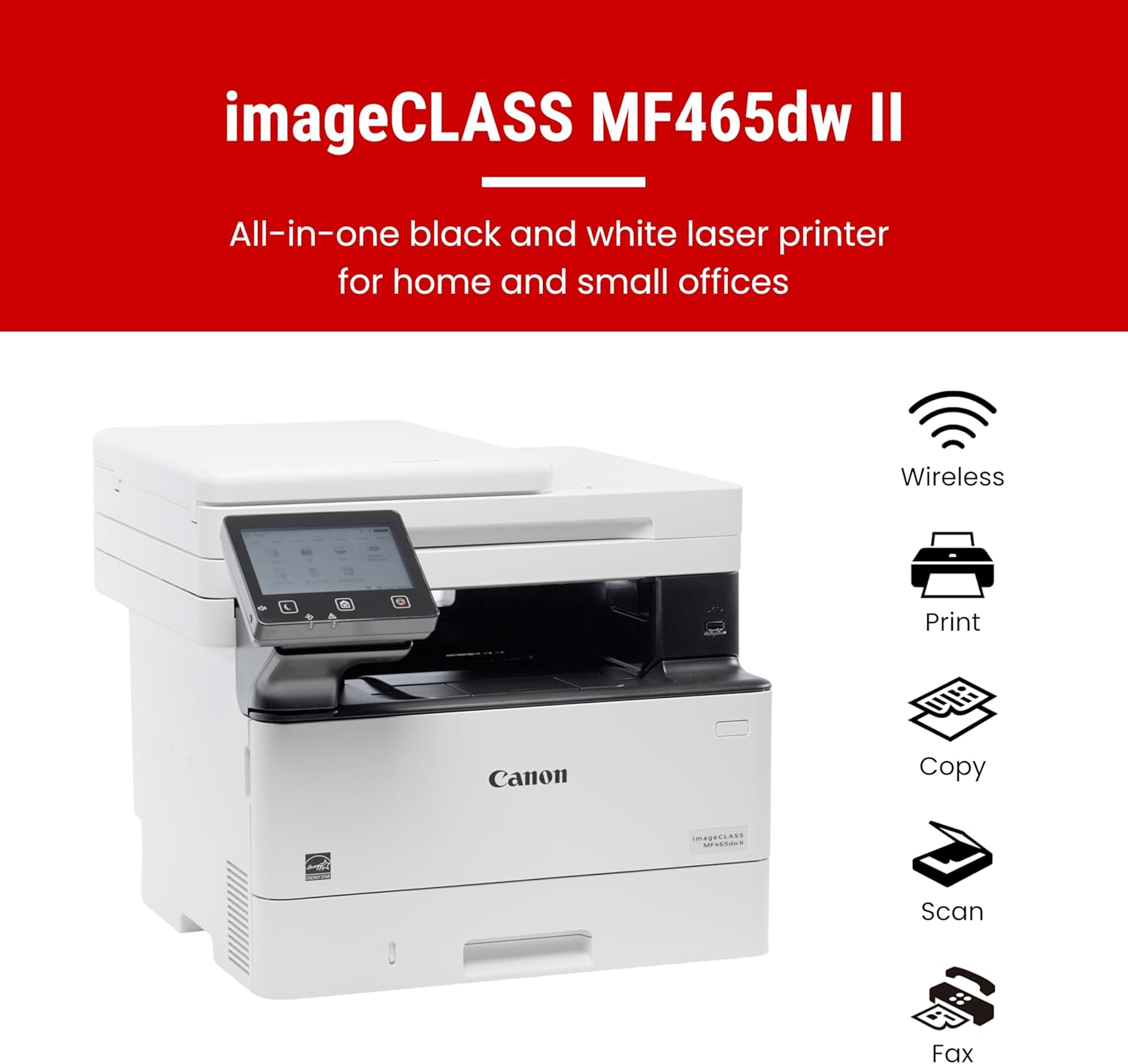
Canon imageCLASS MF465dw II - Wireless Duplex Laser Printer with Print, Copy, Scan, Fax, Expandable Paper Capacity and 3 Year Limited Warranty, 42 PPM

4.30

지난 32시간 동안 판매됨 43

$ 319.99
$ 324.00
-1.25%

This printer does a fantastic job at printing high quality images at a very hastily pace. The printer I would consider as “medium size” for a printer and does not take up much space. It makes the minimal amount of noise compared to other printers and it’s for a short period of time because of its hasty printing speed. You can either connect it to the internet through Ethernet cable or wireless, wireless in my case and I’ve never had any issues with the internet connection. I have yet to try the color printing version of the printer because this printer set only comes with black and white ink, but I’m sure it also does a magnificent job. With the sharpness in the images, I’m sure the color quality will be great. Overall, this printer is very very good, even if it a little pricey. You can even add users with passwords if you want to use it for office work

10 현재 누군가가 웹사이트를 탐색 중입니다.

Style
New Model Old Model
수량:
- +

예상 배송 시간: 12~26일(국제), 3~6일(미국)

구매일로부터 45일 이내에 반품이 가능합니다. 관세 및 세금은 환불되지 않습니다.

  • ADDITIONAL_PRINTER_FUNCTIONS:

    All In One, Copy, Fax, Scan

  • ASIN:

    B0FMBQ1JF4

  • BEST_SELLERS_RANK:

    #4,891 in Office Products (See Top 100 in Office Products) #18 in Laser Computer Printers

  • COMPATIBLE_CARTRIDGE:

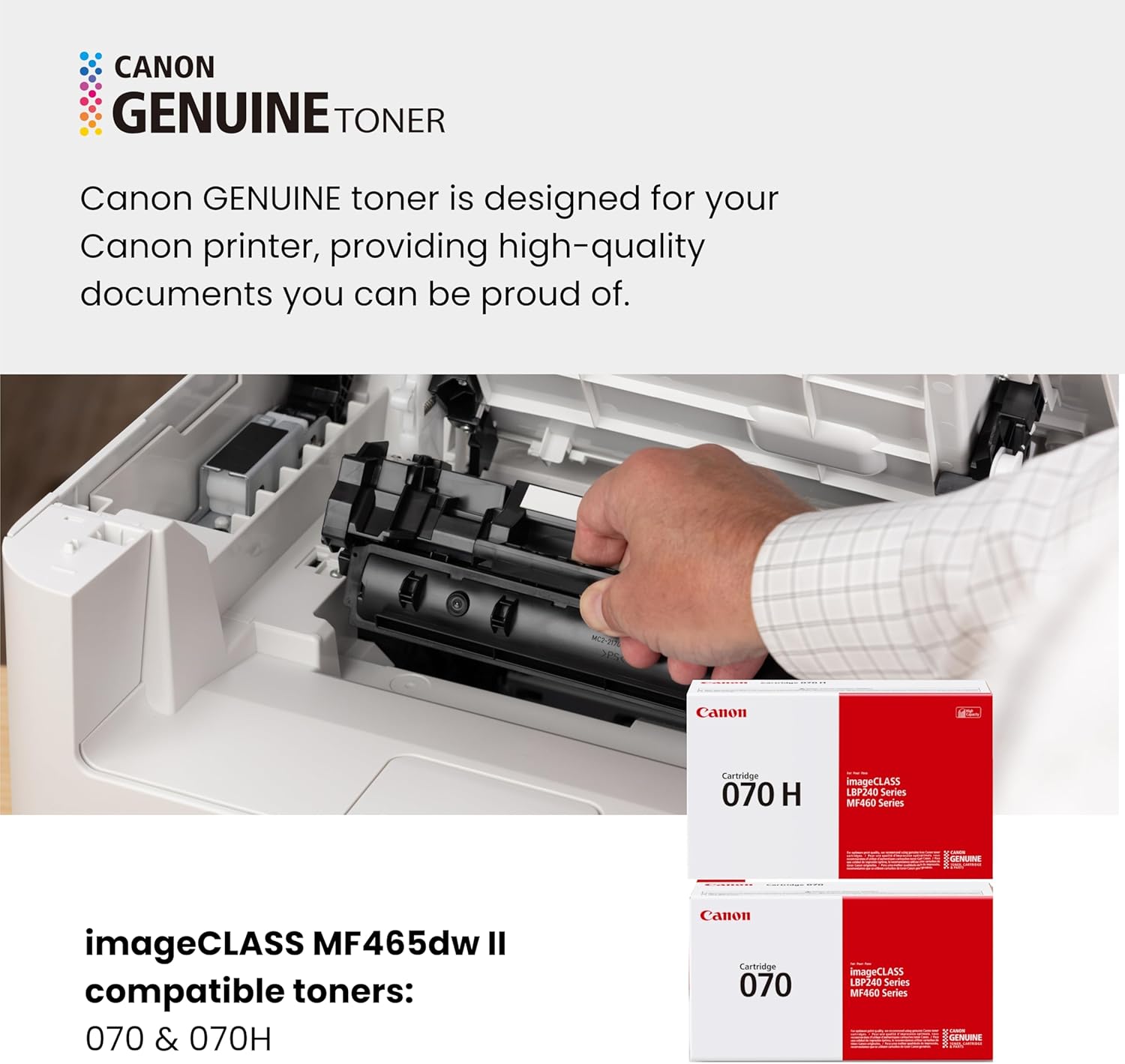
    Canon Genuine Toner 070

  • COMPATIBLE_DEVICES:

    Laptops, PC, Smartphones

  • CONTROL_METHOD:

    Touch

  • CUSTOMER_REVIEWS:

    4.3 4.3 out of 5 stars (480) 4.3 out of 5 stars

  • DATE_FIRST_AVAILABLE:

    August 13, 2025

  • DUAL_SIDED_PRINTING:

    Yes

  • DUPLEX:

    Automatic

  • EU_SPARE_PART_AVAILABILITY_DURATION:

    3 Years

  • HARDWARE_INTERFACE:

    USB

  • INCLUDED_COMPONENTS:

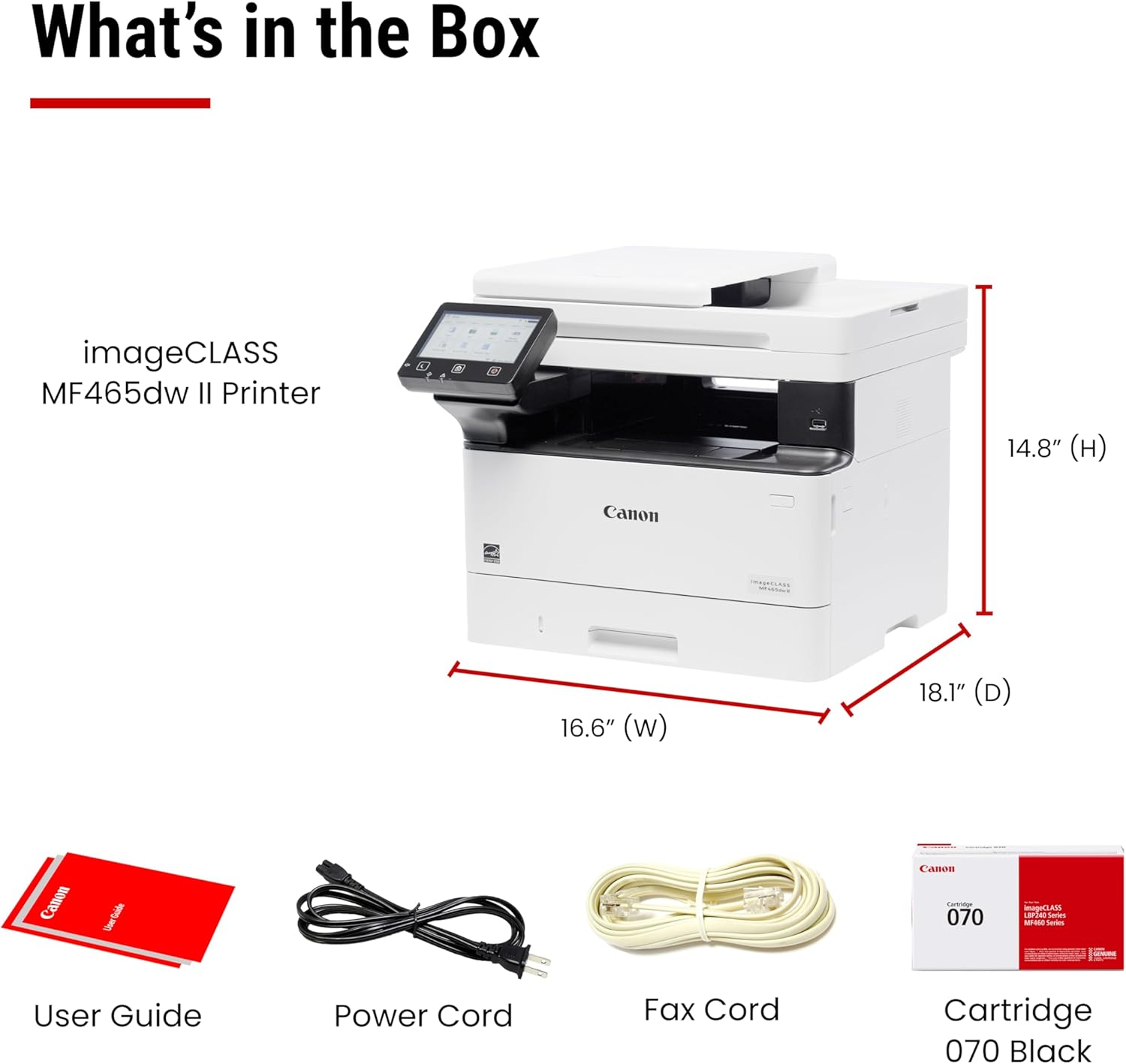
    Cartridge 070 Black Standard, approx. 3,000 Page Yield, Documentation, Power Cord, Telephone Cable, User Software DVD-ROM, imageCLASS MF465dw II Printer

  • INITIAL_PAGE_PRINT_TIME:

    4.9 Seconds

  • INK_COLOR:

    black

  • ITEM_MODEL_NUMBER:

    7188C006

  • ITEM_WEIGHT:

    46.5 pounds

  • MANUFACTURER:

    Canon

  • MAX_COPY_RESOLUTION_BLACK_WHITE:

    600 x 600 dpi

  • MAX_COPY_RESOLUTION_COLOR:

    600 x 600 dpi

  • MAX_COPY_SPEED_BLACK_WHITE:

    42 ppm

  • MAX_INPUT_SHEET_CAPACITY:

    900

  • MAXIMUM_BLACK_AND_WHITE_PRINT_RESOLUTION:

    600 dots_per_inch

  • MAXIMUM_COLOR_PRINT_RESOLUTION:

    600 x 600 dpi

  • MAXIMUM_MEDIA_SIZE:

    Legal (8.5 x 14 inches)

  • MODEL_SERIES:

    imageCLASS

  • NUMBER_OF_TRAYS:

    2

  • PRINT_MEDIA:

    Paper (plain)

  • PRINTER_INK_TYPE:

    Toner

  • PRODUCT_DIMENSIONS:

    22.5 x 21 x 20 inches

  • SCANNER_TYPE:

    ADF

  • SHEET_SIZE:

    Standard / Optional Cassette: 4.1 x 5.8 to 8.5 x 14 Inches / Multipurpose Tray: 3 x 5 Inches to 8.5 x 14 Inches Inches

  • SPECIFIC_USES_FOR_PRODUCT:

    Office

  • SUPPORTED_MEDIA_SIZES:

    Legal (8.5 x 14 inches), Letter (8.5 x 11 inches)

  • TOTAL_USB_PORTS:

    1

  • UPC:

    013803386769

  • WARRANTY_TYPE:

    limited

안전한 결제를 보장하세요

제품 상세 정보
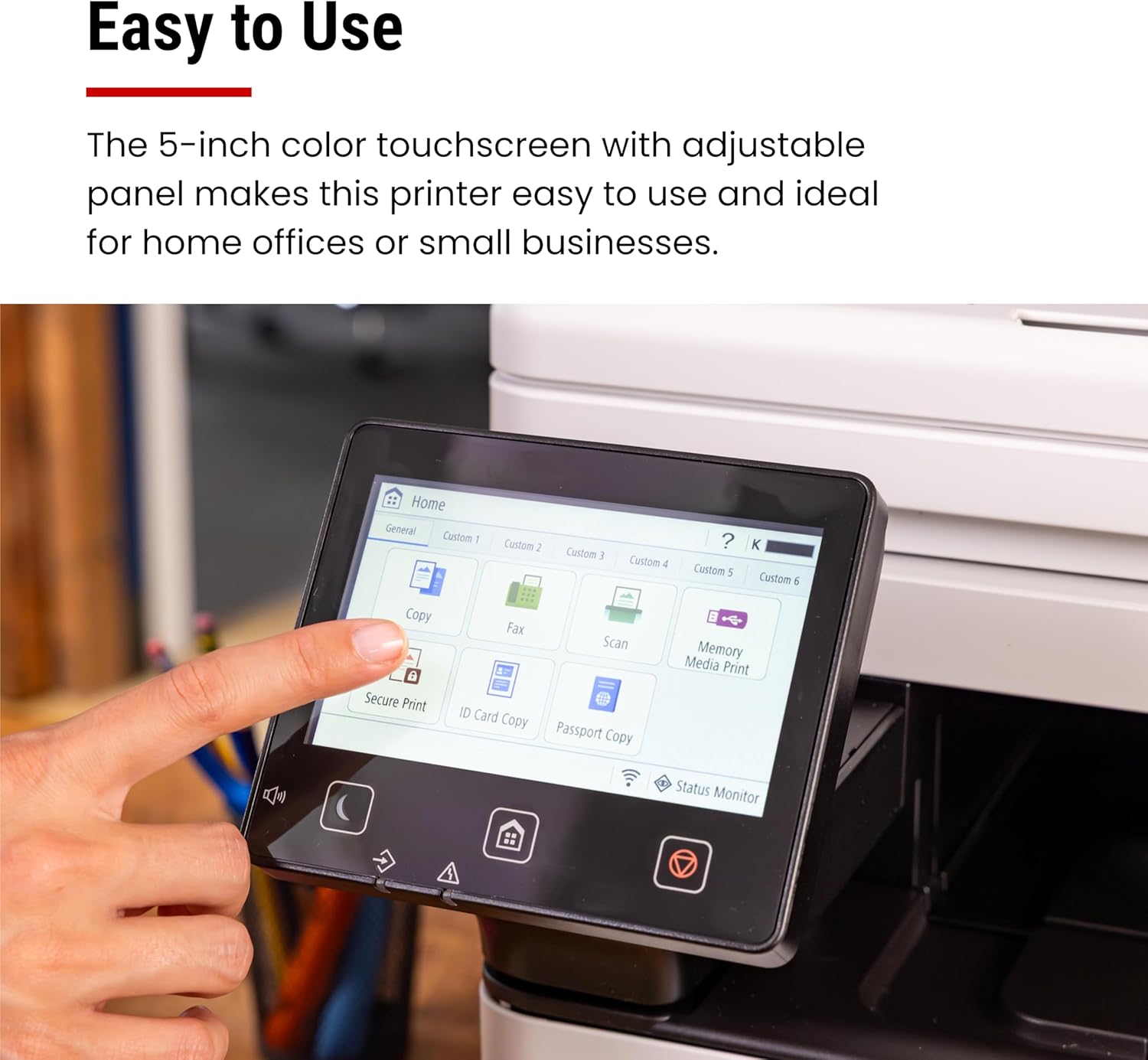
Designed for small / home offices and hybrid work environments, the imageCLASS MF465dw II model balances speedy performance and minimal maintenance. The MF465dw II is easy to set up and has a customizable, 5" color touchscreen that delivers an intuitive user experience. The MF465dw II has fast print speeds of approximately 42 pages per minute to keep up with your business. The MF465dw II uses high quality Canon Genuine Toner 070 / 070 H, for bold, crisp output your business can count on. Toner 070 yields approximately 3,000 pages and Toner 070 High-Capacity yields approximately 10,200 pages. The MF465dw II offers a plain paper capacity of up to 250 sheets in the standard cassette, 100 sheets in the multipurpose tray, and expandable paper capacity of up to 900 sheets using optional cassette AH-1 which holds up to 550 sheets. The 2-sided, automatic document feeder (ADF) holds up to 50-sheets and scans both sides of your document in a single pass using the one-pass scan function, which helps save you time. Easily connect wirelessly from computers or mobile devices. Print using a variety of mobile apps, including the Canon PRINT app using your compatible mobile device. The MF465dw comes with a 3-year limited warranty and is backed by Canon's Service and Support network.
고객 리뷰
4.30

(100 점수)

5
11
4
3
3
4
2
11
1
71
댓글 취소
댓글을 남겨주세요

20 논평

I have 2 homes and spend 6 months per year in each. I got tired of returning to the other home only to find out my IJ printer once again has dried out from lack of use, so now I use a laser at each home and have no issues with turning them off for 6 months at a time. Love my Canon MF465dw! Great for printing, scanning and copying.

I like Canon printers. This is my upgrade to my older Canpn printers. I like the scan function: scan files directly to my NAS for file picke up. and the scan resolution is high. I can set quick buttons to scan to different NAS locations for different formats (pdf or jpg).Just to reminder that to use this device as a printer, you have to turn on "Window Protected Printing" service. Otherwise, the device is not recognized by the Window.

This unit replaced an over 10 year old Canon printer, whose paper intake finally failed. (No complaints there, that one served well over the years.)We have this unit connected via Ethernet and use it as copier/printer and scanner. So far it has worked flawlessly and - unlike with a recent Brother printer that I purchased for my mom - here the driver installation was smooth and went without a hitch.As with any network device that acts as a "server" (in the broadest sense), it is a good idea to set it to a fixed IP address on your network's DHCP server (usually your router) and you should do that BEFORE installing any drivers. This is how you do that:1. Connect the device to your network and power it up.2. Go to your router's management interface and check the IP address and the MAC address of this printer.3. Add this device via its MAC address as a static IP address and save this new setting. Make sure that IP address is inside your subnet, but outside of the range of dynamic IP addresses.4. Wait until this printer has picked up the IP address, you assigned it to. This make take a few hours, but you might be able to speed this up by turning off the router and this printer, then turning on the router again and - after a minute or two - turn on this printer.5. Get the newest drivers and software from the website, don't bother with any included CD and install them in the sequence that the manual suggests.6. You're ready to print and scan to your heart's content.

After multiple calls to Canon, this paperweight will simply not scan more than once. After that, a complete uninstall (including registry) and hours of work is required to scan again. And if the printer happens to be in sleep, it won't wake back up to print (or even to completely turn off) so I have to physically unplug it and plug it back in to print. Assuming it actually prints... Tried this on three different computers, wirelessly and hardwired (with printer cord) and results are the same. Its a great paperweight if you don't mind how much space it takes up. The hours spent trying to get this to work just isn't worth it. Best to just go to Staples or FedEx. Last Canon purchase I make.

I bought this Canon imageCLASS MF465dw II due to the price and capabilities.Pros:>Really cool ADF that can duplex scan on one pass, FAST>Color screen is very nice and easy to use>Print quality is good, assuming you're using the right drivers>Great value for moneyCons>Really complicated web UI for advanced functions>Need to fine tune print quality with correct driversI was about to return this printer because the print quality for simple text was bad compared to my old Brother MFC-L2900dw. But was able to fix this by installing the using the most updated PS drivers from Canon for my Mac. Do not use the default AirPrint drivers.The other thing I was about to return this unit for was it's web UI, it's convoluted and unintuitive, even for myself with a career in IT. I was trying to set the SMTP server and port so I can scan to e-mail, but Canon decided to put the port settings in a completely different part of the menu. Typically SMTP server address and port fields are in the same page, but Canon decided to put the port setting in the TCP/IP menu. I swear this web interface was about to shave a few years off my life due to stress.

Poor working
2026-02-11    -Nishant Ranjan

Poor working

I bought this Canon imageCLASS MF465dw II due to the price and capabilities.Pros:>Really cool ADF that can duplex scan on one pass, FAST>Color screen is very nice and easy to use>Print quality is good, assuming you're using the right drivers>Great value for moneyCons>Really complicated web UI for advanced functions>Need to fine tune print quality with correct driversI was about to return this printer because the print quality for simple text was bad compared to my old Brother MFC-L2900dw. But was able to fix this by installing the using the most updated PS drivers from Canon for my Mac. Do not use the default AirPrint drivers.The other thing I was about to return this unit for was it's web UI, it's convoluted and unintuitive, even for myself with a career in IT. I was trying to set the SMTP server and port so I can scan to e-mail, but Canon decided to put the port settings in a completely different part of the menu. Typically SMTP server address and port fields are in the same page, but Canon decided to put the port setting in the TCP/IP menu. I swear this web interface was about to shave a few years off my life due to stress.

Ok ok
2026-02-15    -Deepak

Toner capacity is less, and cartridge is also expensive

After multiple calls to Canon, this paperweight will simply not scan more than once. After that, a complete uninstall (including registry) and hours of work is required to scan again. And if the printer happens to be in sleep, it won't wake back up to print (or even to completely turn off) so I have to physically unplug it and plug it back in to print. Assuming it actually prints... Tried this on three different computers, wirelessly and hardwired (with printer cord) and results are the same. Its a great paperweight if you don't mind how much space it takes up. The hours spent trying to get this to work just isn't worth it. Best to just go to Staples or FedEx. Last Canon purchase I make.

5.0 out of 5 stars Amazing printer!
2026-01-02    -Nathaniel Flores

This printer does a fantastic job at printing high quality images at a very hastily pace. The printer I would consider as “medium size” for a printer and does not take up much space. It makes the minimal amount of noise compared to other printers and it’s for a short period of time because of its hasty printing speed. You can either connect it to the internet through Ethernet cable or wireless, wireless in my case and I’ve never had any issues with the internet connection. I have yet to try the color printing version of the printer because this printer set only comes with black and white ink, but I’m sure it also does a magnificent job. With the sharpness in the images, I’m sure the color quality will be great. Overall, this printer is very very good, even if it a little pricey. You can even add users with passwords if you want to use it for office work

댓글을 남겨주세요:

댓글 제목
댓글 내용
배송 및 반품
우리가 당신을 보호하겠습니다

대부분 지역에서는 배송비를 한 번만 지불하시면 됩니다 (주문 및 배송 페이지를 확인해 주세요).

구매 후 14일 이내 무료 반품 가능 (단, 수명이 다한 제품, 맞춤 제작 상품, 마스크, 향수 및 에어로졸과 같이 위험하거나 인화성 물질이 포함된 일부 제품은 제외).

수입 관세 정보

복잡한 절차는 저희가 처리해 드리겠습니다. 카나리아 제도를 제외한 모든 EU 국가, 영국, 미국, 캐나다, 호주, 뉴질랜드, 푸에르토리코, 스위스, 싱가포르, 한국, 쿠웨이트, 멕시코, 카타르, 인도, 노르웨이, 사우디아라비아, 대만, 태국, UAE, 일본, 브라질, 맨섬, 산마리노, 콜롬비아, 칠레, 아르헨티나, 이집트, 레바논, 홍콩 특별행정구, 바레인, 터키로 배송되는 상품 가격에는 모든 수입 관세가 포함되어 있습니다. 표시된 가격이 최종 결제 금액입니다.

예상 배송 시간

특급 배송: 7-10일

해당 창고에서 배송되었습니다.

더 자세한 정보가 필요하신가요?
반품 정책
반품 정책

저희는 제품 품질에 자신 있습니다. 만약 구매하신 제품에 완전히 만족하지 못하신다면, 수령일로부터 30일 이내에 간편하게 반품하실 수 있도록 정책을 마련해 두었습니다.

간편한 교환 또는 환불
  • 다른 사이즈, 색상 또는 스타일의 상품으로 교환하거나 전액 환불받을 수 있습니다.
  • 반품되는 모든 상품은 착용하지 않은 상태여야 하며, 원래 포장 상태 그대로 모든 태그가 손상되지 않은 상태여야 합니다.
간단한 절차
  • 온라인으로 반품을 신청하거나 고객 서비스 팀에 문의하여 도움을 받으실 수 있습니다.
  • 물품을 제대로 포장해 주시고, 원래의 포장 목록도 함께 넣어주세요.
  • 반품하실 상품을 보내주실 때에는 저희가 제공해 드린 선불 배송 라벨을 사용해 주시기 바랍니다.
  • 환불 요청 접수 즉시 처리해 드리겠습니다.

반품과 관련하여 궁금한 점이나 우려 사항이 있으시면 언제든지 저희 전문 고객 서비스 팀에 문의해 주세요. 고객 만족은 저희의 최우선 목표입니다.

범주
차이
제품
모든 제품 지우기